
I spent the last couple of weeks using Bitly, and I have some thoughts.
First, full disclosure. I work in marketing for Rebrandly, a link intelligence platform and Bitly competitor. But that’s actually why this review is useful if you’re considering buying Bitly. I know what a link management tool should do, what to look for, and how it compares to other options on the market.
But I get why you might be skeptical. Most competitor comparisons are marketing fluff written by someone who’s never used the product.
So I did the opposite. I signed up for a paid account and tested link creation, QR codes, Bitly Pages, analytics, and its AI tools.
I liked a lot of what I found. Depending on what you’re looking for, Bitly might be a good option. But it also has its drawbacks.
Here’s my Bitly review, good and bad, based on my firsthand experience.
Key takeaways from my Bitly review
- Bitly makes the basics easy: short links, QR codes, and link-in-bio pages are simple to create and design.
- The free plan is too limited for business use, so plan on paying to get any real value.
- Even the paid plan I tested has tight caps on link edits, QR codes, routing options, and click history, and lifting them means a much pricier plan.
- Analytics are light, and the AI tools and click attribution weren't reliable in my testing.
- Bitly fits solo marketers and small teams. If you need bulk links, finer routing, deeper analytics, or compliance for a regulated industry, Rebrandly is a better option.
Bitly’s setup process
Before I get into what Bitly can do, here’s a quick rundown of what the setup process looked like.
The free plan feels more like a demo
Bitly’s free plan gives you basic access to three main features:
- Creating short links
- Creating QR codes
- Creating landing pages (link-in-bio pages)
The free plan lets you create five links and two QR codes per month. Most businesses will run through that within a week.
Beyond that, most of the features are paywalled, including analytics.
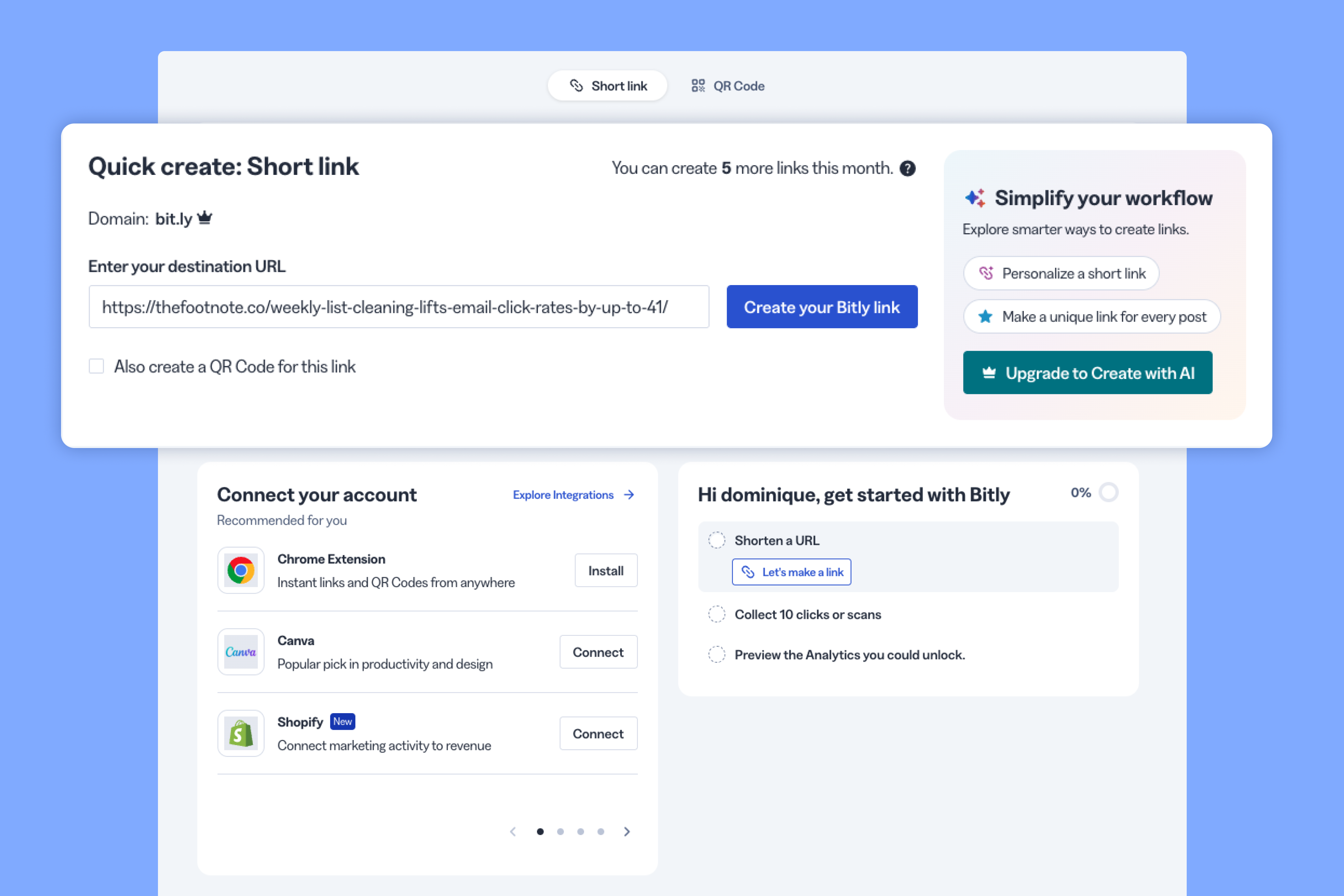
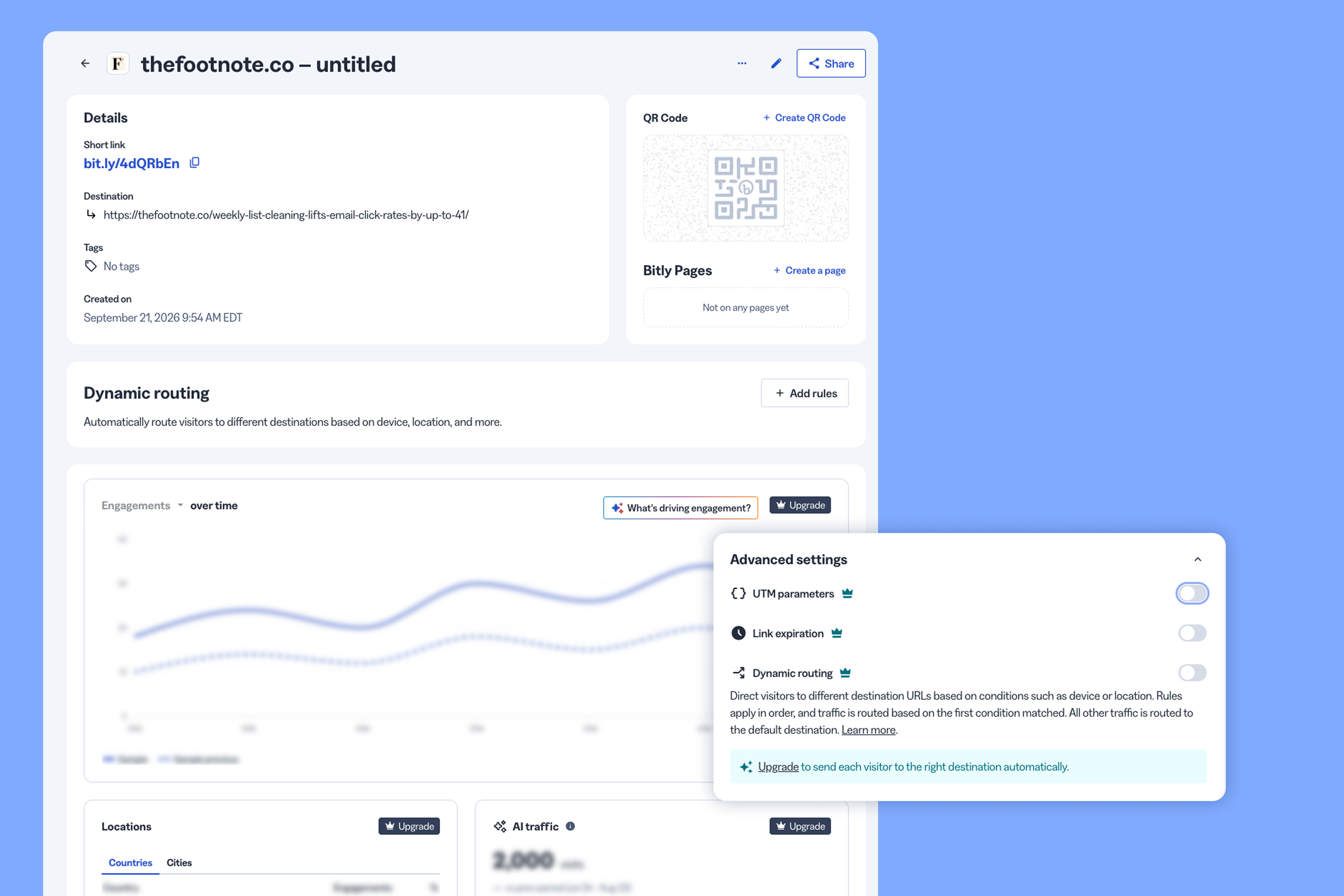
Your links are also stuck on the bit.ly domain, which some people are skeptical of, especially when the back-half is a string of random numbers and letters.
Bitly’s free plan feels less like a starter tier and more like a stripped-down product demo.
For a business, there's no real case for Bitly without a paid subscription, which is why I upgraded to the Growth plan. That’s what the rest of this review is based on.
Custom domain setup takes under an hour
The Growth plan includes one complimentary custom domain. You also have the option to use your own.
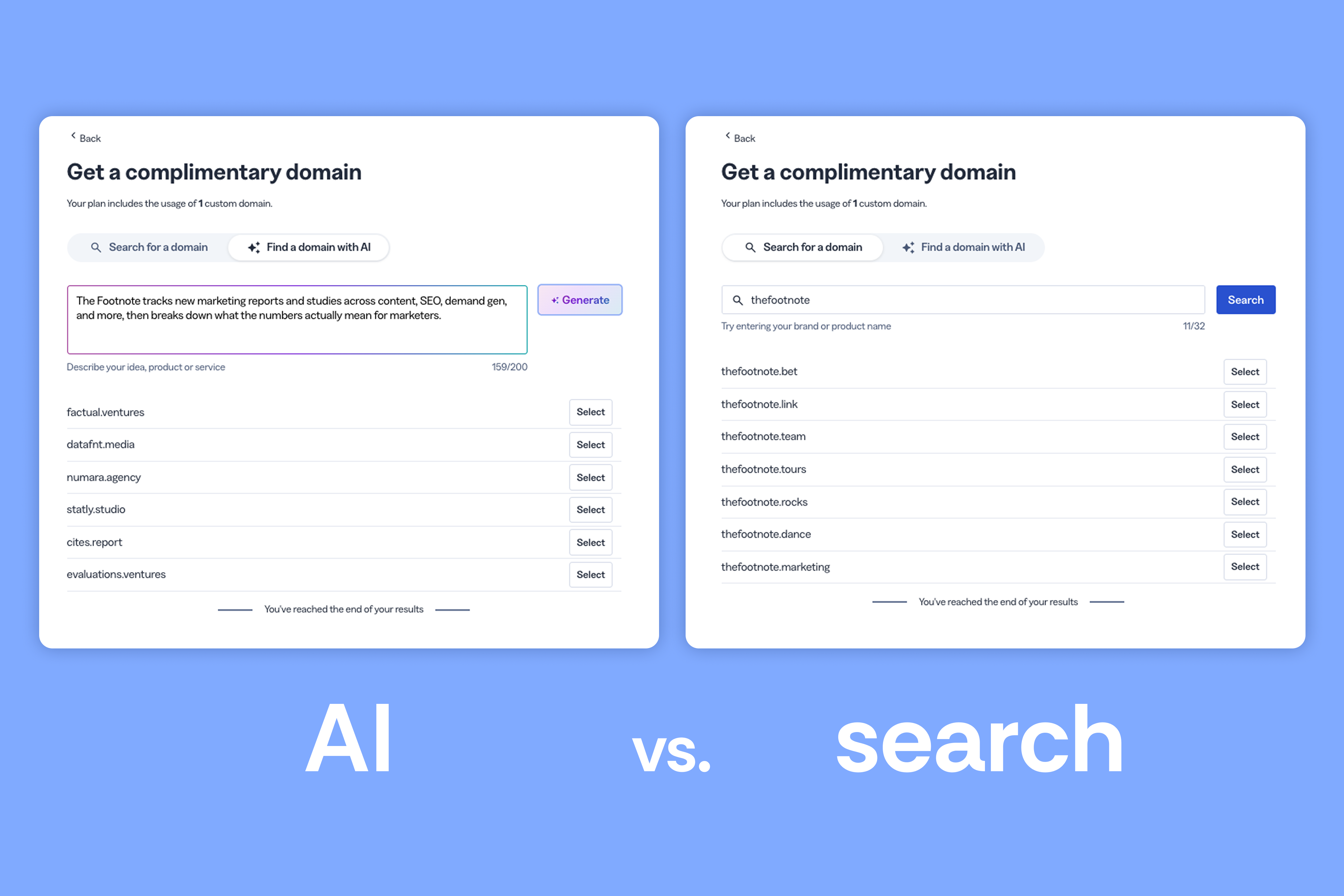
Bitly has a "find a domain with AI" tool to help you choose your branded domain, but my experience wasn’t great. I described my site and included my brand name directly in the prompt.
It came back with three suggested domains, but they felt random and didn’t use my brand name at all.
That defeats the entire point of a branded domain. People need to recognize it as yours.
They also have a manual search, which worked better. You enter your brand name, and it shows you which TLDs are available.
After I chose my free domain, it was ready to use within one hour.
There's another detail I liked here. If you get the domain through Bitly, you can set a destination URL for anyone who lands on your bare domain with no back-half, or who hits a 404.
With that set up, I tested each of Bitly’s core features.
Creating links with Bitly
Links are the foundation of everything else Bitly does, so I started here.
Making short links is simple
Creating a single link with Bitly is straightforward. Add your destination URL, choose your settings, and get a short link.
The Growth plan gives you a lot more options than the Free plan, though. Here are all the settings you can adjust for your links:
- Destination URL
- Your domain (bit.ly or your own custom one)
- A back-half, which you can auto-generate with AI on desktop
- A page title (what shows up in the metadata)
- Tags to organize your links
- Whether to generate a QR code alongside the link
- Whether to add the link straight to a Bitly Page
- UTM parameters, which you can save and reuse on future links
- An expiration date
- Dynamic routing rules
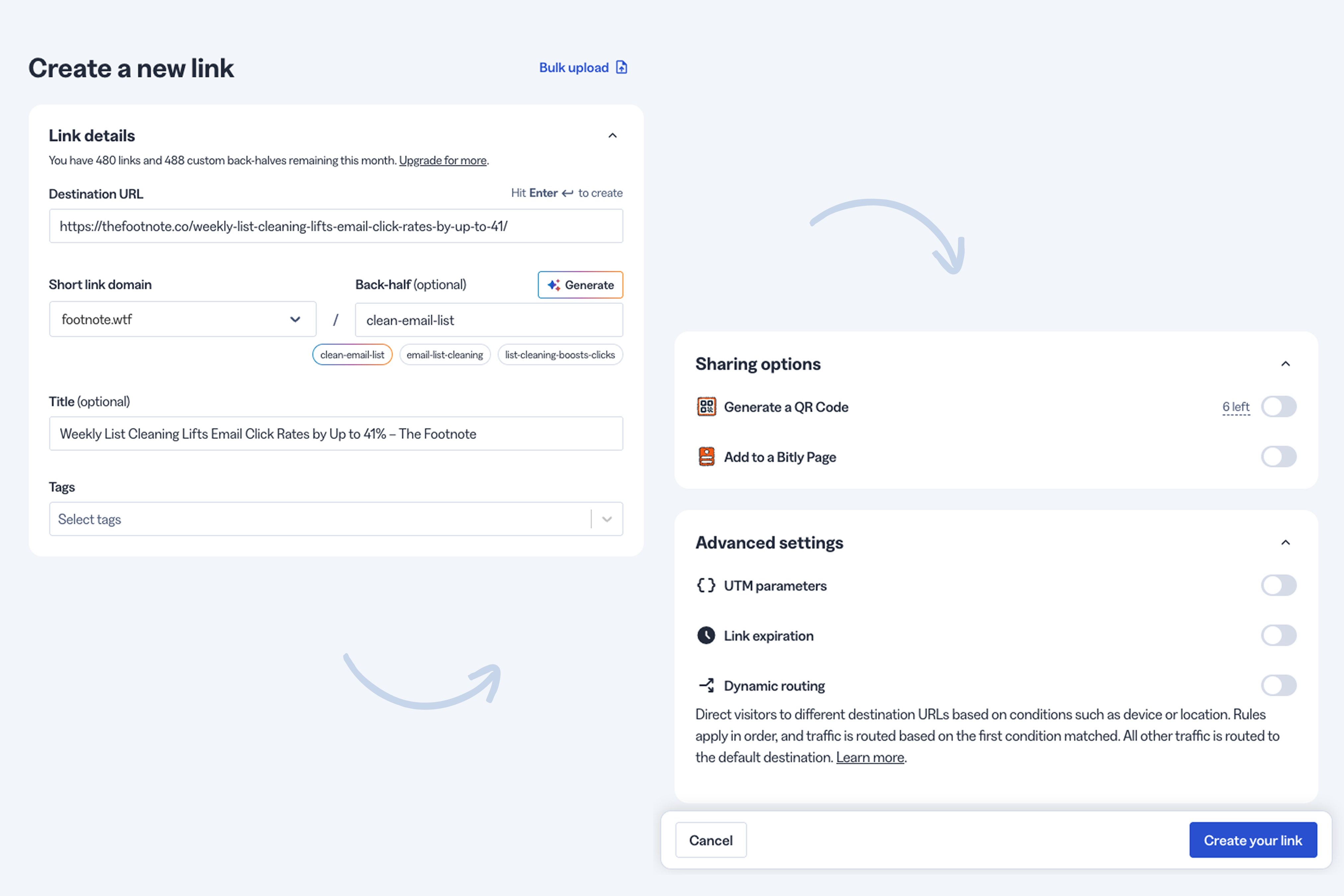
Their auto-generated back-halves worked well too. They suggested three options which were all relevant to my destination URL and followed our best practices.
Dynamic routing has some kinks to work out
Dynamic routing lets you send one segment of traffic to one destination and another segment somewhere else. Here’s how I tested it with Bitly.
I set up a link to route US traffic to a blog post and everyone else to my homepage. I clicked the link from four locations using a VPN, and each instance landed where it was supposed to:
- My own US IP: blog post (correct)
- Australia (VPN): homepage (correct)
- Egypt (VPN): homepage (correct)
- San Francisco (VPN): blog post (correct)
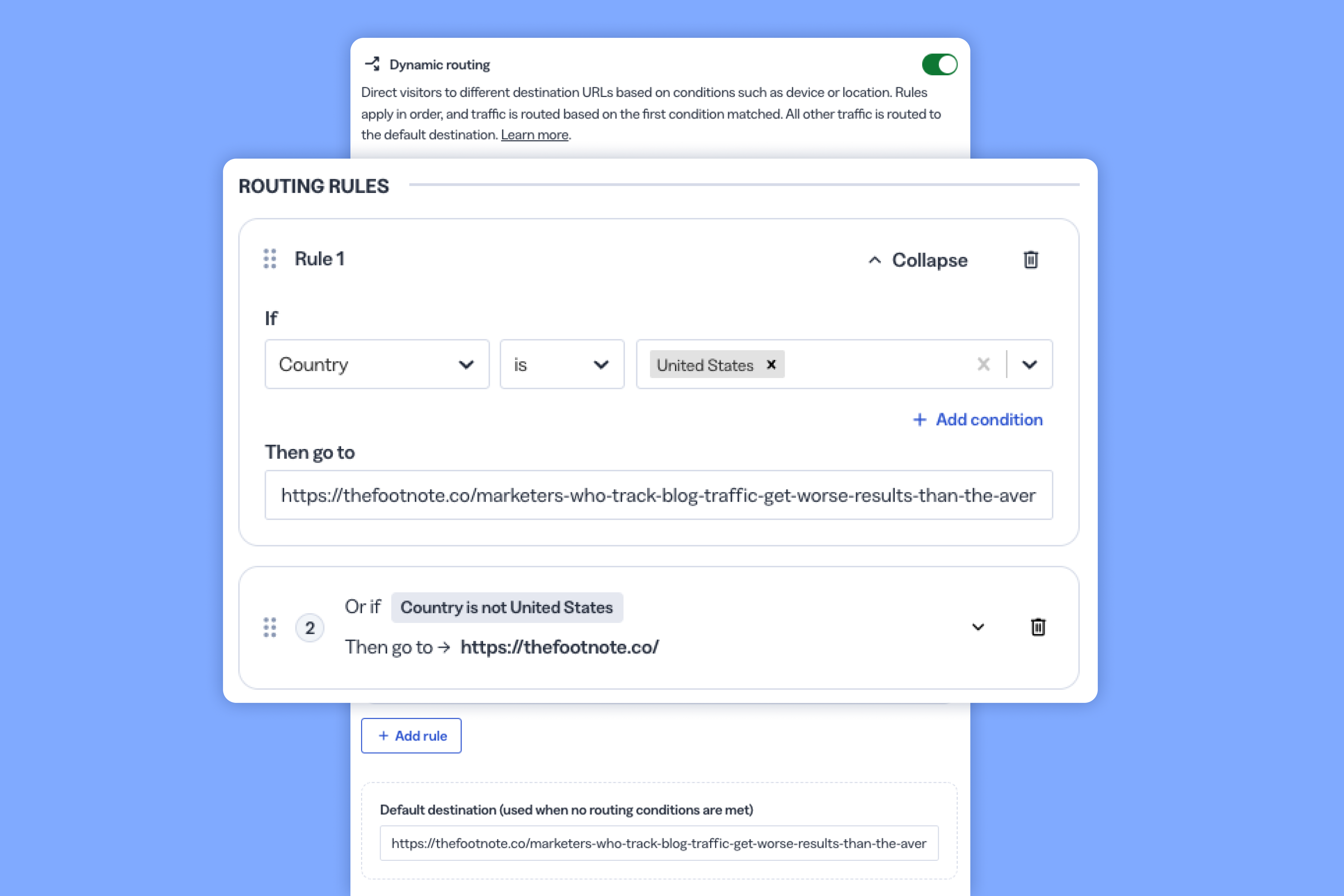
Then I tried routing based on platform. I sent traffic from Android devices to one URL and iOS devices to another, and it passed that test too.
But once I started stacking routing rules, I ran into problems. I set US traffic to the blog post, non-US to the homepage, Android to the blog post, and iOS to the homepage, all at once. iOS traffic landed on the blog post instead of the homepage.
It’s possible it was user error because of how I configured it. Or it could be that Bitly's logic breaks down once you add too many (or conflicting) conditions. Either way, test every scenario yourself before you share your link publicly.
A bigger drawback of Bitly’s link routing is that there aren’t enough options. The Growth plan only lets you route by country or OS, and only Android and iOS at that.
Rebrandly, by comparison, supports dynamic link routing based on:
- Country
- Region
- City
- Date
- Day of week
- Hour of day
- Device
- Language
- Platform
If you need more control over how you route traffic, there are better options than Bitly.
Editing and deleting links is harder than it should be
You can only change destination URLs 20 times per month on the Growth plan.
That's 20 times a month, combined, that you're allowed to fix a typo, swap a dead campaign link, or make any other changes to your destination URL.
That might not be an issue if you’re dealing with a couple dozen links. But when you’re running multiple campaigns and creating short links at scale, mistakes happen, and you need the flexibility to make updates without feeling restricted.
I also ran into issues removing links from my account. When I tried deleting a link I created, I got this error message:
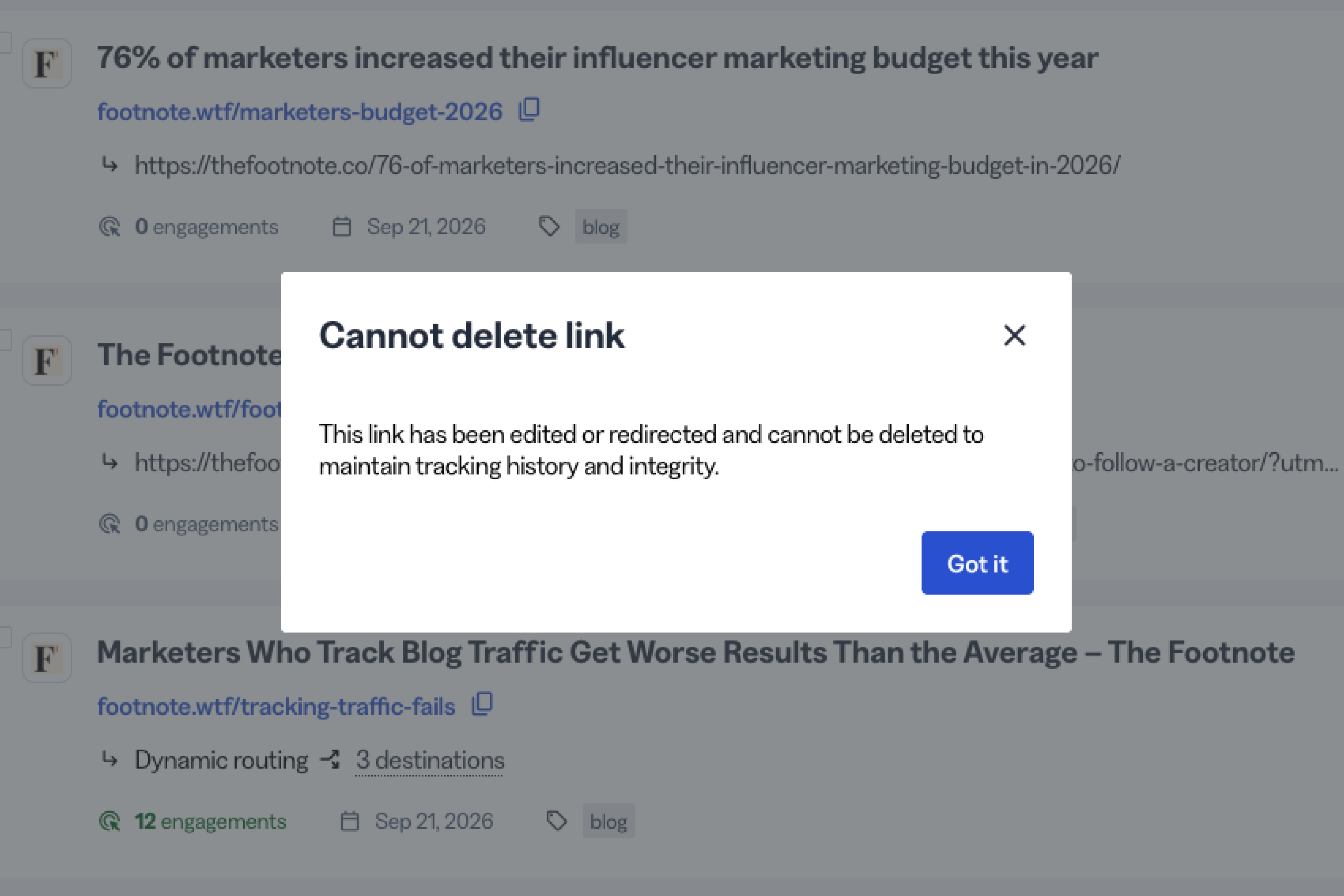
Bitly is very strict about what you're allowed to remove. A link can only be deleted if it meets all of these conditions:
- It's unedited (no title, tags, or destination changes)
- It has no destination overrides
- It isn't part of a campaign
- It has no deeplinks configured
- It isn't used on a Bitly Page
Bitly's workaround is to let you "hide" a link instead. That pulls it off your dashboard, but every click still shows up in your analytics.
With that said, one feature I really liked was change tracking. Bitly logs every change made to a link, whether that's a new routing rule, a new tag, or anything else. You can see the full history for any changes you made on each link’s page.
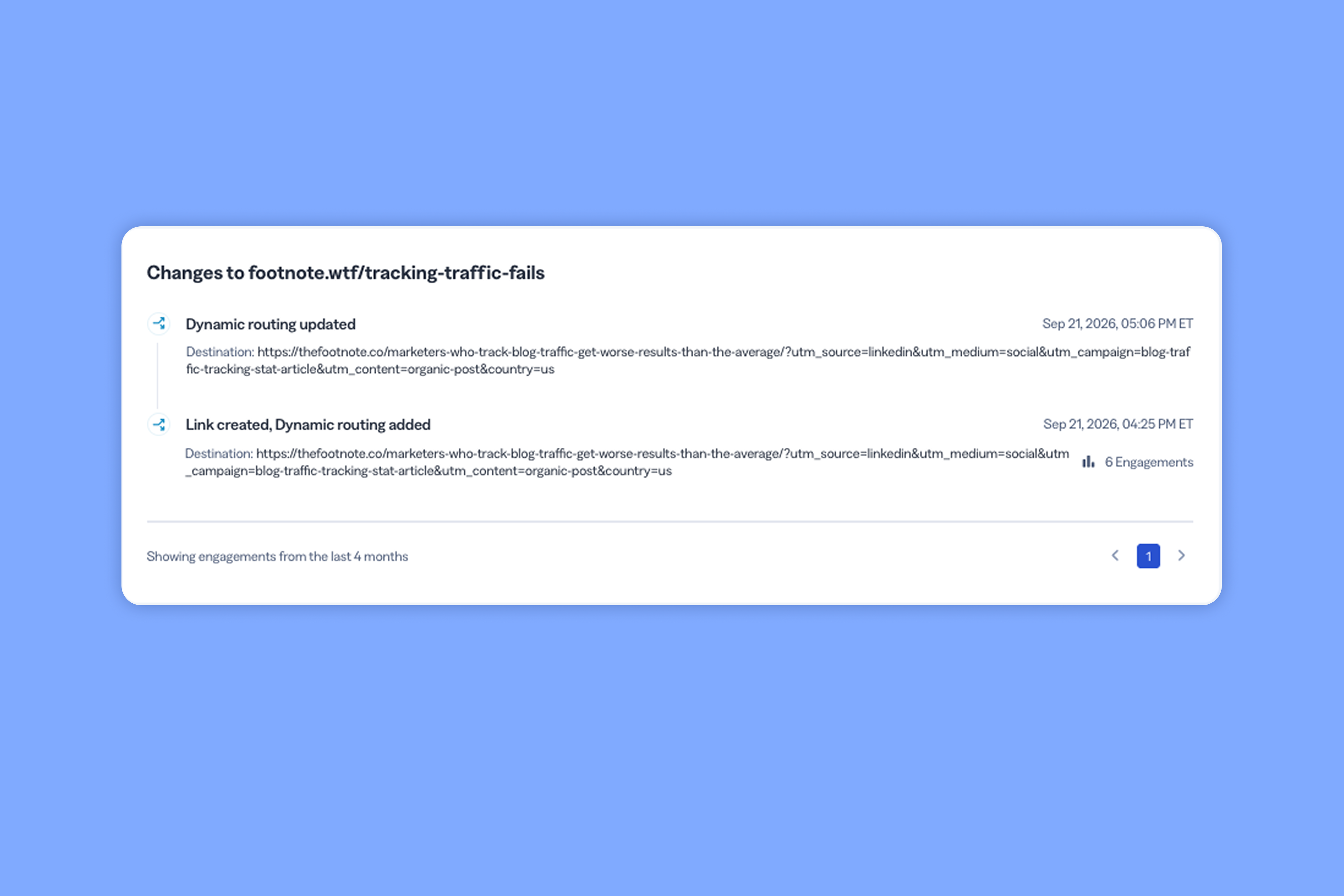
It’s one of those seemingly small features you only appreciate once you desperately need it.
Creating QR codes with Bitly
Bitly is known for links, but added QR codes later. In some ways, that’s very evident. Here’s my experience after testing their QR codes end to end.
The QR code builder is design-friendly
I enjoyed using Bitly’s QR code builder. It gives you a lot of customization options:
- Prebuilt templates
- Pattern and corner styles
- Single-color or gradient fills
- A logo or text in the center
- Frame options
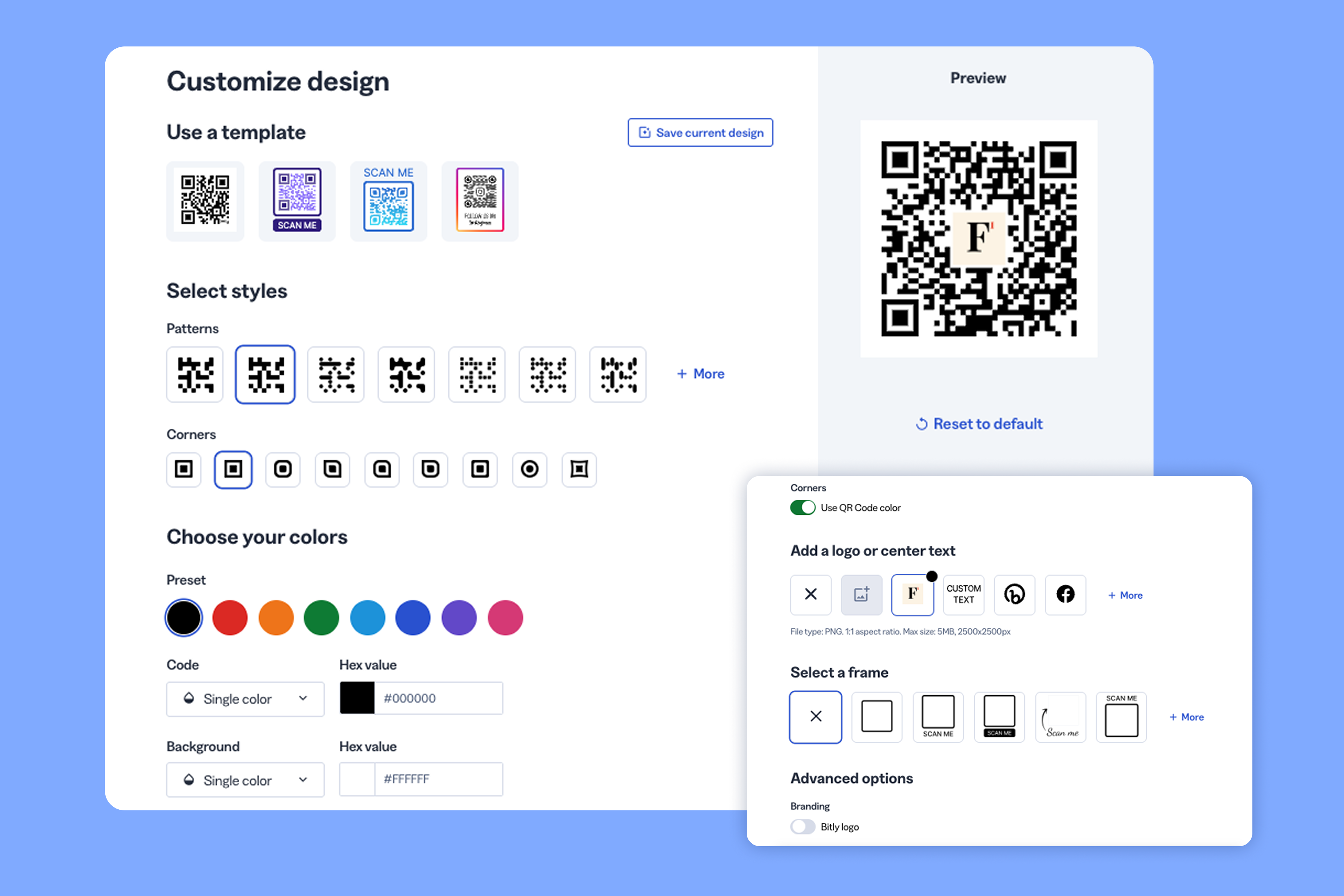
You can get really creative and make on-brand codes and export them in all the standard formats (PNG, JPG, and SVG).
I also tested QR codes with their Canva integration. It lets you pull a QR code into a Canva design and adjust the design with the same options Bitly gives you natively.
I thought this was smart because if you’re working with a designer or external social media person, you might not want them editing any of your links, but they still need to customize QR codes to fit any designs they’re working on.
It’s clear QR codes aren’t Bitly’s core use-case
Unfortunately, the account side isn't nearly as generous as the builder. The Growth plan only includes 10 QR codes a month against 500 links. That ratio alone tells you QR codes are treated as a premium add-on, not a core feature.
Bitly also manages a QR code and its paired short link as two separate objects. For some people, that might not be an issue. But here’s the problem I ran into.
I added a tag to a QR code, and it didn't carry over to its paired link. I had to go add it again in the link editor. It’s an extra step that just feels unnecessary.
If you’re weighing whether you need a code you can edit after printing, our guide to dynamic vs. static QR codes covers the difference.
Creating a “link-in-bio” with Bitly Pages
There are a ton of link-in-bio type tools out there (including Rebrandly's). So I was curious how Bitly’s version (Bitly Pages) would stack up.
The page designer is fun to use
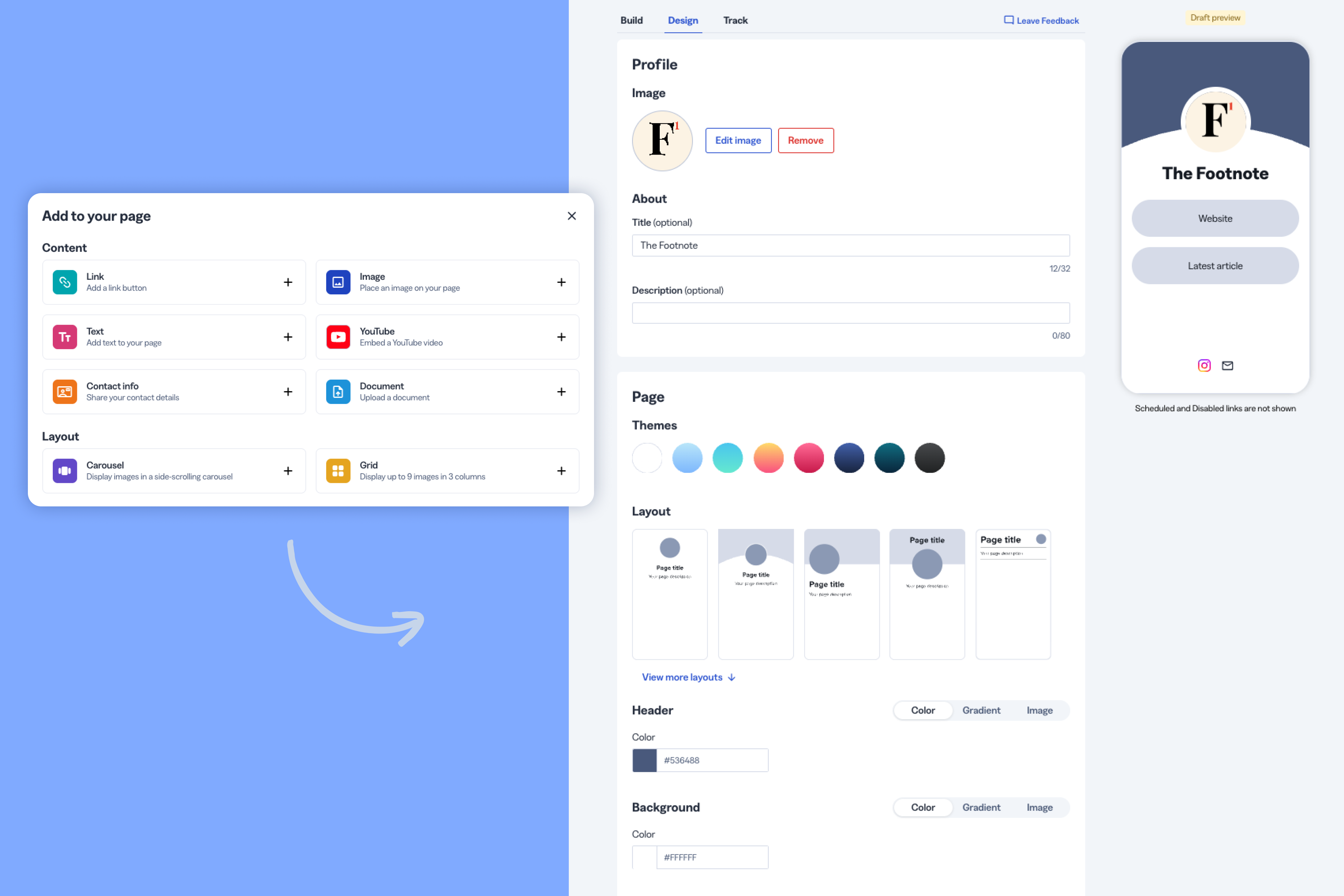
Bitly Pages hits a design sweet spot. You can start from a template or from scratch, and customize the logo, title, description, color theme, and layout. You can also add links, text, images, YouTube embeds, documents, or contact info as blocks.
There's enough here to make something on-brand, without feeling like you’re dealing with a full-on design tool like Figma.
Creating links inside a Page skips key settings
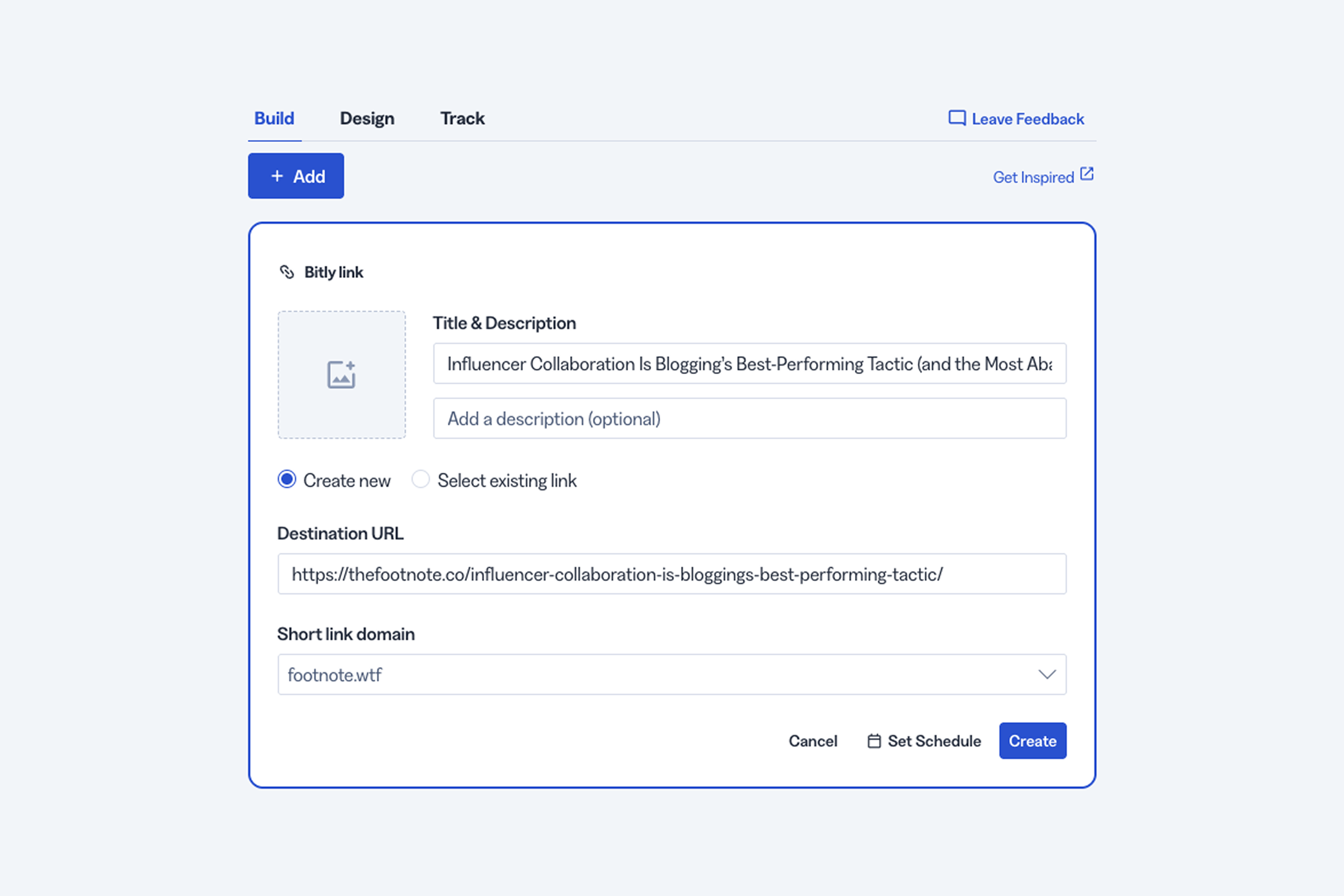
The point of Bitly Pages is to give people somewhere to see all your curated links in one place. Most brands use it as the link in their social media bio and add links to their website, latest content, discounts, lead magnets, etc.
As a marketer, I like to add UTMs to any links I put on these pages to track every click in my analytics.
But here’s where I ran into a problem. Bitly Pages lets you create short links from the page builder. But it’s a stripped-down version of the regular process. You can't add tags or choose from saved UTM parameters.
So you either need to create the links first, then add them to your pages, or manually add them to the destination URL if you’re creating new links from the page builder.
My recommendation is don't create links from inside the Bitly Page editor unless you already know exactly what UTM parameters you need to add to the destination URL. Otherwise you’ll need to edit it later, which counts towards your monthly redirects.
Page-level analytics undercount real engagement
I noticed a data reliability problem with Bitly Pages.
You can see engagement on your Pages segmented by:
- Link clicks
- Image clicks
- YouTube video plays
- File downloads
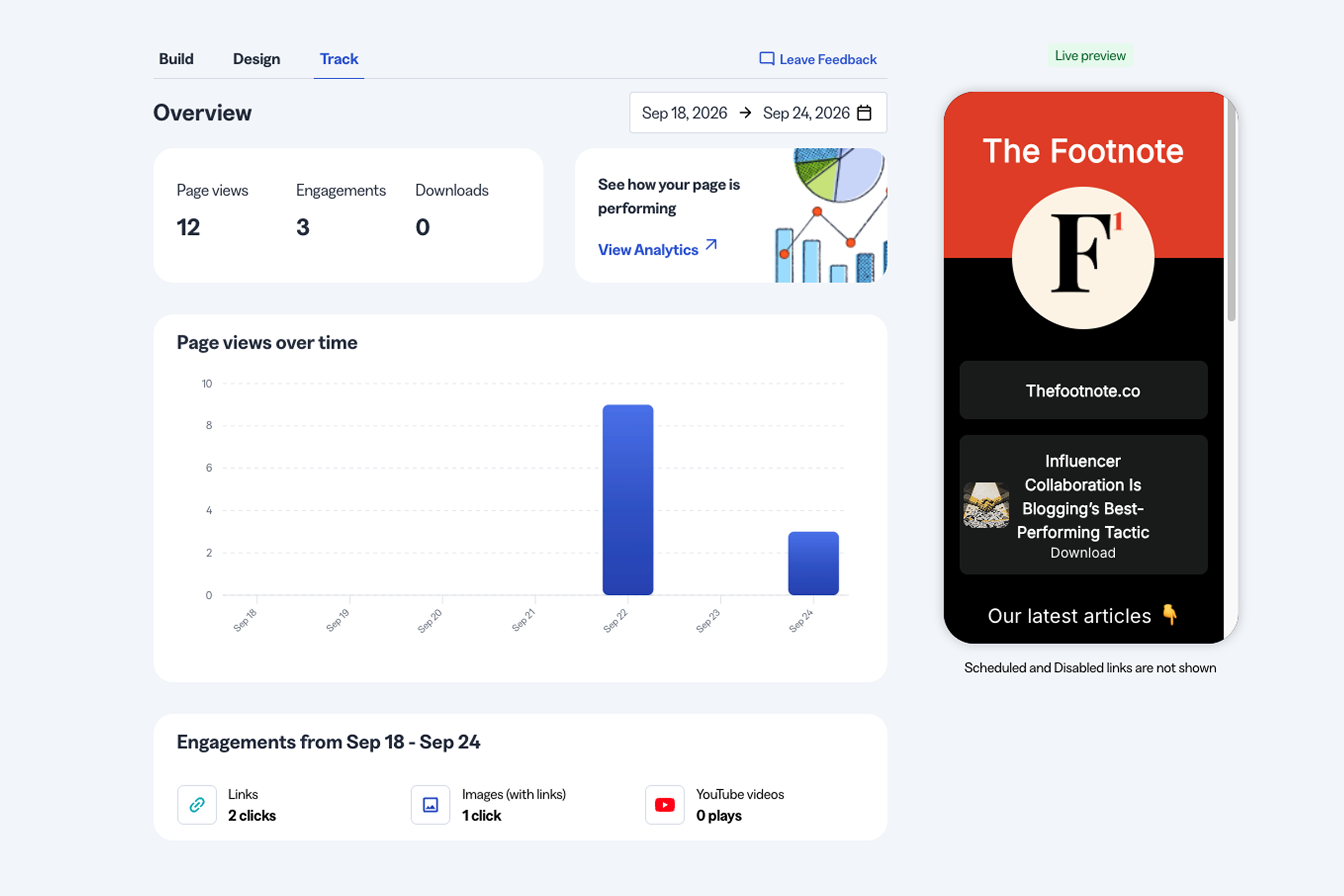
But I ran into issues when I tested whether that tracking actually works.
First, I embedded a YouTube video on my Page and clicked play. The video play count in my Bitly Pages analytics stayed at zero.
Then I added a PDF to the Page (you can upload files directly to a Bitly Page) and downloaded it twice, once over a VPN to rule out something on my end. The download count didn't move either.
When you add a video or file download to a Page, Bitly creates a short link for them. I checked the click stats for the video and PDF, and both showed a click happened.
So the plain link tracking works fine. It's specifically the Pages-level engagement breakdown (the thing meant to tell you what's actually happening on your Page) that undercounts real activity, at least for video plays and downloads.
Whether Pages is worth using comes down to how often you touch it.
If you rotate content regularly, the UTM issue I mentioned can get annoying, and you’re probably better off using a different tool. But if you mainly plan to keep the links static, it’s a pretty good tool outside of the data tracking issue.
Bitly’s analytics leave real insight on the table
Creating links is one thing. But knowing how they perform and turning those insights into action is the real end goal. Here’s what I liked and didn’t like about Bitly’s analytics.
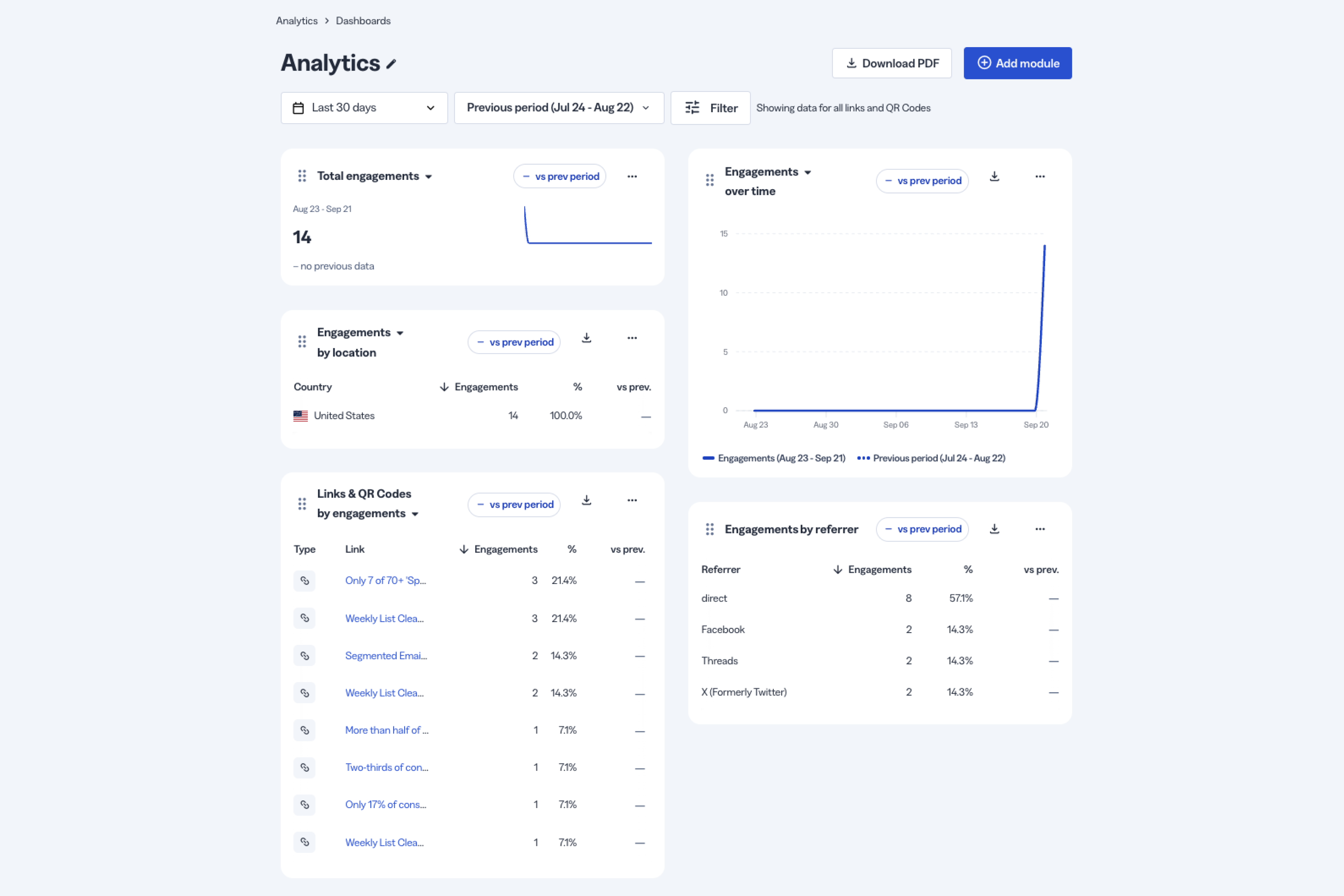
Bitly tracks the basics (but not much else)
Bitly’s metrics are light. You can track:
- Total engagements
- Engagements over time
- Location, by country only
- Top links
- Referrers
For comparison, Rebrandly's similarly priced plan breaks clicks down by:
- Country
- City
- State
- Region
- Device
- Browser
- Platform
- Language
- Time of day
- Clicks over time
- Bot vs human traffic
- Unique vs non-unique clicks
The benefit isn’t just having more data points; it’s what these data points let you do. Here’s an example of how Rebrandly’s data gives you an advantage over what you get with Bitly.
Say you’re an e-commerce brand that runs SMS campaigns. Knowing what day of the week and time of day most people click your links (down to the geo) can help you time your messages for the biggest impact.
That’s the kind of insights you lose with Bitly’s limited analytics.
Everything I could track in Bitly stopped at the click, while Rebrandly’s Conversion Tracking connects your branded links to the signups and purchases they drive. That shows you which campaigns bring in revenue and not just traffic.
Also, on the Growth plan, Bitly gives you only 120 days of click data. So you lose historical data and context for anything outside of that window. If you want one year of data, you need a Premium plan.
Dashboards prioritize visuals over depth
You can create custom dashboards using a handful of different modules. And each module has its own visualization options like tables, maps, and graphs
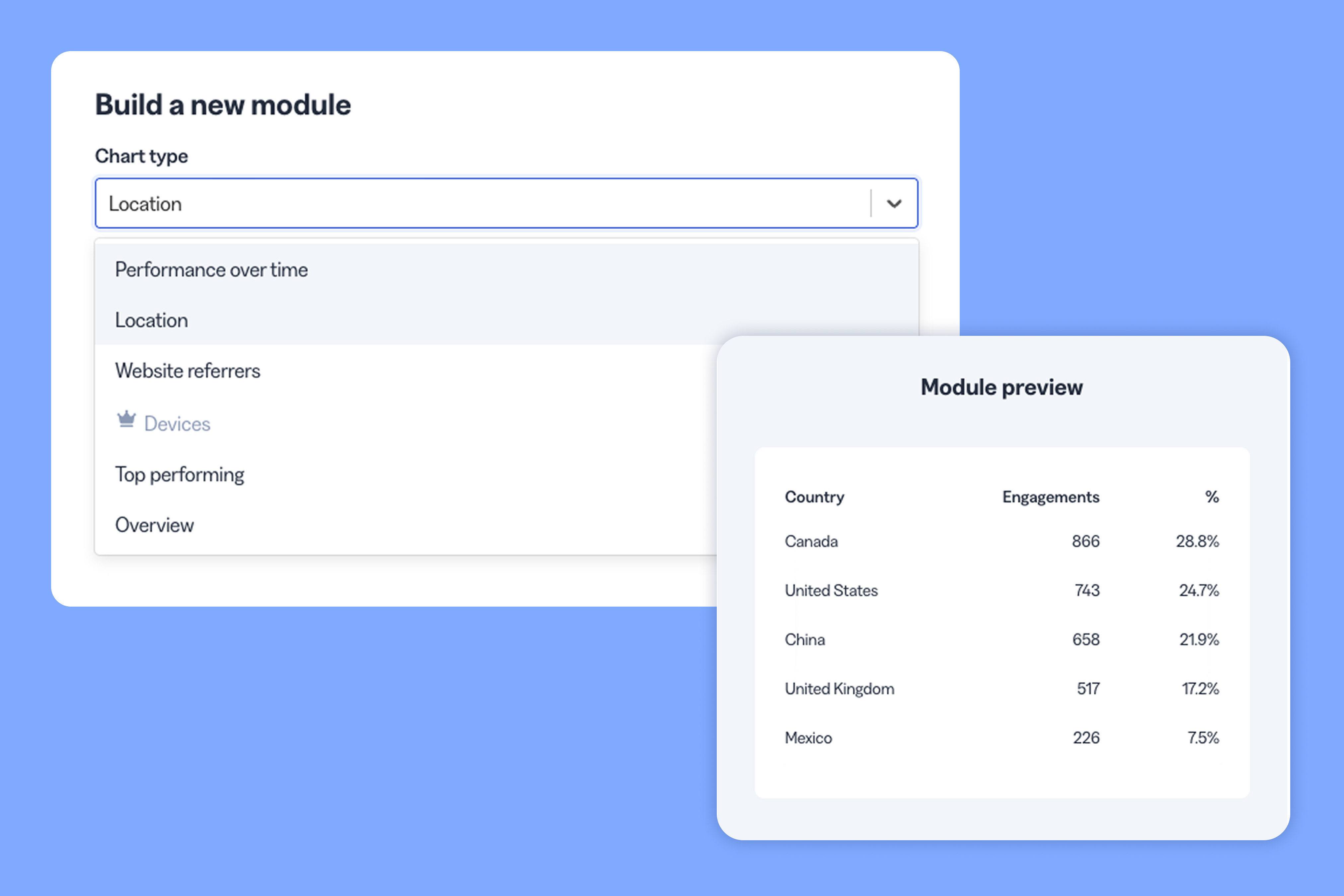
Bitly lets you choose specific links or QR codes to include in your dashboard as well. You can also filter by tags, links with or without a custom back-half, deep linking destination (although deep linking is only available on Premium and enterprise plans), or who the links are created by.
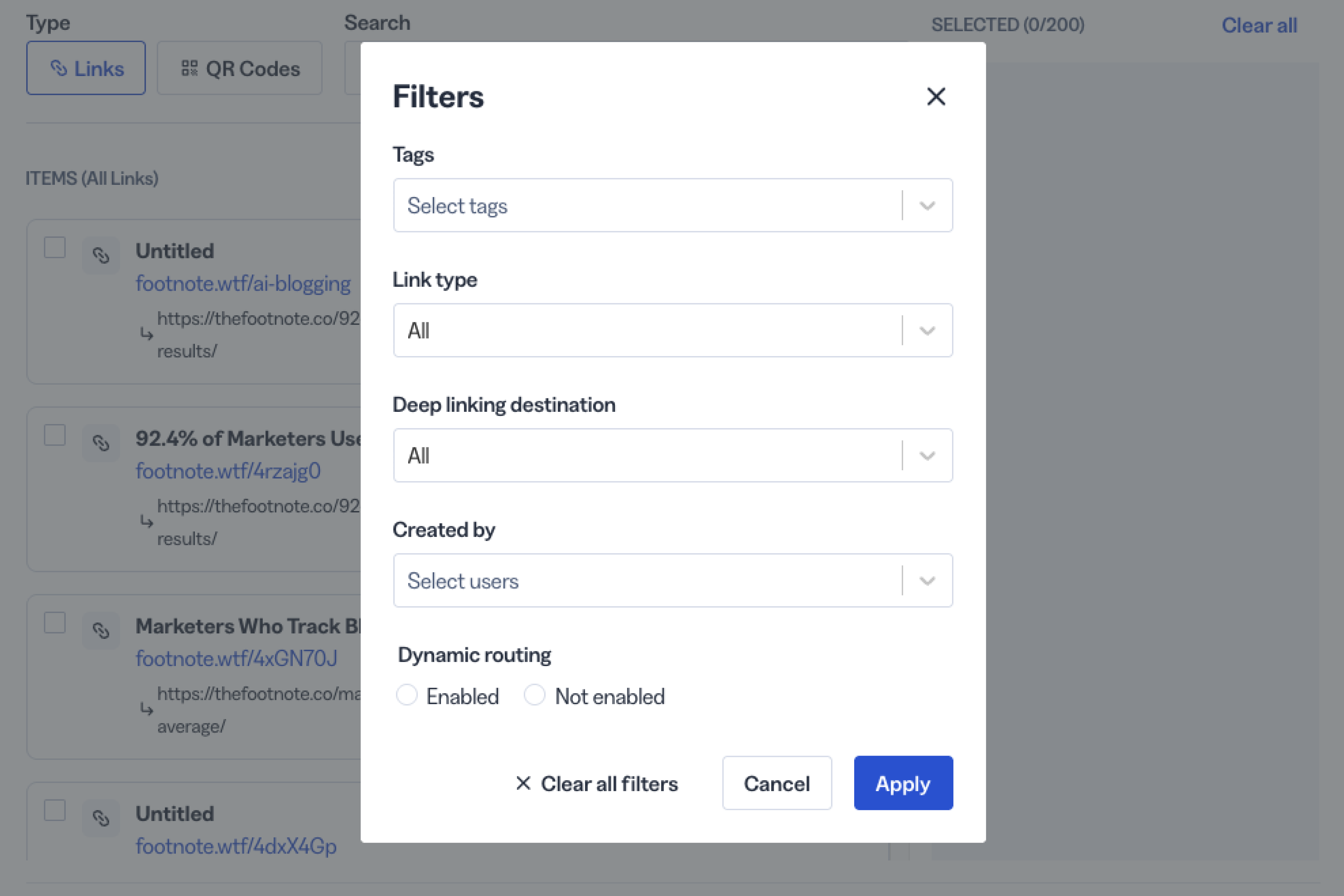
Tags are the most helpful filter in my opinion. If you tag your links by campaign, content type, or something else, you can see how those specific links have performed.
Custom dashboards are nice, but for me, the value of analytics comes from the depth of the data, not just how it’s visualized. When I look at analytics, I want to know how I can use the data to improve my campaigns?
In that regard, Bitly falls short compared to tools like Rebrandly.
Click attribution isn’t 100% reliable
Basic click attribution was mostly accurate for me.
I clicked my own links through a handful of channels to check how Bitly attributed them:
- Email: came through as Direct
- A tweet: came through as X
- A Threads post: came through as two separate clicks
The Threads click got credited once to Facebook and once to Threads, meaning Bitly double-counted Threads traffic.
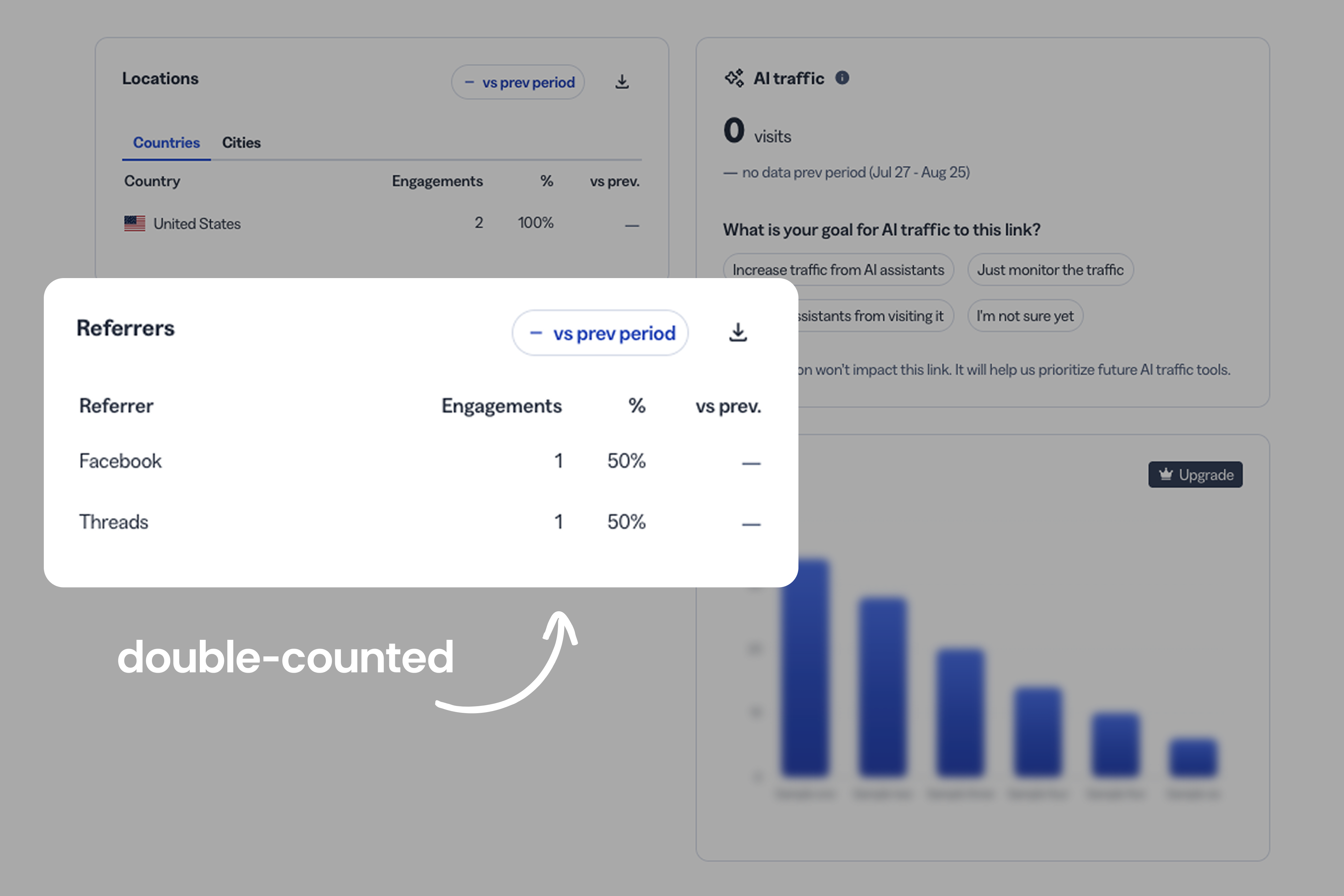
I’m not sure if this is an issue with all links from Meta properties (WhatsApp, Instagram, Facebook) or if it’s specific to Threads. But in any case, double-counting clicks muddies your data. So if you notice variances or the data looks strange, question it.
Bitly’s AI still needs a human checking its work
Bitly has been adding more AI into the product. But does it make creating, managing, and analyzing your links easier or harder?
I tested two ways to use AI with Bitly:
- Bitly Assist, their built-in assistant
- Bitly's Claude connector
For each, I ran two types of prompts: one to analyze data and one to create a link.
Bitly Assist answers confidently and incorrectly
I asked Bitly Assist how many clicks I'd gotten in the last 90 days. It gave the correct number, which I confirmed against my dashboard.
But that’s pretty basic. What if I asked for something more specific?
So I asked how many clicks my "blog"-tagged links got that month. Bitly Assist said zero, even though several of those links had clicks.
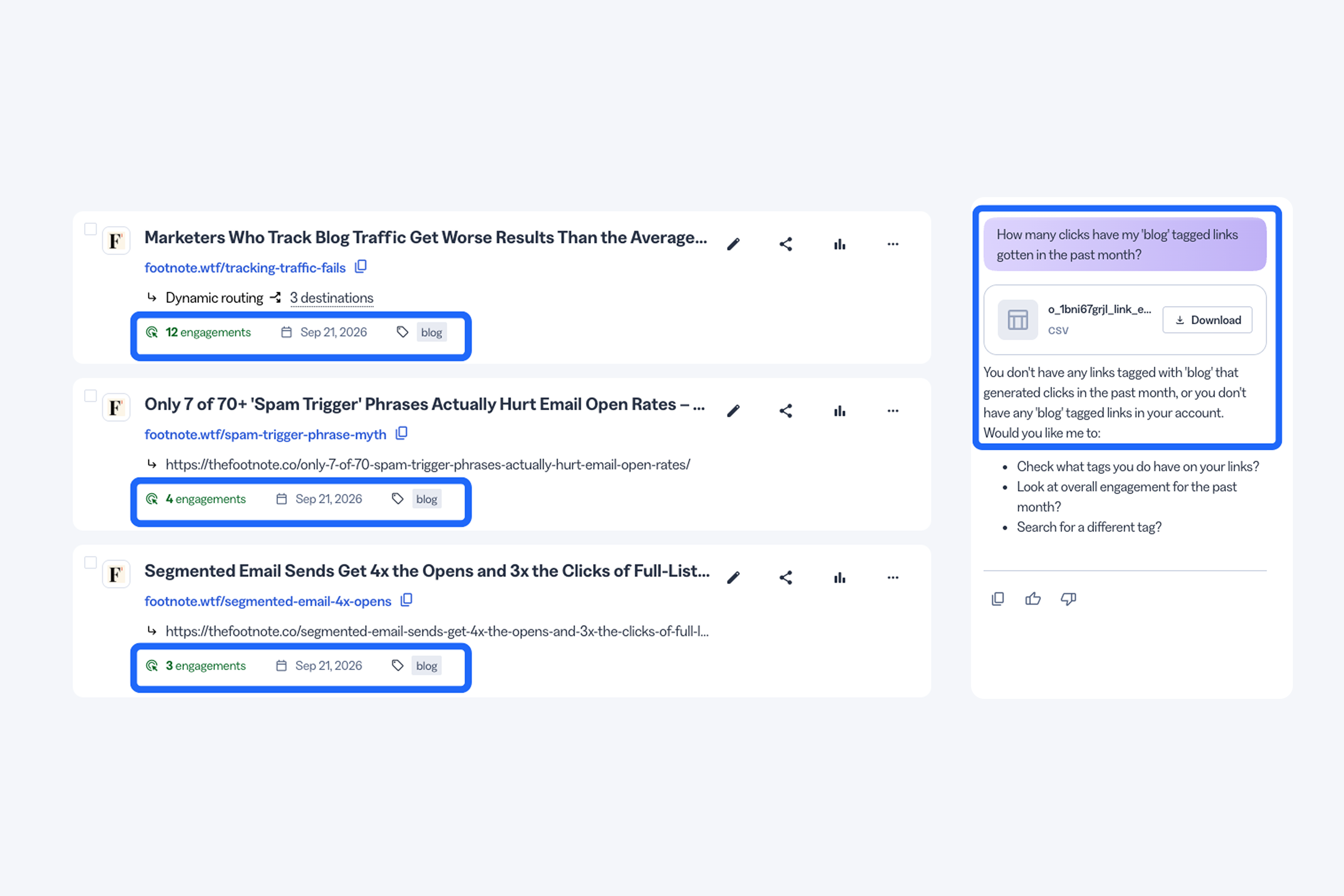
I thought maybe it just couldn't see tags, so I asked it to list my "blog"-tagged links instead. It pulled up every one of them correctly, clicks included.
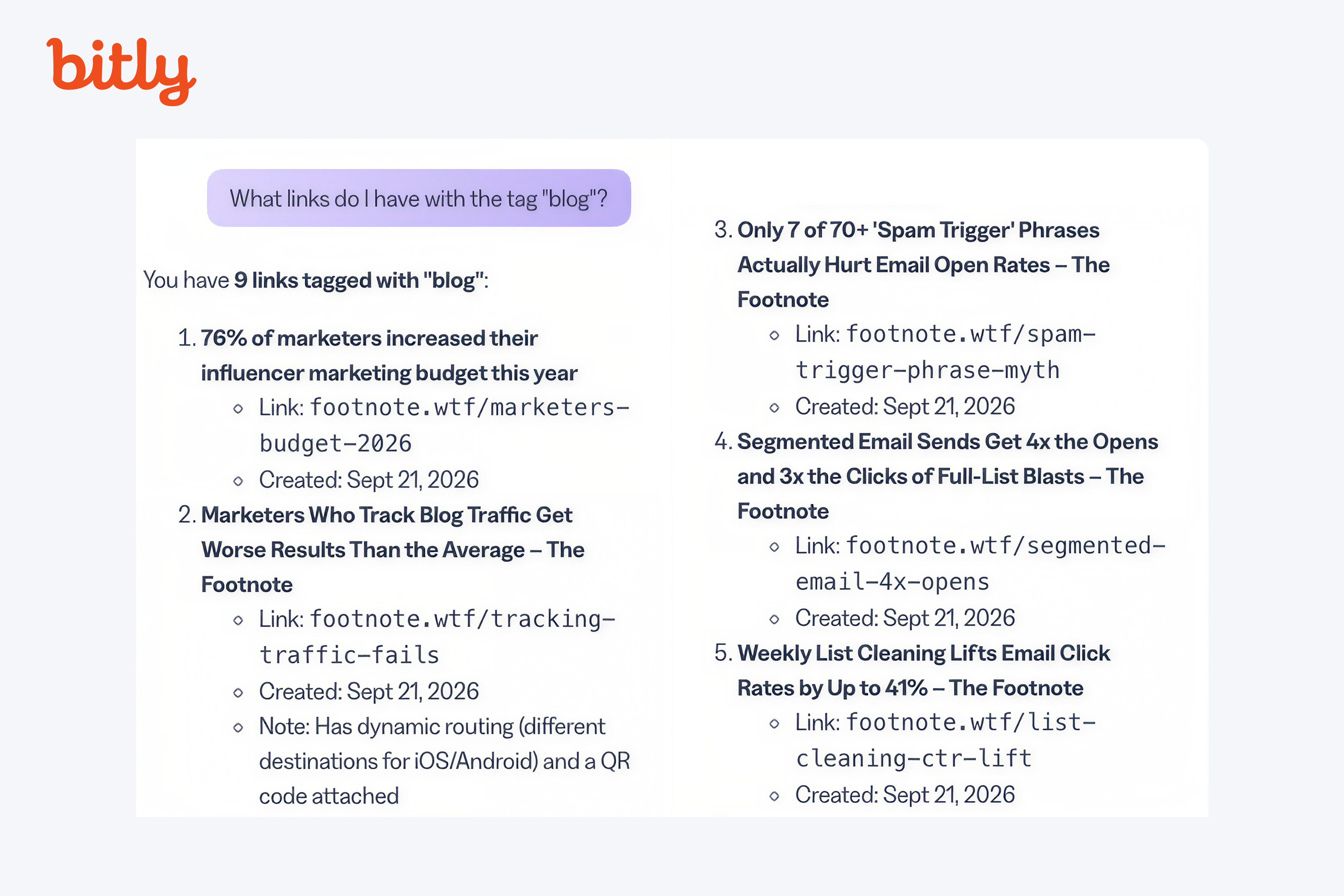
So Bitly Assist can see the tags for links. It just can't cross-reference tag and click data correctly, even though it answered with full confidence (incorrectly).
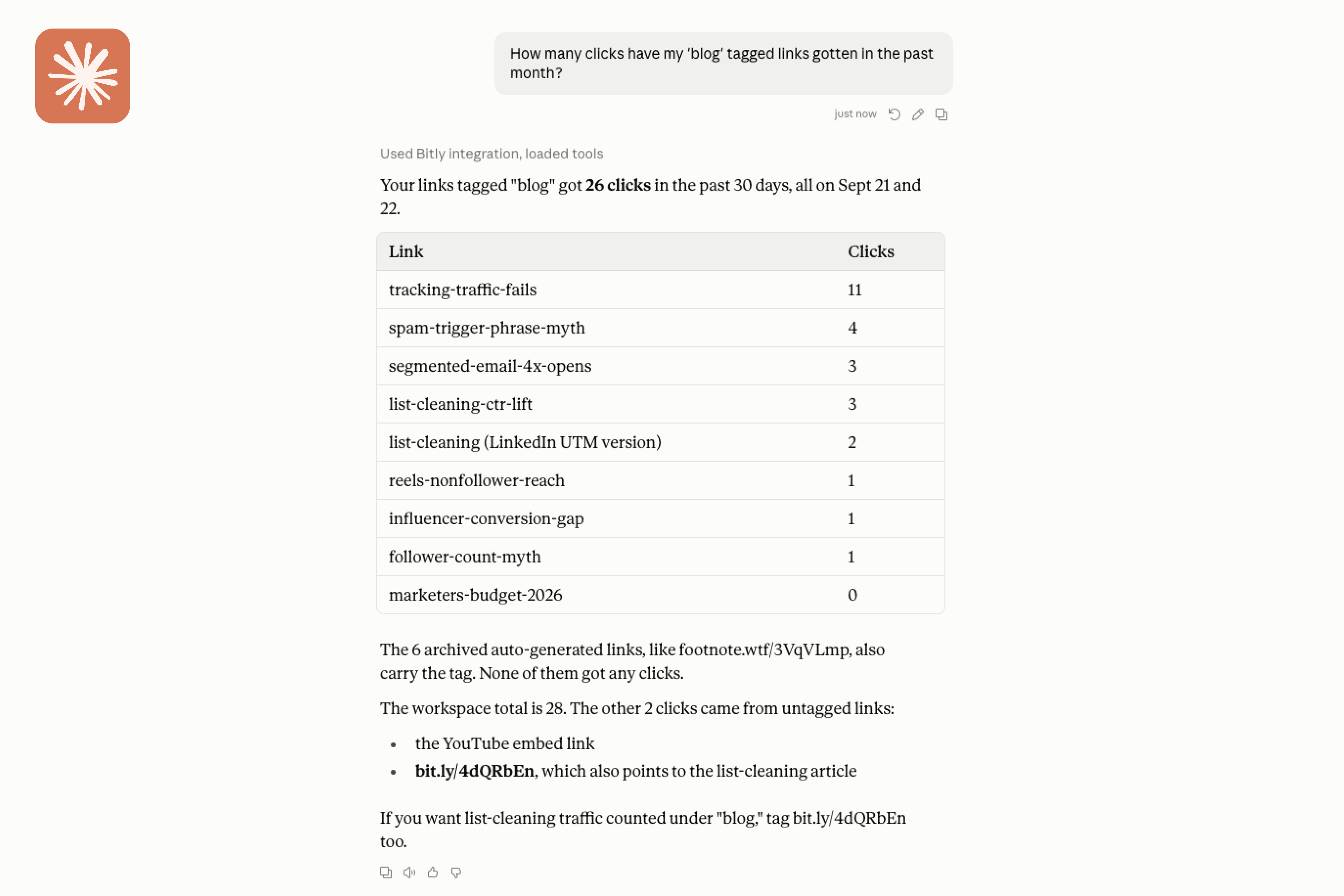
I asked Claude the same two questions. On the 90-day question, it gave me the same correct number, plus more context than Bitly Assist did.
On the "blog" tag question, Claude got it right, and gave me a full table breaking down the clicks by link.
AI-created links skip the details that matter
Next, I gave Bitly Assist a destination URL and asked it to create a link. It created one immediately, but without a custom back-half and without asking about UTMs or routing until after the link was created.
When I followed up asking it to set up dynamic routing, it asked me some clarifying questions. But at that point, I started wondering: would it be easier to just use the regular link creator?
To compare, I asked Claude to do the same thing. It behaved almost identically to Bitly Assist, creating the link right away with a generic back-half and no questions asked.
Claude did offer to make the back-half more readable afterward and I said yes. But instead of updating the link it had just created, it made a new one instead, one that's somehow tied to the first. Unfortunately, I can't delete either link.
Long story short, if you’re creating a link with Bitly or Claude, ask for everything you want upfront and give it guidance.
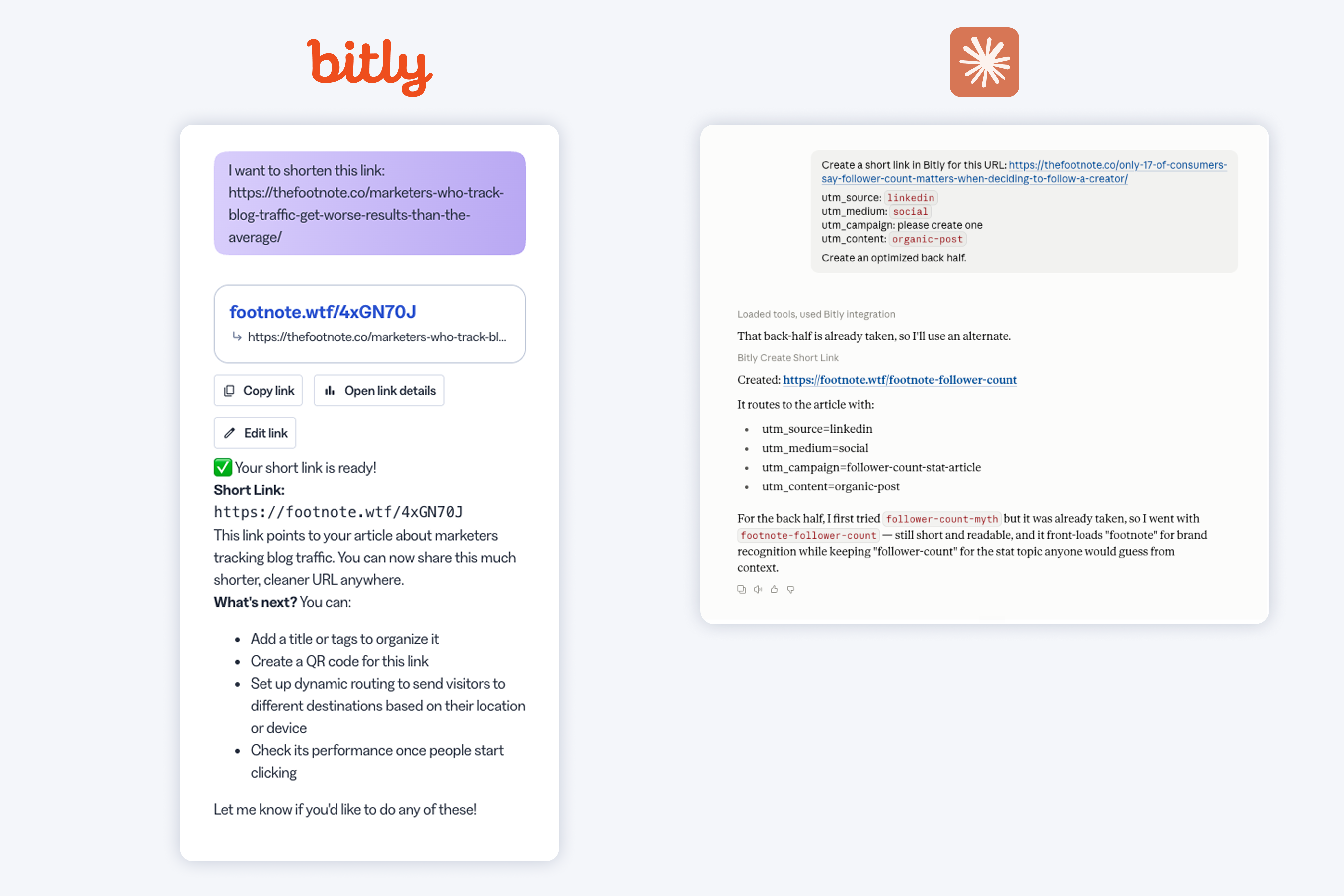
If you want to create links or analyze your Bitly data with AI, I recommend using Claude over Bitly Assist. It's better at understanding what you're asking, and its responses are more thorough.
Overall, Bitly’s AI tools aren’t at the point where I’d feel comfortable having it run with a task without verifying everything myself first.
Bitly’s customer support relies on AI a little too much
Bitly’s email support is handled by AI, which means you don’t need to wait days for a reply. But it doesn't always comprehend what you're actually asking.
I asked about deleting my hidden links and got an answer back immediately.
The response was a generic walkthrough of how hiding links works, plus a note that anything customized can't be deleted.
I replied back and clarified that I don't care about the link itself; I care about the data still counting. They sent the fastest email reply I’ve ever received, but the response was nearly word for word the first one.
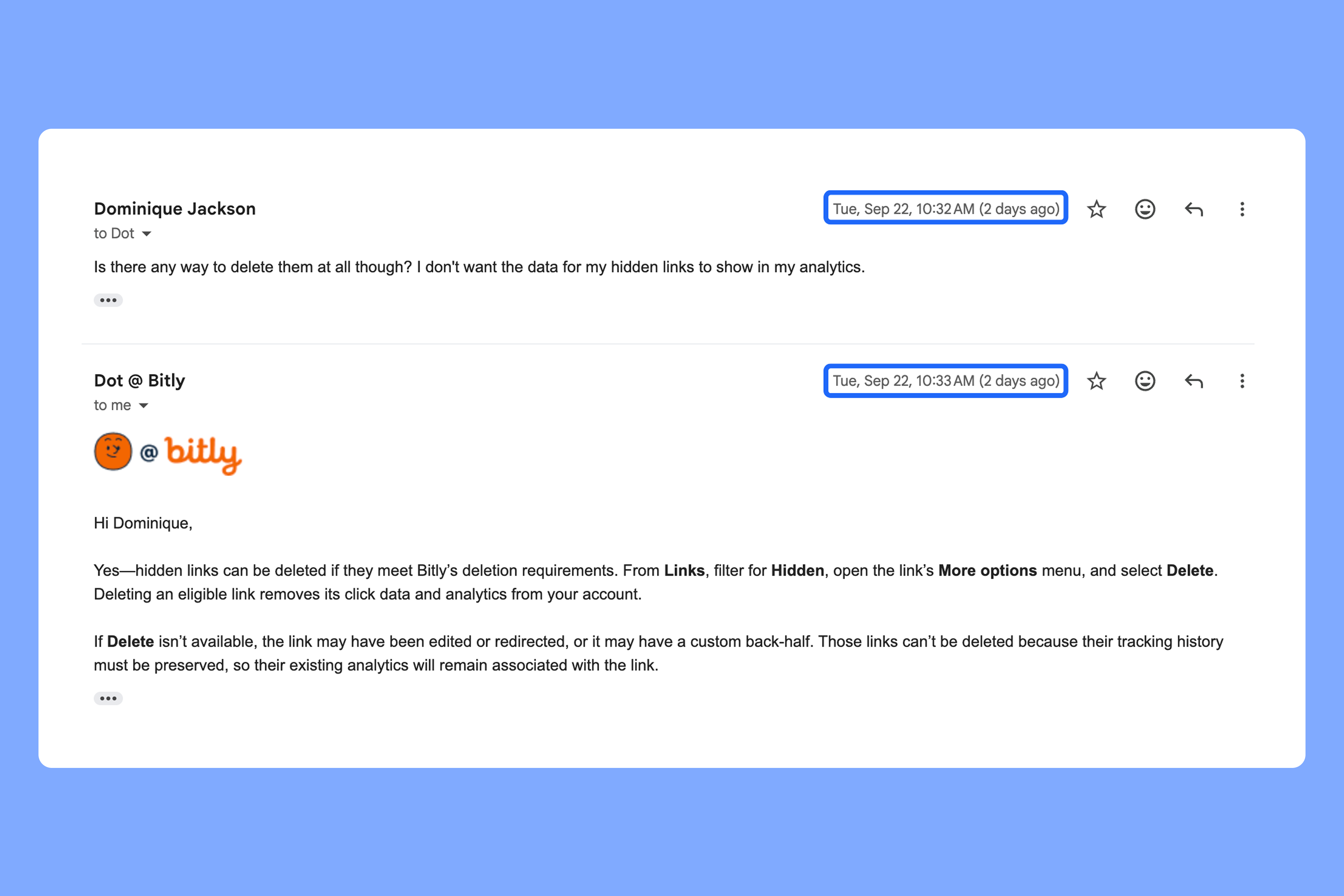
I’m sure their AI can handle basic questions well. But it wasn’t the best at reading between the lines.
How Bitly’s pricing works
I don't love Bitly's pricing. The lower-tier plans have a ton of limitations, and most features on the highest-tier plan are available on cheaper plans from competitors.
But if you’re trying to decide which plan to choose, here are my thoughts.
The free plan isn’t built for businesses
Unless you’re just curious what Bitly looks like, the free plan isn't worth bothering with. You get a handful of links and QR codes, and zero analytics.
The Core plan skips branded links entirely
Core is Bitly's lowest-priced paid plan.
You can’t use branded links, which defeats the point of paying at all.
Beyond that, here's what you get:
- Five link edits a month
- No deep linking
- No dynamic routing
- No bulk creation
- Five QR codes a month
- 30 days of history
The Growth plan caps the features businesses need
Growth is the plan I tested, and the one that makes the most sense for brands.
It's still capped in a lot of areas that matter for businesses:
- No deep links
- Routing limited to country and OS
- 10 QR codes a month
- No city or device-level analytics
- No Campaigns feature
- No user management
Premium and Enterprise plans give you the features the others lack
Premium is where the features Growth was missing finally show up. But most of them are things tools like Rebrandly already include on lower-cost plans.
Bitly doesn’t publish its enterprise pricing, and I didn’t try the features that come with it, so I can’t comment on whether it’s worth it. But if you’re considering the enterprise plan, I’d suggest shopping around to see how it stacks up to other tools.
Is Bitly worth it?
On the surface, it’s easy to see why so many people use Bitly. It does a lot of the basics well, and it’s a household name. But pressure-test it against what most marketers actually need, and the weak spots start to show.
If you're a solo marketer or small team that just needs to shorten a link occasionally and already lives in the tools Bitly integrates with, it does that job well. The Growth plan is enough to get by on, and you may never run into most of the caps I hit during testing.
But if you plan on creating bulk links and QR codes, need more analytics you can actually act on, or work in a regulated industry like healthcare or finance (our guide to HIPAA compliant link shorteners is a good place to start), look at Rebrandly instead. It gives you more links and QR codes, more granular routing, deeper analytics, and fewer limits.
You can get started for free here.
Frequently asked questions about Bitly
What is Bitly used for?
Bitly is a link management platform that shortens long URLs, generates QR codes, builds link-in-bio pages, and tracks clicks. Marketers use it to share cleaner links and see basic performance data.
Is Bitly free?
Yes, but the free plan is limited. It gives you 5 short links and 2 QR codes per month, keeps your links on the bit.ly domain, and paywalls most features, including analytics. For business use, you’ll need a paid plan.
How much does Bitly cost?
Bitly has five tiers: Free, Core, Growth, Premium, and Enterprise, which uses custom pricing. Branded links start on Growth, and features like city and device-level analytics, deep linking, and Campaigns only arrive on Premium. The pricing table above lists each plan’s price and limits.
Do Bitly links or QR codes expire?
No. Bitly’s support documentation says links and the QR codes you create in Bitly never expire, unless you delete them or remove the paired short link. On the Growth plan, you can also set an expiration date on individual links if you want one.
Is Bitly safe?
Bitly is a legitimate, widely used service, but anyone can create a bit.ly link, including scammers. A generic bit.ly link with a random string of characters also gives readers nothing to judge before they click, which is why a custom domain helps. If you’re unsure about a short link, here’s how to check whether a URL is safe.
Is Bitly worth it?
For a solo marketer or small team that shortens links occasionally, the Growth plan does the job. If you need bulk links and QR codes, finer routing, deeper analytics, or compliance for a regulated industry, compare it against other tools first, starting with our Rebrandly vs. Bitly comparison.