
I actually think TinyURL is a genuinely good tool.
Kind of a crazy thing to hear from a writer for Rebrandly, a link intelligence platform and TinyURL competitor, I know.
But hear me out.
If all you need to do is shorten a long link, you probably don’t need to look much further than TinyURL.
It's free, fast, and you don’t even need to sign up for an account to use it—the link shortener is just sitting there on the homepage.

It’s not the only free URL shortener out there, though (try Rebrandly’s here).
As a marketer, I admire that they’ve just stayed squarely in the “make links shorter” lane, especially in a moment where it seems like every MarTech tool is scrambling to merge and acquire in a bid to keep growing LTV.
But at the same time, I can see some clear gaps in what TinyURL offers, and many of them are things marketers flat-out need from a link management platform.
I’ll get into those in a second, then I’m going to look at five TinyURL alternatives I’ve tested myself and give you my thoughts on which TinyURL limitation each solves.
Already know you don’t want to use TinyURL? Jump straight ahead to the five alternatives.
Key takeaways
- Choose Rebrandly if you’re a business or marketing team that needs conversion tracking, dynamic routing, deep linking, and team workspaces in one place
- Choose Bitly if you’re a solo marketer or creator who wants link-in-bio pages and QR codes alongside your links, and you only need a few each month
- Choose Dub if you’re running an affiliate or partner program
- Choose Short.io if you’re a technical founder or running a side project and want unlimited links on a budget
- Choose Replug if you need GPS-level location data more precise than city
- Stick with TinyURL if all you need is to shorten links fast, and you’re on a budget
What TinyURL does well (and where it stops)
I’ve already mentioned the main reason you might find yourself using TinyURL. It's fast, you don’t need an account, and free (though, with limitations).
They do have a couple of paid options, with the Pro plan starting at just $9 a month and including bulk link creation from a CSV and a raw export of every click.
What I like most about TinyURL, though, is that it doesn’t force you up a pricing ladder the way some tools do.
TinyURL lets you choose your monthly link limit, with pricing scaling up as you require more volume.
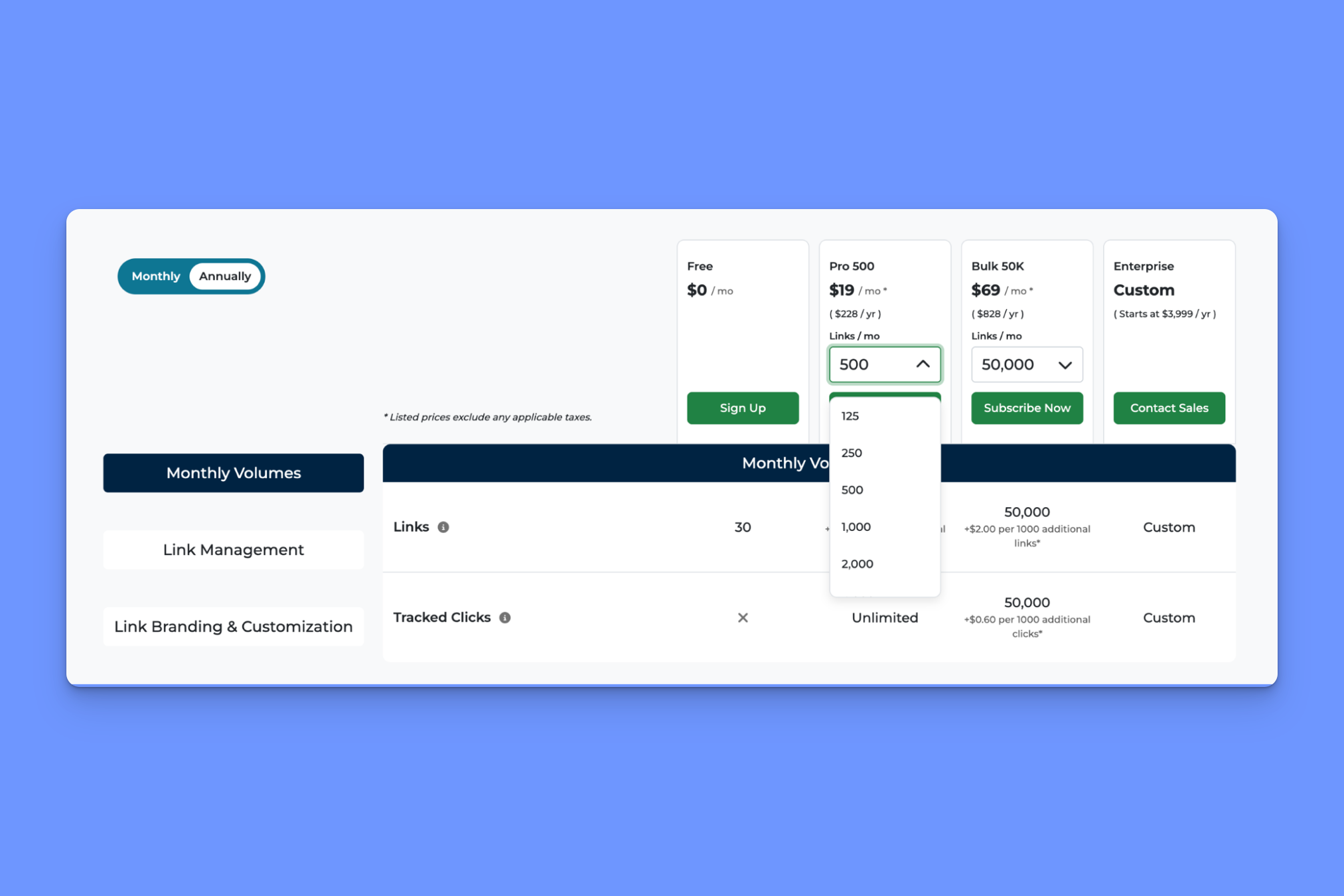
Compare TinyURL with Bitly, for example. You get 500 links a month on the Growth plan ($29 a month when paid annually), but if you need any more than that, the next tier up costs $199 a month for 3,000 links.
For cost-conscious users, TinyURL can be a good fit. For businesses and marketing teams, not so much.
That’s because TinyURL doesn’t have the majority of the features marketers need out of a link management platform, like:
- Dynamic routing, so you can send people to different destinations based on factors like their city or device
- Conversion tracking, so you can understand not just that someone clicked, but whether it led to a conversion event (e.g., a purchase)
- Deep linking, so a link opens inside a mobile app instead of a mobile browser
- UTM rules, so everyone labels links the same way and your analytics stay clean
TinyURL also doesn’t have enterprise support, SOC 2 and HIPAA compliance, or an API for bulk link editing, though that, to be fair, isn’t really their audience.
In short, if you need features like conversion tracking, dynamic routing, or team management tools, one of the five options below might be a better alternative to TinyURL.
Read Dominique Jackson’s full-length TinyURL Review.
Rebrandly gives you more flexibility, better support, and enterprise-grade security and compliance. See how we compare.
See pricingTinyURL alternatives at a glance
Here’s the quick version, with TinyURL in the first row so you have a baseline. Prices are for the lowest-paid plan, assuming annual billing.
| Tool | Best for | Free plan | Paid plans start at | Custom domains | Standout features |
|---|---|---|---|---|---|
| TinyURL | Quick links priced by volume | 30 links a month | $9/mo | Pro and up | No account needed, branded domain setup handled for you, plans scale by link volume |
| Rebrandly | Businesses and marketing teams | 10 links a month | $11/mo | Every plan | Conversion Tracking, dynamic routing, deep linking, link-in-bio, team workspaces and roles, SOC 2 and HIPAA |
| Bitly | Solo marketers and creators | 5 links a month | $10/mo | Growth and up (one included) | Links, QR codes, and link-in-bio pages in one dashboard, lots of integrations |
| Dub | Affiliate and partner programs | 25 links a month | $27/mo | Every plan (up to 3 on Free) | Partner payouts, filterable analytics dashboard, open source |
| Short.io | Side projects and solo technical users | 1,000 links total | $4/mo | Every plan (up to 5 on Free) | Unlimited links on paid, Bulk Create spreadsheet, accurate referrer data |
| Replug | Granular location data | 100 links | $9/mo | Every plan (3 on Free) | GPS location tracking, retargeting pixels, A/B testing |
Best TinyURL alternative overall for businesses: Rebrandly
What separates Rebrandly from TinyURL: Dynamic routing, conversion tracking, deep linking, team workspaces, and more
Rebrandly is the best TinyURL alternative for marketers who need (much) more than a simple link shortener.
Here’s what you’ll get from Rebrandly that TinyURL doesn’t offer.
Conversion Tracking
TinyURL tells you someone clicked a link, but not whether they signed up or bought anything.
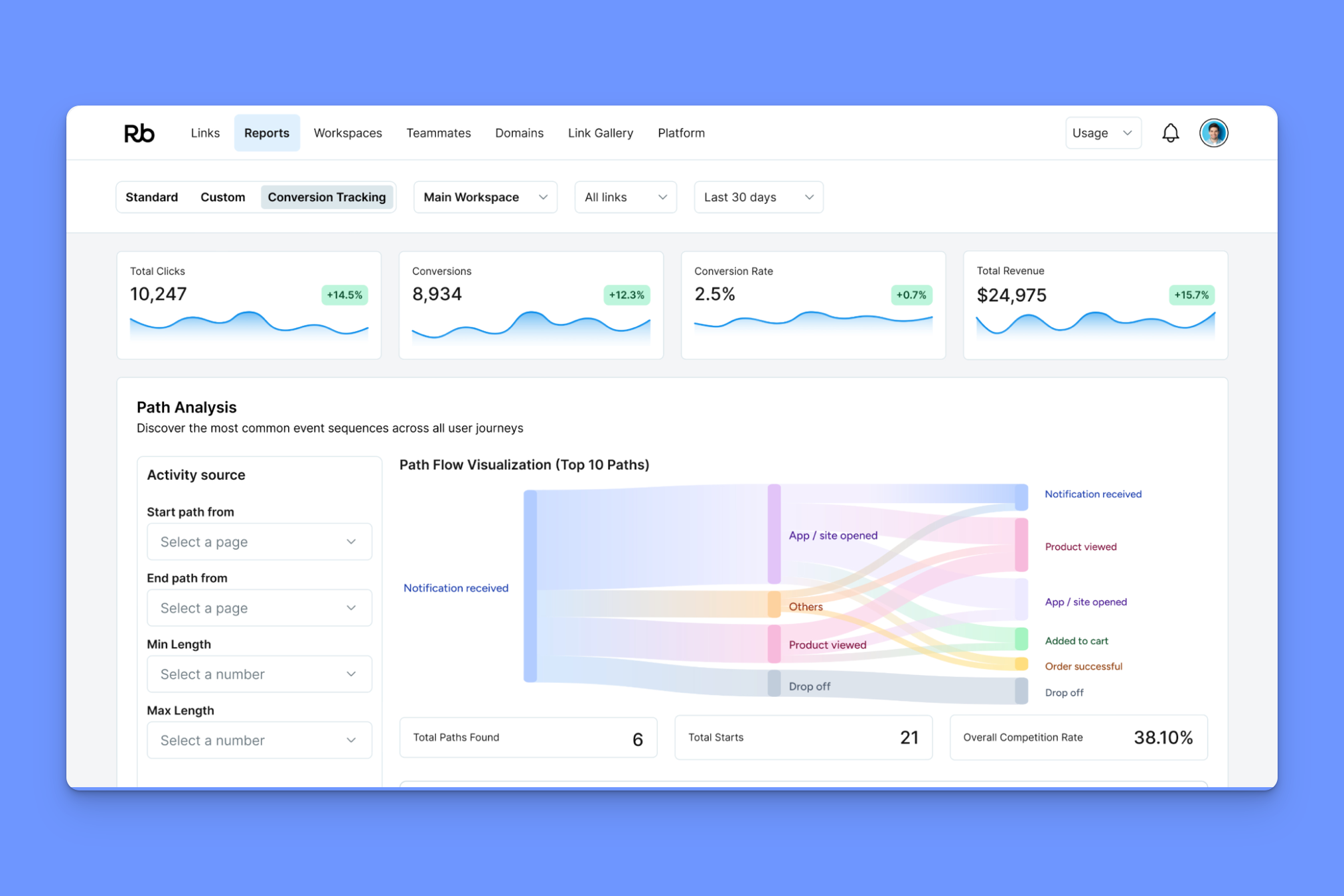
Rebrandly’s Conversion Tracking connects each link to the outcome that follows it: sign-ups, purchases, form fills, downloads, or whatever you define as a conversion, with revenue attributed per link.
You can set your own attribution window (7, 14, or 30 days), see the time it takes people to convert, and use Path Analysis to follow the common routes from first click to sale.
Deep linking
Deep linking allows you to set a link to open directly inside an app (YouTube, Instagram, or your own) instead of a landing page.
Rebrandly supports standard, deferred, and contextual deep links, so you can send someone to a specific in-app page, route them through the app store first if they haven’t installed yet, and carry context like a promo code through installation.
Dynamic routing
Dynamic routing means you can have one branded link, but send each person somewhere different based on who they are and where they click.
Rebrandly detects the visitor’s device, location, language, or custom URL parameters, then redirects them to the matching destination.
That means that one link can send iOS users to the App Store, Android users to Google Play, and everyone else to a landing page.

Team workspaces
Every TinyURL paid plan is a single login.
Everyone shares one email and password, which means nobody can tell who created or changed a link, and you can’t give someone view-only access.
In Rebrandly, each person can have their own login inside shared workspaces, with five permission roles so you decide who can create, edit, view, or manage links.
You can spin up separate workspaces per campaign, brand, or client, assign specific domains to specific teams, set UTM parameters at the workspace level so everyone tags consistently, and see who created or edited each link.
Comprehensive analytics
TinyURL’s reporting stops at the region level and groups email, SMS, and direct clicks into one bucket.
Rebrandly’s analytics are much more detailed, with clicks broken down by:
- Country
- City
- State
- Region
- Device
- Browser
- Platform
- Language
- Time of day
- Clicks over time
- Bot vs human traffic
- Unique vs non-unique clicks

Security and compliance
Rebrandly fills the security and compliance gaps TinyURL still has:
- SOC 2 Type II, HIPAA, GDPR, and CCPA compliance
- 99.99% uptime track record on a global CDN with redundancy at every layer
- SAML 2.0 SSO and SCIM provisioning with Azure AD, Microsoft Entra ID, Okta, Google Workspace, and OneLogin
- Granular user roles across links, domains, and workspaces, including view-only access
PS. We also have a free URL shortener, which doesn't need an account.
Best TinyURL alternative for solo marketers: Bitly
What separates Bitly from TinyURL: A QR code generator and custom landing pages
Bitly takes over where TinyURL leaves off: link-in-bio pages and editable QR codes.
Neither is available in TinyURL.
For QR codes, you can customize aspects like styles, colors, and frames, all in a WYSIWYG editor.
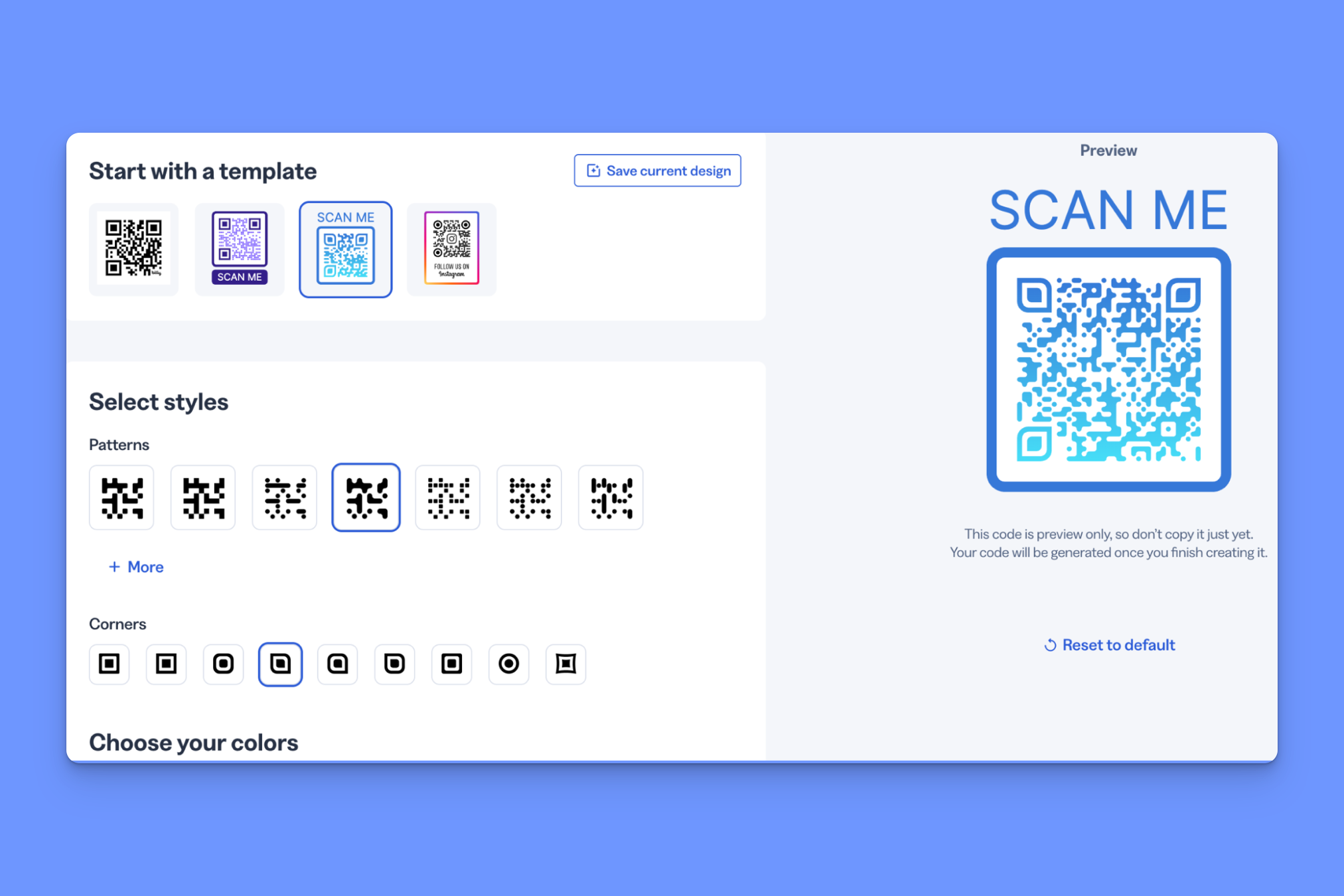
Frustratingly, though, not all of that functionality shows up in the main link editor window. You have to create the QR code first, then go back and edit it if you want to change the pattern, for example.
Relatively small workflow issue, though. The bigger drawback is the volume limits Bitly imposes, even on its higher-priced paid plans.
The Growth plan, for example ($29 a month when paid annually) caps you at:
- 10 QR Codes a month
- 500 links a month
- 10 custom landing pages
For reference, Rebrandly’s similarly priced plan includes 1,500 links and 1,500 QR codes a month.
You also get just one branded domain, 20 monthly destination edits, and only four months of click history on that plan. That’s why Bitly is really only a good fit for solo marketers and creators that don’t need a high-volume of links each month.
Beyond that, you’d need to upgrade to the $199 a month Premium plan, and at that price point, there are better alternatives.
So, would I choose Bitly over TinyURL?
If the only reason I was switching was that I needed link-in-bio pages and customizable QR codes, but only a few of them each month, yes.
Read our full Bitly review: what I liked (and didn't) after testing every feature.
Best TinyURL alternative for affiliate and partner programs: Dub
What separates Dub from TinyURL: It’s built around affiliate programs
Dub splits cleanly (sort of) into two products:
- Dub Links: An alternative to link tools like TinyURL, Bitly, or Rebrandly
- Dub Partners: An affiliate marketing/partner management platform
If you sign up for Partners, you get Links as well, but you can also choose to use Dub Links as a standalone tool, in which case it's closer to a TinyURL alternative.
Dub calls itself “The modern link attribution platform,” going straight after legacy tools like Bitly and playing the “we’re not your grandpa’s link shortener” card.
My first impression of Dub matched that description entirely. The UI has the kind of clean, Mac-native feel that many modern software platforms lean into (e.g., Notion, ChatGPT).
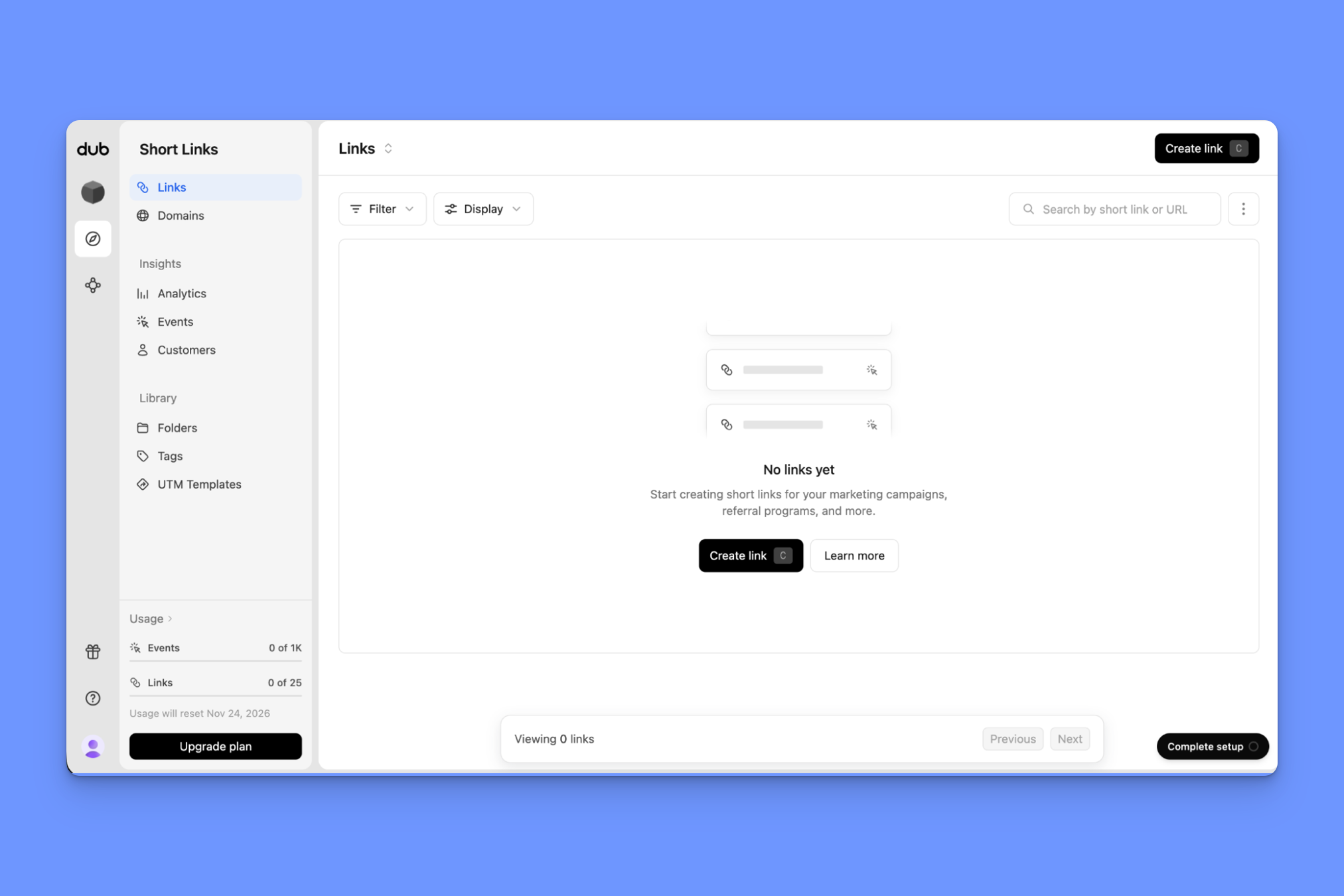
So kudos to them on the positioning front.
The free plan only gives you 25 monthly links and 30 days of analytics retention, so I’d think of it more as an interactive demo than a viable free option for businesses. I went straight up to the Pro plan.
The actual link management features are pretty straightforward, and not too different from what you’d expect if you’ve used TinyURL—add your link, choose a back-half, generate and share.
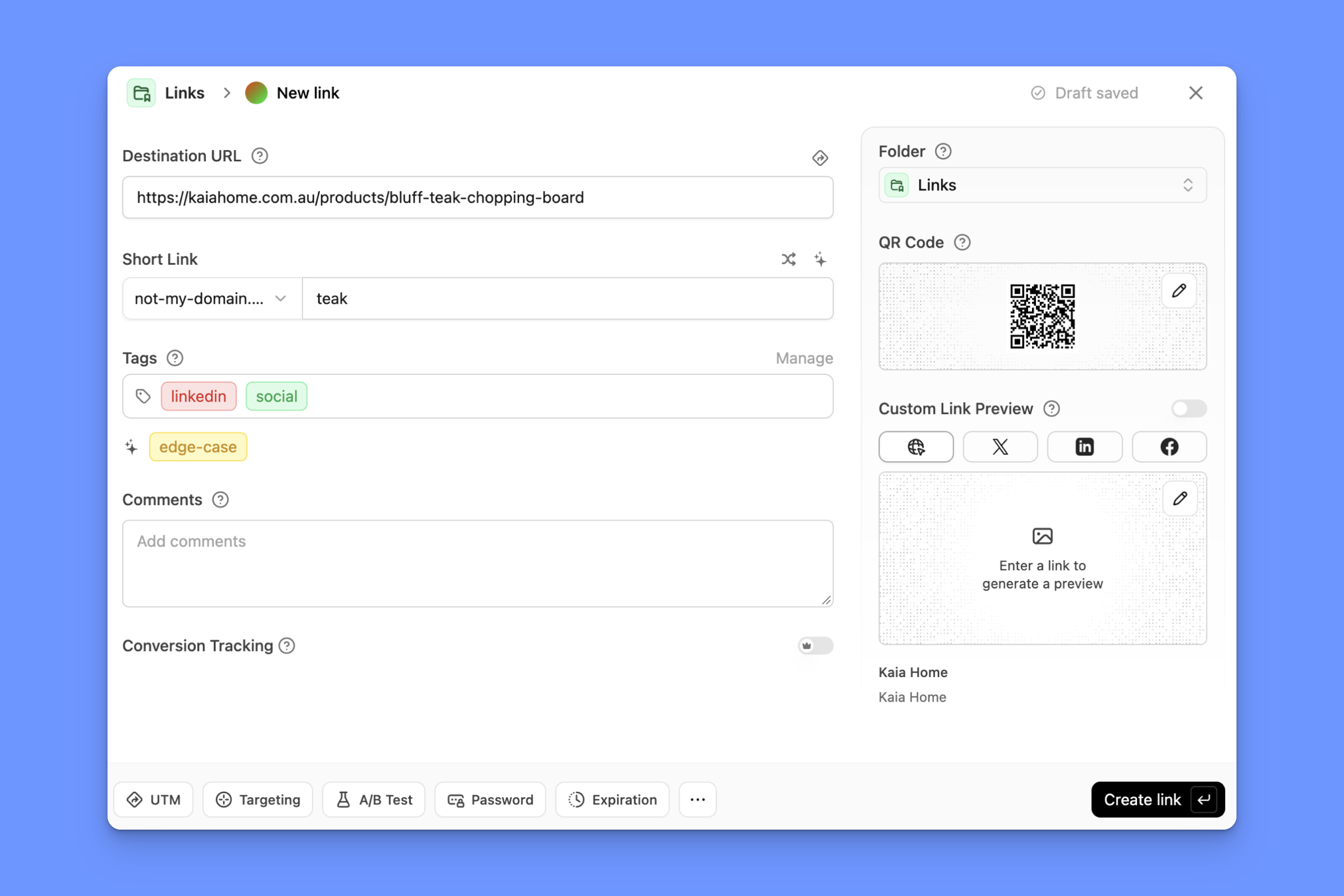
I like that UTM rules, A/B testing, tags, and QR code settings are all available to edit in the same window.
As modern and user-friendly as Dub is, the real reason I’d say anyone would choose it over an alternative is for Dub Partners.
Partners runs on the click tracking that Links provides. The affiliate link a partner shares is a Dub link, and the click and conversion data that link records is what Partners uses to calculate who gets paid for what.
In a lot of affiliate setups, one tool tracks the clicks, another handles commissions, and you have to plug them into each other.
For teams running affiliate programs through Dub, attribution and payout happen in the same tool.
Beyond that use case, though, there are more suitable alternatives.
So, would I choose Dub over TinyURL?
If partners and affiliates were a big part of my GTM strategy, yes.
Read the full Dub.co review (2026): Who it's really for, after 30 days of testing.
Best free/low-cost TinyURL alternative: Short.io
What separates Short.io from TinyURL: Affordability at high link volumes
If, for you, the appeal of TinyURL is its low price tag, Short.io might be a good alternative.
It does link shortening, QR codes, and link-in-bio pages, just like Bitly, but costs way less.
Short.io’s Pro plan ($18 a month) gives you unlimited links. Bitly only gives you 3,000 for $199 a month, and even TinyURL, as basic as it is, gives you 100,000 links a month for $99, and scales up from there.
It also has a decent Bulk Edit feature, which is essentially a spreadsheet built into the tool.
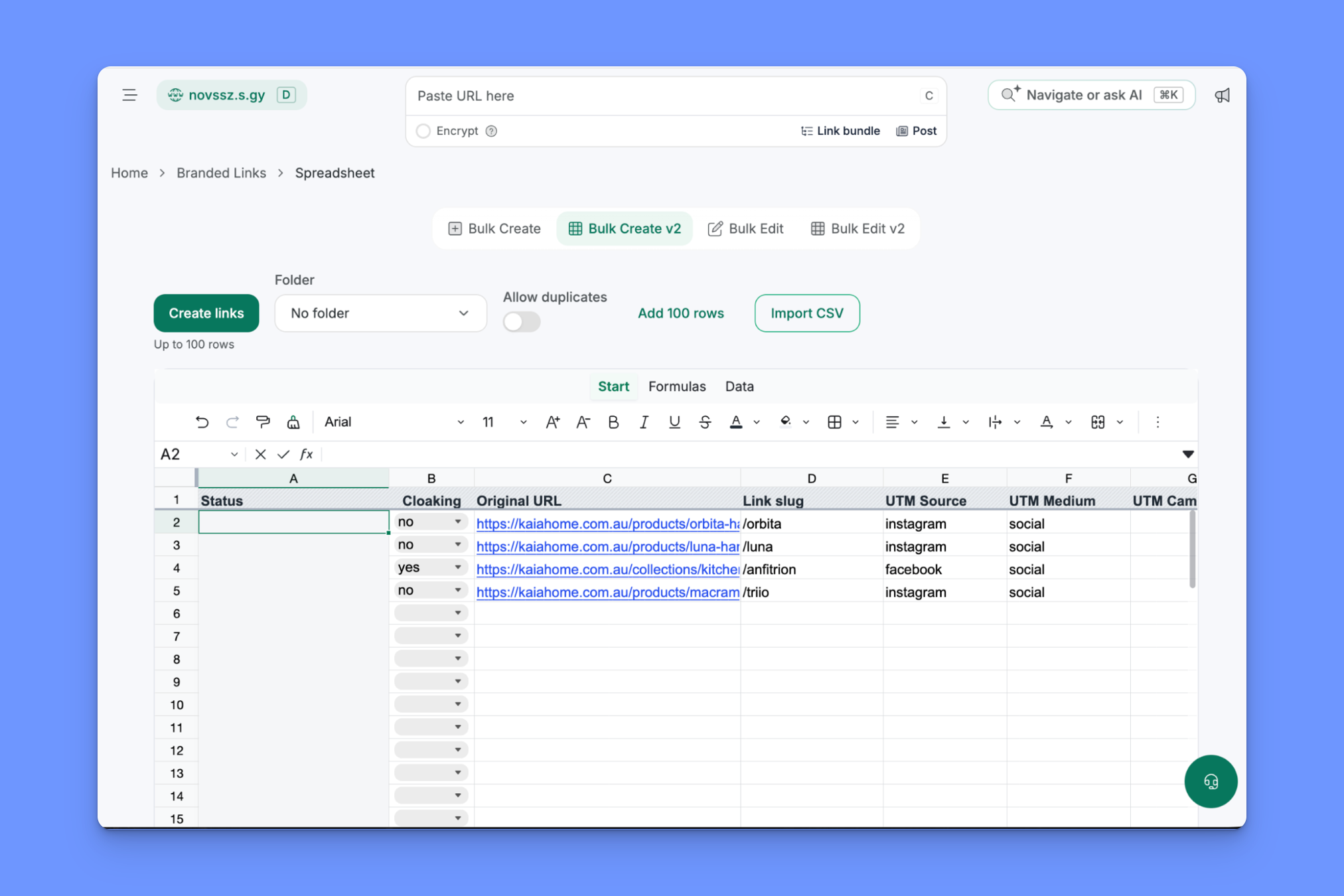
You can also import a CSV file or download Short.io’s template spreadsheet, fill it in, and upload it,
The pricing thing is probably the main reason I’d switch to Short.io over another alternative here, though. It’s affordable at scale, for a single user.
That last point is important, because Short.io feels much more like a tool for a technical founder running a startup or side project than a platform for teams managing links.
For starters, you only get multiple teammates once you upgrade to the Team plan, but you still can’t create multiple user groups and give access to different domains until you get to the Enterprise plan.
UTM guardrails are the other missing piece.
You can create UTM templates, but can’t define UTM parameters at the workspace level so every new link a teammate creates is tagged consistently, something you can do with Rebrandly.
So, would I choose Short.io over TinyURL?
If I were working on a solo side project and needed the standard link management features without hitting monthly limits, yes.
Read the full Short.io review (2026): pricing, features and who it's for
Best TinyURL alternative for detailed location data: Replug
What separates Replug from TinyURL: GPS tracking for more granular engagement data
Replug is another link management platform that, frankly, doesn’t do too much different from the other TinyURL alternatives we’ve looked at here.
It has branded short links, bio pages, and dynamic QR codes (the big three that all competitors cover), and offers A/B testing, routing rules, and deep linking.
Each of the other alternatives has at least one thing over Replug, though:
- Rebrandly has conversion tracking to understand performance beyond the click
- Bitly has a long-standing brand history and dozens of integrations with other tools
- Dub has the affiliate/partner program platform
- Short.io offers unlimited links for less than half the price
Replug does do one thing I haven’t seen anywhere else, and it's the single reason I’d choose Replug as my TinyURL alternative (if it were important to me):
GPS location tracking.
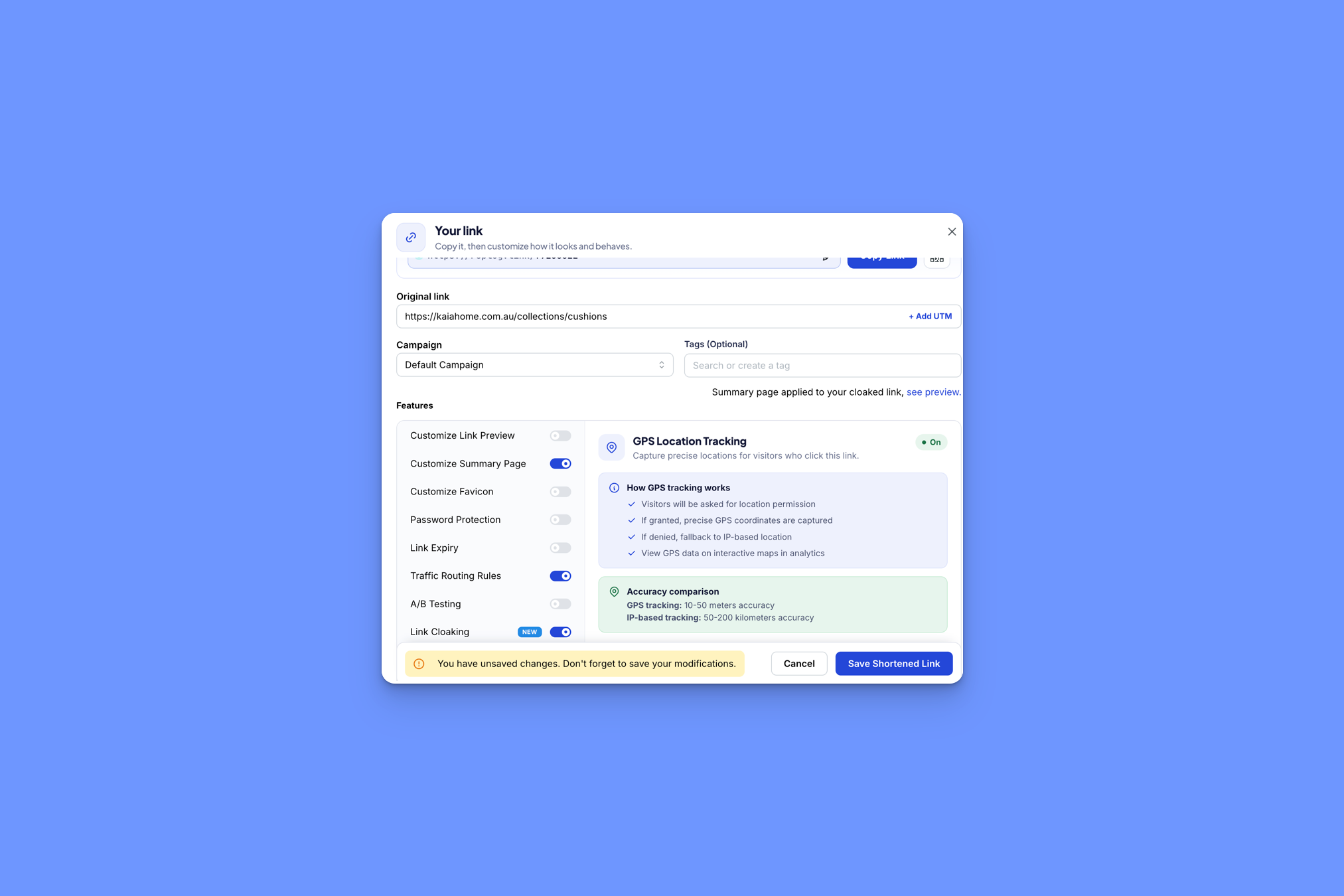
Every other tool on this list gets to the level of the country or city where someone clicks. Replug can be even more precise.
Of course, the visitor has to give permission, so you’re not going to get that level of detail on every click, but I can definitely see this being useful in some specific use cases.
So, would I choose Replug over TinyURL?
If I were running a campaign for which I needed the specificity of GPS location tracking, yes.
Which TinyURL alternative should you pick?
For most businesses that need more than a basic shortener, Rebrandly is the one I’d start with.
Ultimately, though, it really depends on what you need your links to do, so here’s how I’d match them up:
- You want to know which links led to sign-ups or sales: Rebrandly, since TinyURL stops at the click and doesn’t connect it to anything that happens after
- You’re a solo creator who wants a link-in-bio page and QR codes: Bitly
- More than one person creates links, or you need consistent UTMs: Rebrandly, for separate users, roles, and workspace-level UTM rules
- You run an affiliate or partner program alongside your links: Dub
- You need to route people by city, device, language, or time: Rebrandly, which TinyURL doesn’t do at all
- You’re a technical founder or running a side project and want unlimited links cheaply: Short.io
- You work in healthcare, finance, or another regulated industry: Rebrandly, with SOC 2 Type II and HIPAA
- You need location data more precise than city level: Replug
If you're still deciding between more than these five, our roundup of the best URL shorteners compares them side by side.
What happens to your TinyURL links when you switch
If and when you decide to leave TinyURL, what happens to your links depends on the domain they’re on:
- Links on tinyurl.com stay behind. They only work while they live in your TinyURL account. You can’t move them to another tool, so that means anything you printed or turned into a QR code with a tinyurl.com link keeps pointing at TinyURL.
- Links on your own branded domain can come with you. If the domain is yours, you export your links, import them into the new tool, and repoint the domain’s DNS. The old links keep working because the domain still resolves, now through the new tool instead of TinyURL.
- Links on a domain you bought through TinyURL are a bit trickier. That domain can leave, but you can’t do it yourself. You have to contact TinyURL’s helpdesk to find out. They also state that, per ICANN rules, domains that have been purchased or renewed in the past 60 days can’t be transferred to another domain registrar.
Before you move anything, this is a good checklist to tick off:
- Export your links and any analytics data you want to keep
- Confirm which domain each link sits on, and make a plan for links that stay behind
- Import your links into your new tool
- Check for missing or renamed rows (it happens, and the new tool doesn’t always tell you)
- Repointing your domain’s DNS
- Test a handful of old links to make sure they still redirect, then cancel your TinyURL plan
Is TinyURL worth it?
If all you need is to shorten a link fast, there’s no reason to switch over from TinyURL.
The question is where to look if you need more than that, as TinyURL is low on business-centric features like dynamic routing or conversion tracking.
Each alternative on this list covers something TinyURL misses, meaning each fits a different kind of user.
If Rebrandly sounds like it might be the TinyURL alternative you’re after, you can try it out for free.