


Most people compare link shorteners based on the wrong thing. You open the pricing pages for a few of the best URL shorteners, look at the monthly prices and link limits, and pick the cheapest plan that covers your volume.
Then you sign up, use it, and start running into issues:
- You can see a link got 100 clicks, but you have no idea if they led to conversions.
- You have no way to track who created or changed which links because there are no permission controls.
- You have to go through 10 tabs to customize one branded link.
- You try importing bulk links and get a bunch of errors.
Next thing you know, you’re back at square one and need to do it all over again with a different tool. I want to help you avoid that nightmare and choose the right option from the start.
So I tested the most popular URL shorteners and put together a shortlist for every use case.
The five best URL shorteners
- Best for businesses: Rebrandly
- Best for solo marketers: Bitly
- Best for affiliate and partner programs: Dub
- Best for side projects: Short.io
- Best for quick, one-off links: TinyURL
What makes a good URL shortener?
Whether you call it the best URL shortener or the best link shortener, the right tool does a lot more than make a link shorter. It brands your links, gives you insights into who clicked and whether they converted, and lets you easily manage all your links and QR codes in one place.
What a URL shortener does
A URL shortener turns a long, messy link into a short one that redirects to the original page. So instead of sharing something like yourbrand.com/blog/spring-guide?utm_source=newsletter&utm_medium=email&utm_campaign=spring-launch, you share yourbrand.co/spring and it sends people to the same destination.
That shorter link is easier to read and harder to mistype, especially in a text message or on a slide. It also keeps your UTM tracking tags out of sight (nobody needs to see utm_medium=email in your newsletter).
Most businesses end up using short links in a range of places:
- Marketing campaigns, where each channel gets its own link so you can see which one performed best.
- Print and in-person materials, like packaging, menus, signs, and event badges, usually as a QR code.
- Text messages, where every character counts and carriers are careful about which links they let through.
- Podcasts, videos, and live events, where people need to remember a link they heard out loud.
- Social media and link-in-bio pages, where a clean, branded link looks more trustworthy than a long one.
Some platforms already shorten links for you, though, like X, which wraps every link in its own t.co shortener, or LinkedIn’s linked.in. But even in those scenarios, still use your own branded short link for tracking purposes.
What I looked for
Every tool here can shorten a link, so that part was easy. I focused on the other things that matter most to businesses:
- Branded links: How easy it is to use your own domain, customize the back half (the part after the slash), and create QR codes.
- Analytics you can trust: Whether location and referrer data were accurate, and whether the tool can show which links led to sign-ups or sales.
- Link capabilities: Beyond shortening a link, which routing, UTM governance, and other features you can control.
- Team features: Separate logins, permissions, and shared settings, so more than one person can work without stepping on each other.
- Limits and value: What each plan includes, and which limits feel restrictive.
- Ease of use: How quickly you can get onboarded and use it in your workflow, and how often the tool gets in your way.
I also stuck to standalone tools you can sign up for and start using right away. That means self-hosted shorteners and shorteners built into other products (like social media schedulers or email tools) didn't make the list.
How I tested these URL shorteners
I paid for and used each of these tools the way a marketer would. That meant connecting a domain, building real campaign links, and checking whether the data matched what really happened.
To keep things fair, every tool got the same set of tests:
- Connecting a branded domain
- Clicking test links over a VPN from different countries to check location data and routing
- Clicking links from different platforms to see whether each tool tracked referrers correctly
- Importing links in bulk from a CSV
- Creating QR codes, then editing and deleting links
Some tools also had features unique to them, so I tested those too.
I go into much more detail in my full reviews of each tool:
This roundup zooms out, so you can quickly see which tool fits what you need.
The best URL shorteners at a glance
The table below gives you the quick version. Prices are the lowest paid plan available, billed annually, as of the time this article was published.
Best URL shortener for businesses: Rebrandly
Pros
- Branded links and dynamic QR codes on every plan
- Conversion Tracking that shows which links led to sign-ups, purchases, and revenue
- The most traffic routing options of any tool here, including deep links for mobile apps
- Workspaces, users, and roles for real team control
- SOC 2 Type II and HIPAA on every plan
Cons
- The free plan is small (10 links a month and watermarked QR codes)
- Essentials is a single user, with no Conversion Tracking or routing
- You get 10, 50, or 150 destination edits a month, depending on the plan (unless you're on Enterprise)
- SSO is only on Enterprise

Rebrandly is the best URL shortener for businesses that need branded links, analytics they can act on, and control over who does what. Of the five tools here, it's the one that feels most clearly designed around how marketing teams work.
Every link and QR code can use your own branded domain, either one you already own or one you buy inside Rebrandly (it handles the SSL for you). All of its QR codes are dynamic too, so when a landing page changes, you update the link instead of reprinting 2,000 flyers.
The biggest difference, though, is what Rebrandly can tell you about a link. Analytics start with country data on every plan and go down to city, referrer, and browser on Professional, where Conversion Tracking also kicks in.
Conversion Tracking is a Rebrandly feature that connects each branded link to the sign-ups, purchases, and revenue that came from it.
So instead of "this link got 300 clicks," you see exactly what those clicks turned into (with an attribution window of up to 90 days). For anyone who has to defend a campaign budget, that's a very different conversation.
That's also why Rebrandly is considered a link intelligence platform instead of just a link shortener.
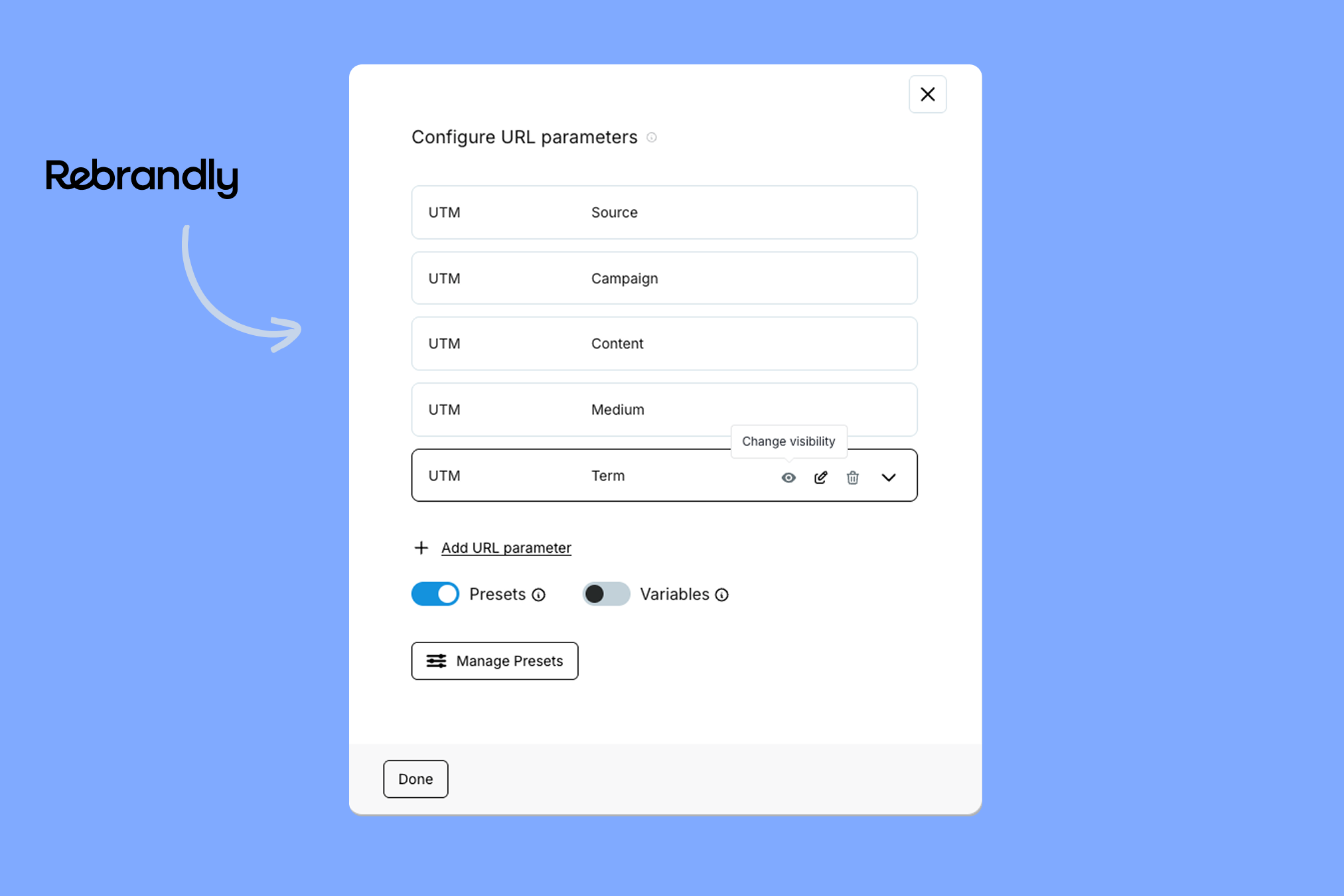
Teams get just as much attention. On the Professional plan and up, you get workspaces with separate users and roles, plus default UTM settings for each workspace, so nobody's tagging links "Facebook" while someone else writes "fb."
A few other things stand out too:
- Traffic routing: send people to different pages based on country, region, city, device, language, platform, date, or time.
- Security: SOC 2 Type II certified and HIPAA compliant on every plan, with SSO on Enterprise.
- Integrations: a generous API, bulk import, webhooks, and 50+ app integrations.
- AI tools: the Rebrandly MCP server and Claude connector let you create links and ask questions about your analytics in plain language.
That mix is why organizations with a lot of moving parts tend to land on Rebrandly. Three Rivers Park District, for example, gets more than 1 million QR code scans a year and saved 300+ physical signs from being replaced by updating their destinations in bulk.
Rebrandly isn't the right fit for everyone, though. If you only need a handful of links, the free plan will feel tight because it’s made for businesses rather than personal use. However, we do have a free URL shortener for one-off links.
Pricing: Free; Essentials $11/mo; Professional $32/mo; Growth $149/mo; Enterprise is custom. Rebrandly also has a free trial.
Best URL shortener for solo marketers: Bitly
Pros
- Links, QR codes, and link-in-bio pages in one place
- Simple-to-use design tools
- A well-known brand that integrates with lots of other tools
Cons
- A very limited free plan with a preview page on every link
- Tight monthly caps on QR codes and destination edits, even on paid plans
- No conversion tracking
- Multiple users require an Enterprise account
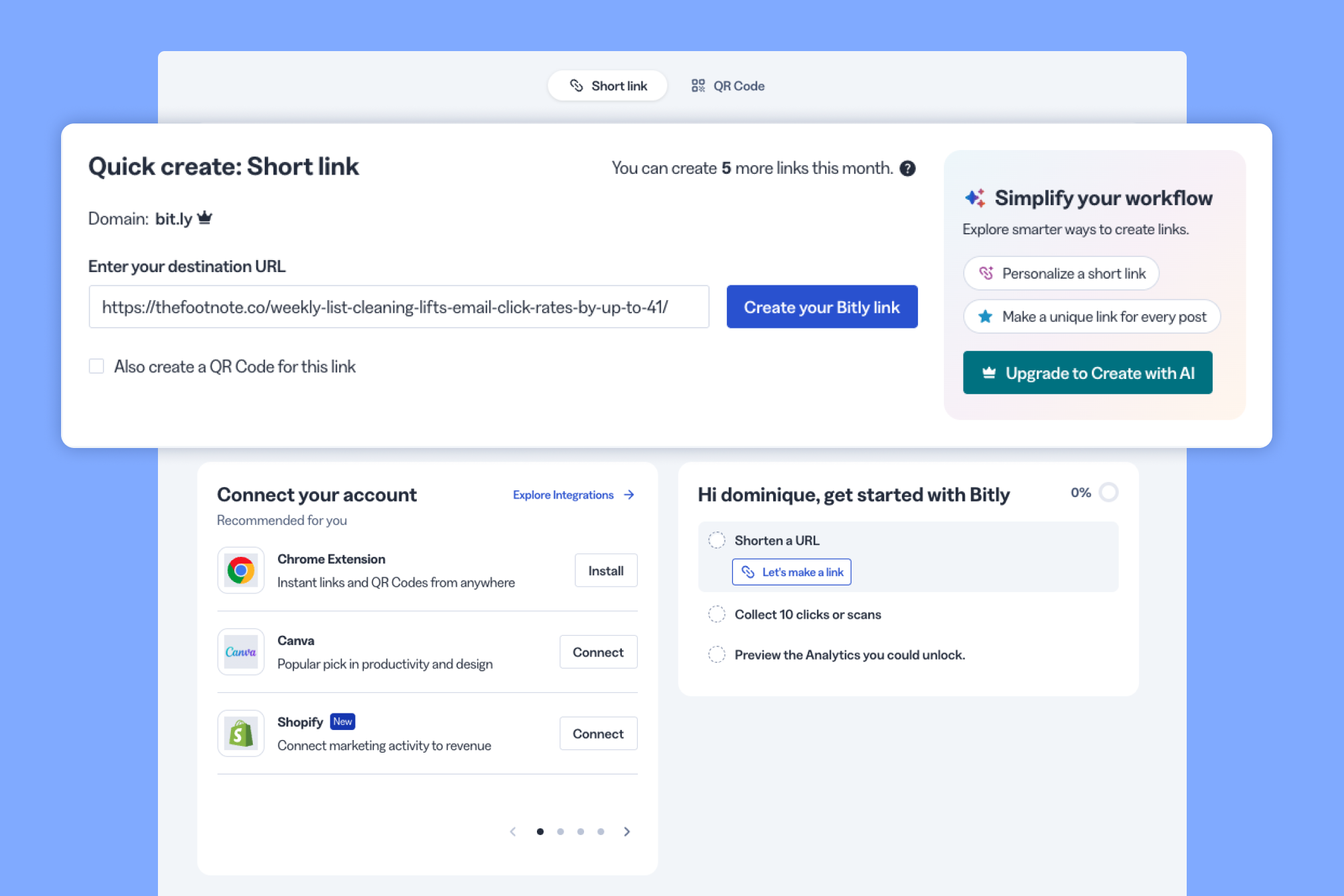
If you don't need team features and just want everything in one dashboard, Bitly makes the basics easy. Short links, QR codes, and Bitly Pages (its link-in-bio tool) all live side by side, so a solo marketer who shares links now and then can get it all done without switching tools.
Bitly is also one of the best-known names in link shortening, and it connects to a lot of the tools marketing teams already use. For instance, I tested the Canva integration and it worked very well.
The trouble starts when you lean on it harder. The free plan gives you 5 links and 2 QR codes a month, and every link opens on a Bitly preview page before it redirects (it's really a demo with a $0 price tag).
Its primary paid plan (Growth) also feels limited in some aspects:
- Branded domain: One complimentary domain, starting on Growth. If you downgrade to a plan without one, Bitly won't renew it, and links on that domain stop working once it expires.
- QR codes: 10 a month, even though you get 500 links. The builder is nice, but that ratio makes QR codes feel like an add-on.
- Edits: 20 destination edits a month across all your links, and you can't delete a link once you've edited it (only hide it).
- Analytics: Country-level clicks and about four months of history. City and device data need Premium, and there's no conversion tracking.
- Teams: User management is an Enterprise feature.
So if it's just you and a steady trickle of links, Bitly does the job. But once you're creating QR codes regularly or multiple people need access, you'll bump into those caps fast.
The Bitly pricing breakdown goes plan by plan if you want the details.
Pricing: Free; Core $10/mo (billed annually only); Growth $29/mo; Premium $199/mo; Enterprise is custom. There's no free trial.
Best URL shortener for affiliate and partner programs: Dub
Pros
- A usable free plan with editable links and custom domains
- Built-in affiliate and partner payouts on Business and up
- Open source
Cons
- More advanced features are only available on higher-tier plans
- Routing is limited to country and device
- A lot of what makes Dub special only matters if you run a partner program
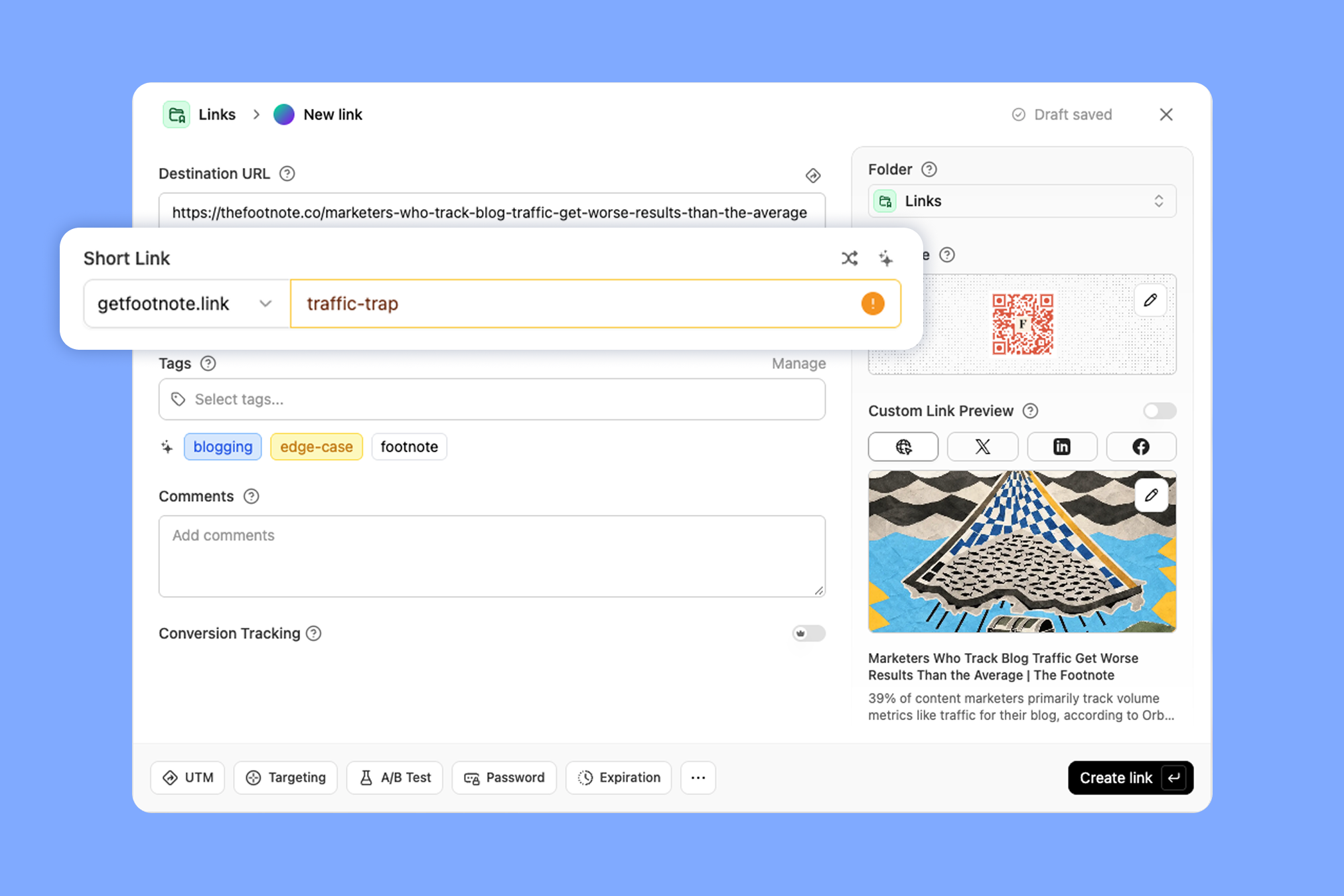
Dub is split into two main products. Dub Partners, its product for tracking the sales your partners drive and paying them out, sits front and center. Dub Links, the link shortening and management tool, feels like it was built underneath it.
The link side isn’t an afterthought, though. It has a more modern feel and seems like it was made for people who work in tech. If you compare the UI against TinyURL, for instance, there’s a stark difference.
What I enjoyed most was the analytics dashboard. When you click any link, country, or referrer in the analytics, everything else filters to match, which makes it fun to dig around in. The downside is you don’t get quite as much data as Rebrandly or a couple of other tools here.
The free plan is one of the more useful ones here too. You get 25 links a month, links you can edit, up to 3 custom domains, and a free .link domain if you don't have one.
The catch is the jump to the Business plan. Conversion tracking, A/B testing, and Dub Partners all start there, at three times the price of Pro, and routing stays limited to country and device either way.
If your growth strategy runs through affiliates or partners, Dub is made for that use case. But if you just need a link shortener, the other tools on this list are better options.
Pricing: Free; Pro $27/mo; Business $81/mo; Advanced $270/mo; Enterprise is custom. Paid plans come with a 14-day free trial.
Best URL shortener for side projects: Short.io
Pros
- The most generous free plan of the five
- Low prices for a single user
- Accurate referrer data and good bot filtering
Cons
- One user until you move up to Team
- A cluttered interface where it's easy to lose unsaved work
- Most useful stats filters require Team
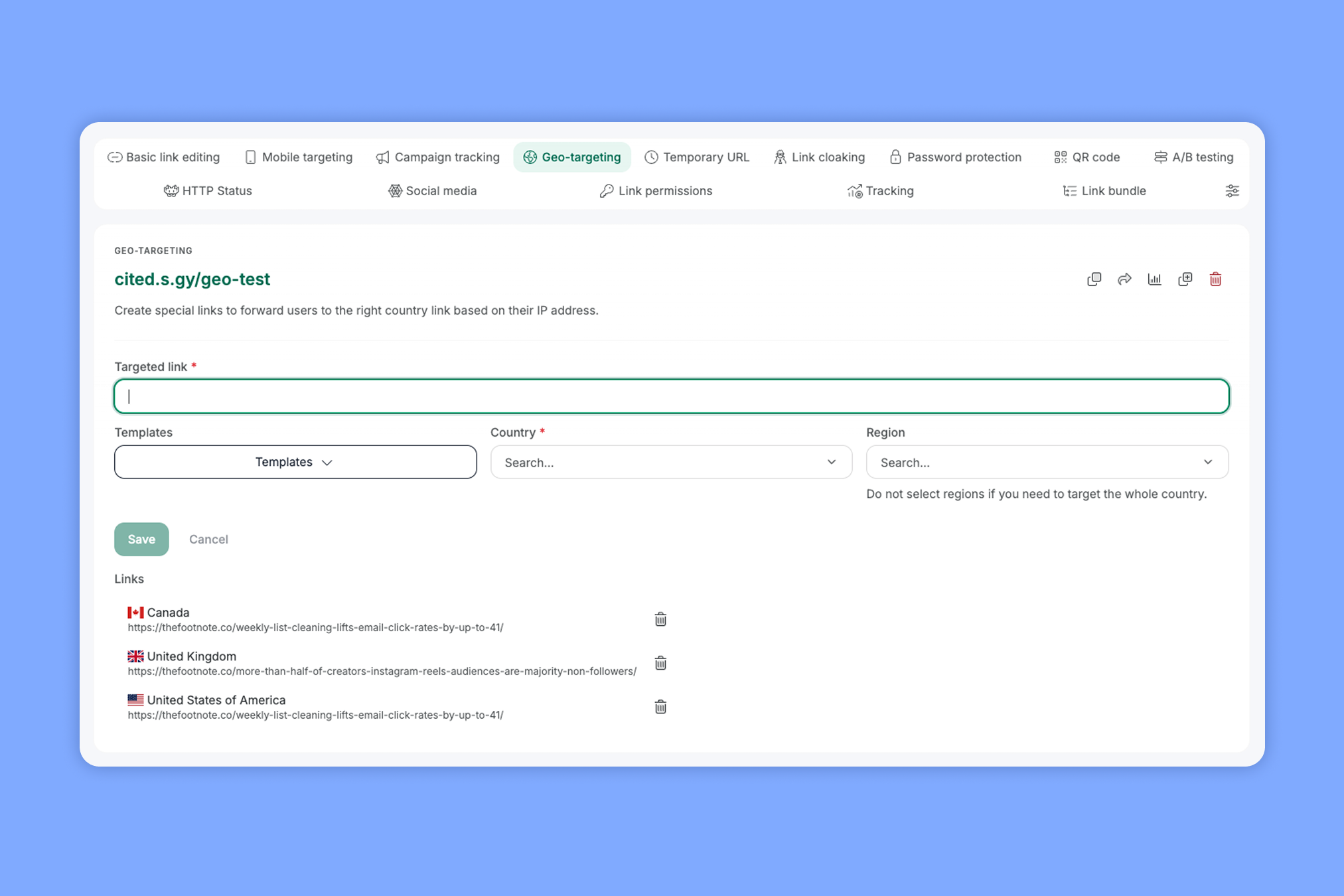
Short.io sits at the other end of the price range, giving one person a lot of links for very little money. That makes it a great fit for a side project or a small personal site, as long as you don't mind some rough edges.
The free plan alone covers a lot. You get 1,000 links total and up to 5 custom domains.
The analytics were a pleasant surprise. Short.io tracked referrers more accurately than most of the tools I tested and filtered out a lot of bot traffic, so your click counts aren’t tainted with fake clicks.
Using it day to day takes some patience, though. Short.io spreads its link settings across a lot of tabs, it's easy to lose work you haven't saved, and you need the Team plan to filter your stats by country or campaign.
That's also where the "one person" part comes in. Pro is a single user, so once a second person needs access, you're paying Team prices for a tool that still feels built for one.
Pricing: Free; Hobby $4/mo; Pro $15/mo; Team $40/mo; Enterprise $123/mo. Paid plans include a 7-day free trial.
Best free URL shortener for quick, one-off links: TinyURL
Pros
- No account needed for a quick short link
- Easy to set up a custom domain
- Plans scale by link volume, so you pay for what you create
Cons
- No analytics or link editing on the free plan
- One shared login and no team controls
- No routing, conversion tracking, or customizable QR codes
- A preview page with ads, even on paid plans
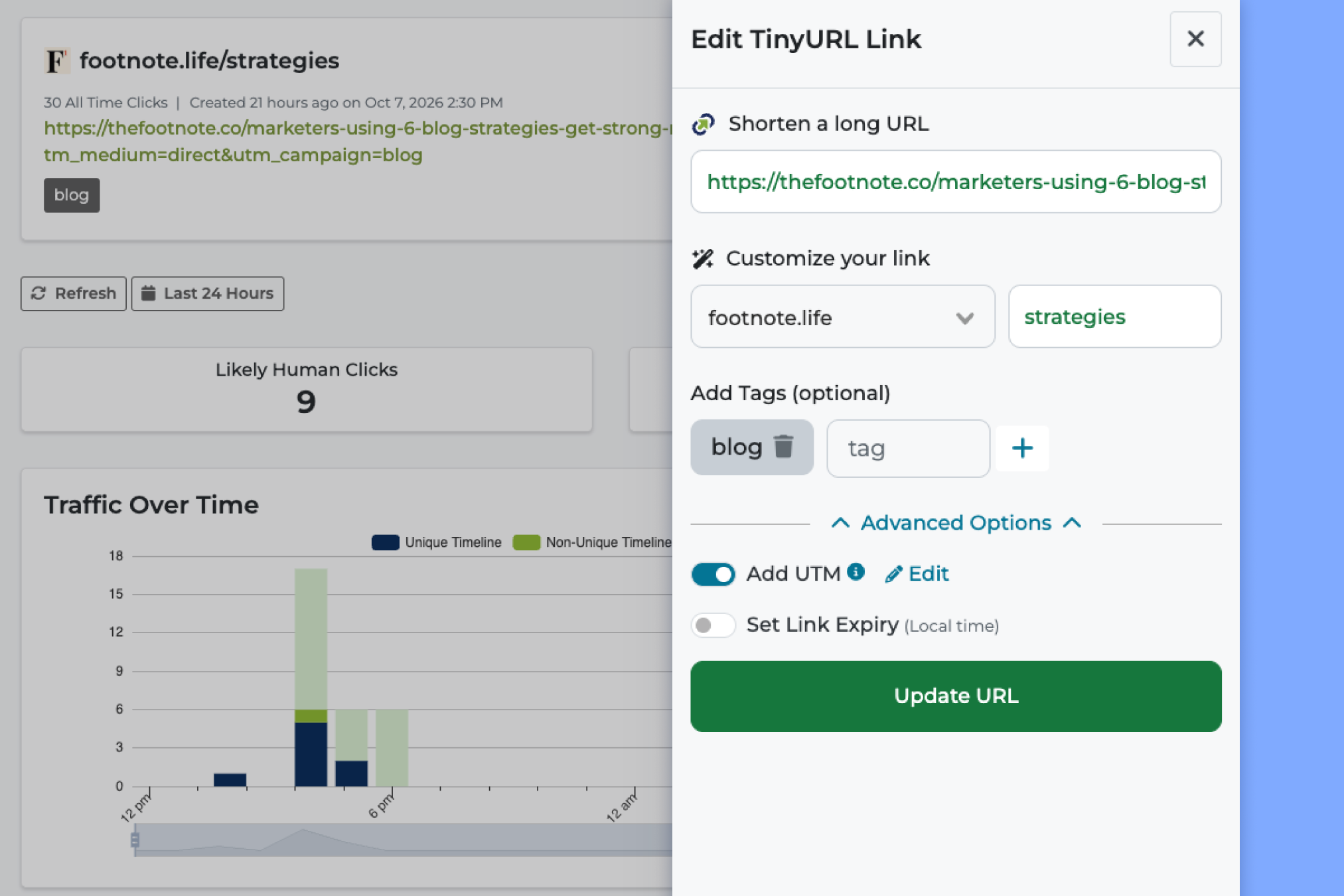
If you just need a link right now, TinyURL is the fastest way to shorten one without signing up for anything. It's been around since 2002 and still keeps things simple, which is exactly why most businesses outgrow it quickly.
For a one-off link, it's hard to beat. You paste a URL, get a short link back in about a second, and that's it.
The free version has real limits, though. You don't get analytics, and once you make a free link, you can't change where it goes or delete it.
The Pro plan is made more for a small business. You can buy a domain inside TinyURL and it handles the setup for you, which is a nice touch if you'd rather not deal with DNS records (just check the renewal price after the first year).
Beyond that, it's clearly built with personal use in mind:
- Teams: One shared login for everyone.
- Analytics: Clicks by region with bots separated out, but no city data or conversion tracking.
- Missing features: No routing, deep links, UTM presets, or folders.
- QR codes: You can't customize them, even on a paid plan.
TinyURL is about as bare-bones as it comes in terms of a URL shortener. Luckily, the pricing reflects that. That makes it great for a solo founder or people who just want to make a handful of links, but scratches it off the list for bigger companies or anyone who wants something beyond basic link shortening.
Pricing: Free; Pro plans start at $9/mo for 125 links and scale up to 4K; Bulk plans start at $69/mo; Enterprise starts at $3,999 a year. No free trial available.
What to look for in a URL shortener
Once you get past the shortening itself, there are some key features you should look for when you’re evaluating a URL shortener.
Your own branded domain
A branded domain is a short domain you own (like yourbrand.co) that replaces the shortener's generic one in every link, and it's what most people mean when they look for a custom URL shortener. Every tool here supports one, so the real questions are what it costs, how hard it is to set up, and how many you get.
Using your own domain matters more than which tool you pick. In three randomized trials published in JMIR, a bit.ly link did no better than a plain long link at earning people's trust, while a link on a domain people recognized did.
Most URL shorteners give you the option to use a generic shared domain as well. For instance, bit.ly or s.gy (Short.io’s option). But shared domains also come with baggage, since scammers lean on them too (more on that below, in the section on free URL shorteners).
So when you compare tools, check:
- How many custom domains each plan includes
- Whether you can buy a domain in the app or need to bring your own
- What your domain's homepage and 404 page show (some tools promote themselves there by default)
Analytics you can trust and act on
Once your links are on your own domain, the next question is whether you can trust the numbers they report. In my testing, several tools misread where clicks came from, especially clicks from social platforms like Threads.
Unfortunately, this data accuracy is one of those things you can’t gauge without trying the tools yourself. In my experience, Rebrandly and Short.io gave me data I felt most confident about, and Dub and Bitly were less reliable.
In addition to accuracy, there’s also a difference in the actual metrics each tool reports on. Rebrandly gives you the most click data, by far, and breaks down clicks by:
- Country
- City
- State
- Region
- Device
- Browser
- Platform
- Language
- Time of day
- Clicks over time
- Bot vs human traffic
- Unique vs non-unique clicks
At a bare minimum, you should look for a tool that shows clicks by country, device, and browser type. Data granularity is particularly important if you have customers around the world (or even within your own country). Knowing where most clicks come from and when helps you target and time your campaigns better.
Some tools also offer conversion tracking, which is extremely valuable because you can see whether those clicks turn into results. Are people signing up for your newsletter, buying products, or taking any other action you want them to take?
Consistent UTMs across your team
Conversion data is only as clean as the links feeding it, and that's where UTM parameters come in. They're the tags you add to a link so tools like Google Analytics know which campaign, source, and channel a click came from, and they only work if everyone writes them the same way.
When they don't, one campaign turns into a dozen rows in your report. Chloe Christine, a GA4 and GTM specialist, summed it up on LinkedIn after auditing client accounts:
"The campaign report has 47 entries that should be 12."
Chloe Christine, GA4 & GTM Specialist
Look for a shortener with a built-in UTM builder and saved defaults.
Team workspaces and permissions
Consistent naming gets harder with every person you add, and so does keeping track of who can create, edit, and delete links. Without that control, one wrong edit can redirect a live campaign without anyone noticing.
If you have multiple people creating and managing links, they should all have a separate login. And they might need different permissions. So look for a tool that has that option.
Now, some tools will include a set number of users in each plan, and give you the ability to add additional users for a monthly fee. Others will require you to upgrade to a higher-priced plan to have any control over how many people you can add.
When you’re pricing out your options, take into account how many seats are included and what the user management options look like.
Security and compliance
Permissions are one part of keeping links safe, and compliance is the other. So if you work in a regulated industry, check which security standards a tool meets and which plan they're on. SSO, SOC 2, HIPAA, and GDPR are often reserved for enterprise contracts (if you're in healthcare, our guide to HIPAA compliant link shorteners goes deeper).
Dynamic QR codes you can edit after publishing
The best URL shorteners usually offer QR codes as well. Every tool on this list includes them, but what you can do with them varies a lot (TinyURL's QR codes can't be customized, for example).
When you compare tools, check:
- How many QR codes each plan includes each month
- Whether your codes keep working if a trial ends or you downgrade
- Whether you can add your logo and brand colors
- Whether the QR codes are static or dynamic
Integrations, API, and bulk link creation
If your team builds dozens of campaign links at once, or your app, CRM, or SMS platform creates them automatically, look at how each tool handles bulk link creation and its API before anything else.
There are a few things worth checking:
- Can you import and edit links in bulk from a CSV (what some tools call a bulk URL shortener)
- Is there a documented URL shortener API, and what rate limits come with each plan
- Which apps it connects to directly, like HubSpot, Salesforce, Zapier, or Slack
- Does it send click data to your other tools through webhooks
Every tool in this roundup has an API in some form, but bulk tools and limits vary a lot from plan to plan.
SMS and email deliverability
However your links get made, your domain choice comes back around once you send them through text or email, since it affects whether your message arrives at all.
The CTIA's messaging guidelines say senders should use a shortener with a domain dedicated to them, and Twilio warns that shared public shorteners carry a "higher risk of filtering."
Email works the same way. Florent Destors, a deliverability manager at Marigold, put it simply:
"Spam filters judge you by the company you keep."
Florent Destors, Deliverability Manager, Marigold
A branded domain fixes most of this, which is why we always recommend using one, particularly for SMS campaigns.
Which URL shortener should you choose?
The best URL shortener depends on what you need from your links. The list of options is way longer than I could include here, so I narrowed it down to the best options for most people.
Some of you may simply want a way to shorten links and you’re less concerned about analytics and tracking. Others might have Demand Gen, Social, Content, and Customer Success teams all creating links, so you need something with governance and control options.
This list covers all your bases, so you don’t need to spend months testing different tools. Pick the one that matches your needs and start shortening your links!
FAQ
Are URL shorteners safe?
URL shorteners themselves are safe, but because a short link hides its destination, scammers use the shared domains of popular shorteners to disguise phishing links. Links on a company's own branded domain are easier to trust, since you can see who sent them.
Do short links expire?
Most short links don't expire on their own, but they can stop working if a branded domain lapses, you downgrade to a plan without that domain, or the tool shuts down (like goo.gl). Some tools also let you set an expiration date.
Can you change where a short link goes after you share it?
On most paid plans, yes, which is one of the main reasons people use URL shorteners. Free link shorteners are more limited, and most tools cap how many edits you get each month.
Can I make my own URL shortener?
You can, but it's more work than it looks. When the agency Caktus Group replaced Bitly with its own shortener, it ran into its hosting provider's redirect limit, and a self-built tool won't come with analytics, QR codes, or team controls unless you build those too.
What happened to all the free URL shorteners?
Free URL shorteners haven't disappeared, but most of their free plans have gotten a lot smaller. Bitly's free plan now covers 5 links a month, TinyURL's free links come without analytics, and several tools add a preview page or ads before your link redirects.
There are a couple of likely reasons. Free accounts are an easy target for scammers (a 2026 study of SMS scam reports found phishing links on the shared domains of nearly every major shortener), and short links have turned into a business analytics tool more than a social media convenience.
What happened to Google's URL shortener?
Google stopped making new goo.gl links in 2018 and shut down most of the old ones in 2025. That history is a good reminder to keep your short links on a domain and a tool you control.
According to Google's August 2025 update, goo.gl links that were still getting traffic kept working, and Google turned off the rest. Firebase Dynamic Links, another Google link service, didn't get that reprieve, and every link now returns a 404.





