
For this TinyURL review, I paid for a month of the Pro plan, ran it through the gamut, and here’s what I found.
If all you need is a short link, the low price tag is very appealing. But once I started testing the things marketers need most from a link management tool, I started to understand why businesses opt for more advanced tools instead.
If you haven't used it before, TinyURL is a link shortener that turns long URLs into short, shareable links. It was launched in January 2002 by web developer Kevin Gilbertson and there’s a good chance you’ve seen their links at some point.
Since it’s been around for so long, I was surprised by how bare-bones it still is, and it doesn't feel like it's changed much over the years.
Key takeaways from my TinyURL review
My verdict: TinyURL is a fast, cheap way to shorten and brand links, but most businesses will outgrow it quickly.
What I liked
- Making and editing links is quick, and you can delete or archive any link you create.
- Setting up a branded domain took minutes, since TinyURL handled the DNS and SSL for me.
- Clicks got tracked almost instantly, no matter which country they came from.
- Pro includes bulk link creation from a CSV and a raw export of every click.
What I didn't like
- There's no dynamic routing, deep linking or multi-user access on the Pro plan.
- Analytics stop at the click, with no conversion tracking, and some of the analytics seemed less than accurate.
- Free links to shopping sites can be automatically turned into affiliate links that earn TinyURL a commission.
- QR codes don’t have any customization, even on the Pro plan.
How I tested TinyURL
Before I get into what I found, I should mention that I work in marketing for Rebrandly, a link intelligence platform and TinyURL competitor. People sometimes compare the two when they're shopping for a link shortener, so I wanted to see firsthand how well TinyURL actually works for a business.
That background also shaped how I tested it. Between what Rebrandly offers and what prospects tell us they need, I have a good sense of what a link tool should include.
To see how it holds up for a business, I started on the free plan, upgraded to Pro (billed monthly) and put it through the following:
- Creating, editing, renaming and deleting links
- Buying and setting up a branded domain inside TinyURL
- Bulk-importing links from a CSV
- Clicking test links over a VPN from Australia, France and Argentina
- Clicking links from LinkedIn, Threads and X to check referrer tracking
- Testing QR codes, the preview page and data exports
What I liked about TinyURL
I'll start with the good stuff, because there's a fair amount of it. TinyURL nails the basics, and Pro adds a few things I wish more link shorteners did as well.
Creating a short link takes about a second
The core of TinyURL is about as simple as it gets. You paste a long URL, click a button and get a short link back in about a second, and you don't even need an account to do it.
If you want more control over how the link looks, you can set your own alias, which is what TinyURL calls the back-half of a short link (the part after the slash). Aliases need at least 5 characters (letters, numbers and dashes), and they aren't case-sensitive, so "Spring-Sale" and "spring-sale" count as the same one.
Skip the alias, and TinyURL gives you a random string of letters and numbers instead. But there's no option to auto-generate a readable one, so you're either typing your own or taking what TinyURL hands you.
Along the way, I noticed a couple of small touches I liked:
- Shortening a URL you've already shortened returns your existing link instead of creating a duplicate.
- TinyURL won't let you shorten links from other link shorteners (including its own), so nobody can build a chain of redirects that hides where a link really goes.
You can edit, archive or delete any link
After you create a link, you can change its destination whenever you want. In my testing, the redirect updated right away.
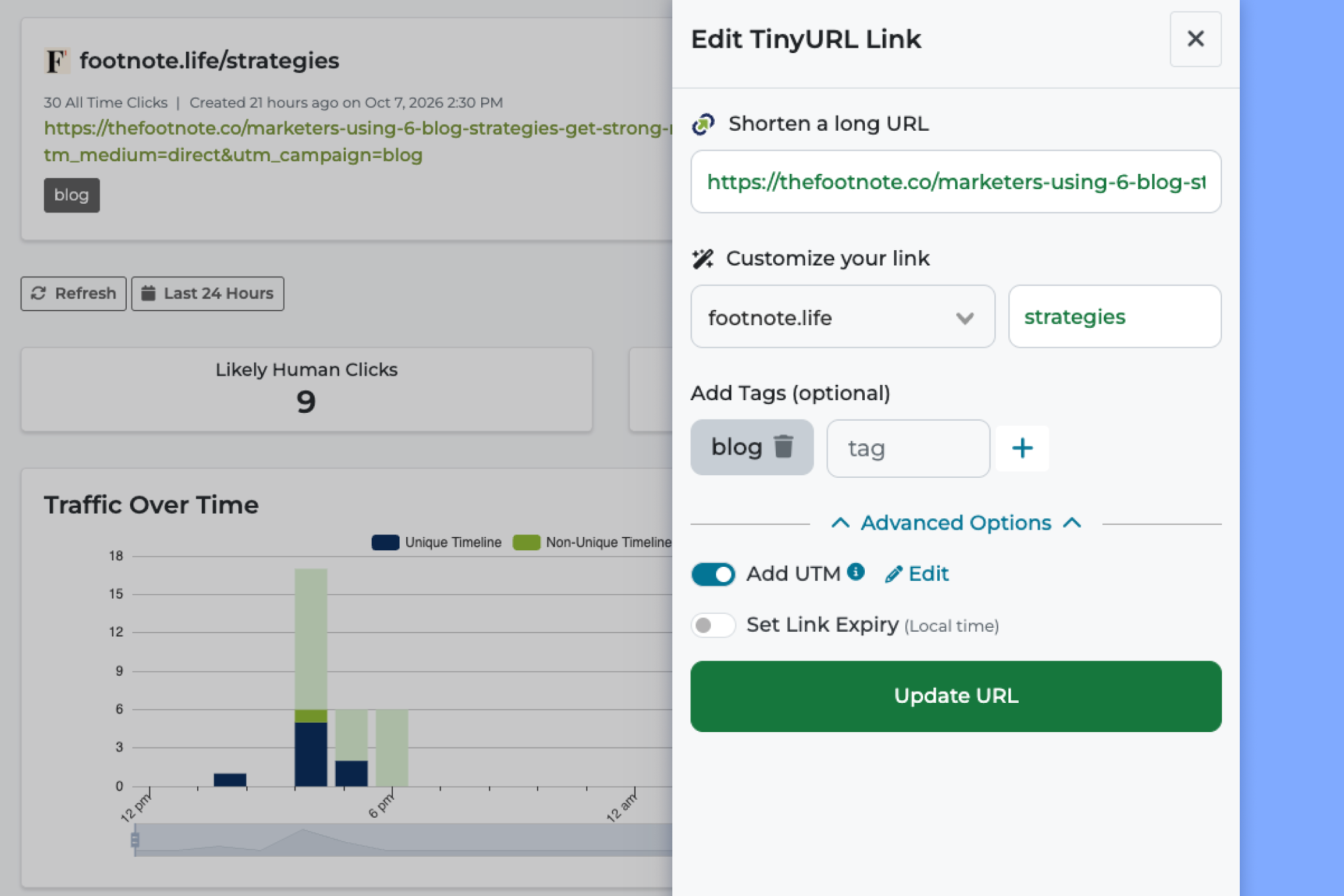
You can also delete or archive any link you create. That might sound basic, but when I tested Bitly, I couldn't delete links I'd edited, so it stood out.
On top of that, there's a setting to turn off stats collection for individual links. I haven't seen that in many tools, and it's handy if there's a specific link you don't want click data on.
Branded domains take minutes to set up
If you use a link shortener, I always recommend using your own domain instead of the generic one they give you. That's where a branded domain (also called a custom domain) comes in, since it replaces "tinyurl.com" in your links with a short domain you own.
TinyURL makes this part easy. I bought my domain inside TinyURL for $0 for the first year, and since it set up the DNS and SSL for me, the domain started working the same day.
So if you don't feel comfortable editing DNS records or don’t have a developer to help, that's a real plus.
Clicks get tracked almost instantly
Once my domain was live, I started clicking my test links, and every click showed up on my dashboard as soon as I refreshed it. That means you don’t need to wait hours to find out whether a link works.
Next, I wanted to check the location tracking, so I clicked links over a VPN from Australia, France and Argentina. Every click showed up under the right country, and you can click into a country to see clicks by region (down to the state in the US).
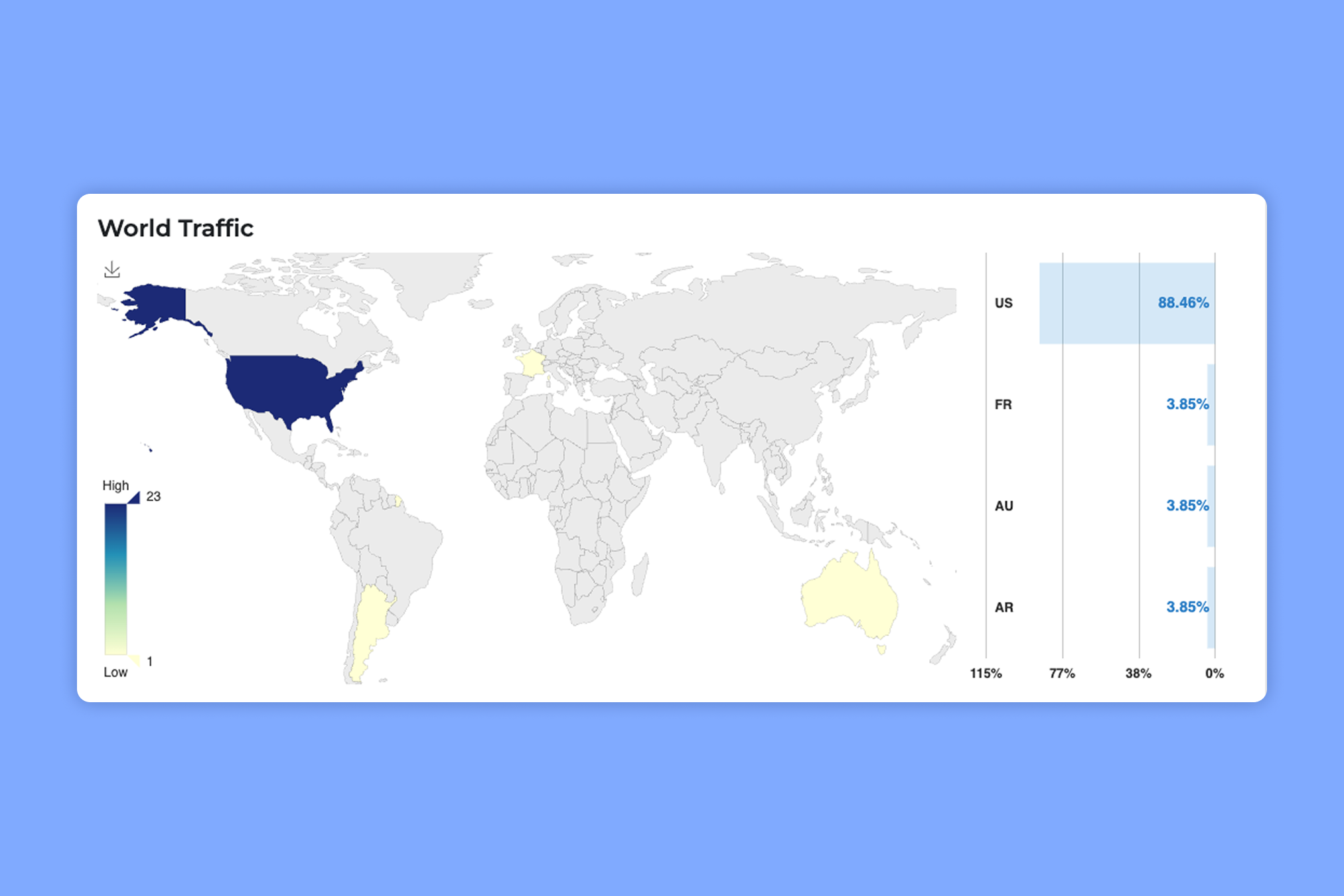
The dashboard also separates "likely human" clicks from bot clicks, and the Pro plan lets you keep two years of click history.
But my favorite find was hiding under the "..." menu on the dashboard. It's a raw click log that exports every click as a CSV with the timestamp, link, referrer, country, browser, OS, device and language.
Just keep in mind that the raw log also includes each visitor's IP address. If your team is careful about GDPR, think about how you'll store it.
Bulk import pulls domains, aliases and tags from one CSV
The raw log isn't the only CSV feature on Pro. You can also create links in bulk by uploading a CSV with columns for the URL, domain, alias and tags.
I tried it with 20 links, and TinyURL used the branded domain from my file instead of the tinyurl.com default, applied every alias and tag, and sent a notification when the upload finished. That last part is small, but it means you don’t need to constantly refresh the dashboard wondering if all the links got added.
So if you're moving links over from another tool or launching a campaign with dozens of links, it beats creating them one at a time.
What I didn't like about TinyURL
That's the good side. Where TinyURL fell short for me was the stuff you need once you're doing more than shortening a link, and a handful of smaller annoyances added up on top of that.
Analytics only cover the basics
I'll start with analytics, since that's where I spent most of my time. On paper, TinyURL's dashboard tracks a lot: unique visitors, clicks over time, location, popular days and times, referrers, languages, browsers, operating systems and devices.
In practice, though, I kept running into limits. For one, location stops at the region level, so there's no city data.
Referrers have a similar problem. Email, SMS and direct traffic all get grouped into one category called "Direct, Email, SMS," which makes it hard to tell which of those channels clicks came from.
To see how TinyURL handles social traffic, I also clicked one link each from LinkedIn, Threads and X:
- LinkedIn: counted correctly
- X: counted correctly, labeled as t.co (X's own link shortener)
- Threads: one click registered as 3, with 2 from Facebook and 1 from Threads
To be fair, Bitly double-counted my Threads click too, so this might come down to how Meta passes referrer data.
Either way, it inflates your numbers, so it's worth questioning any Threads or Facebook spikes you see.
The charts didn't help much either. The Top Browsers and Top OS charts each show a percentage at the top and bigger numbers inside the bars, with no label explaining them.
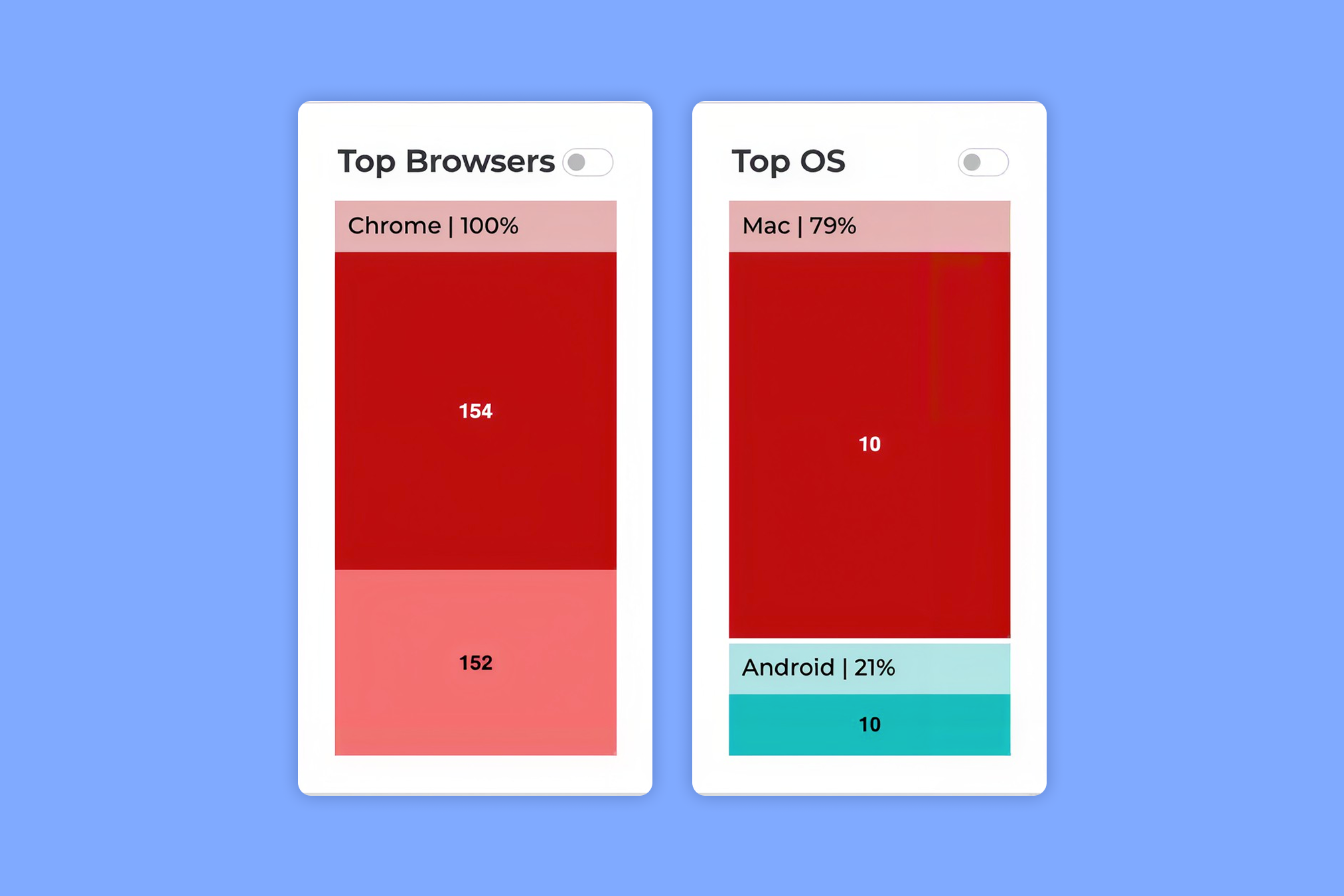
I ended up exporting the raw click log just to figure out what those numbers meant. It turns out they're browser and OS version numbers (Chrome 154 vs. Chrome 152, for example).
None of this is a dealbreaker if you just want to know how many people clicked. But if you plan campaigns around where people are, Rebrandly breaks clicks down to the city level as well.
Everything I could track in TinyURL stopped there. For some people that might not be an issue, but most businesses want to go beyond just surface level clicks. For instance, Rebrandly's Conversion Tracking connects your branded links to the signups and purchases they drive, so you can see which campaigns bring in revenue.
No dynamic routing or deep linking
Beyond analytics, TinyURL is also missing two features I'd expect from a link shortener built for marketers, dynamic routing and deep linking.
In case you haven't used it, dynamic routing sends people who click the same short link to different destinations based on rules you set, like their location, device, language or the time they click. Without it, every TinyURL link sends everyone to the same destination URL, no matter who's clicking.
That gets limiting faster than you might expect. Here are a few examples:
- Device: You want one "download our app" link that sends iPhone users to the App Store and Android users to Google Play.
- Location: You print one QR code on packaging that ships to 3 countries, and each country has its own store or language.
- Language: You run a campaign in the US and Canada and want French speakers to land on the French version of your page.
- Time: A promo ends Friday, and you want the same link to send people to a "sale's over, here's what's new" page after that instead of an expired offer.
Deep linking solves a different problem, which is getting people from one app into another. A deep link opens a link directly inside a mobile app (like YouTube, Instagram or your own app) instead of a mobile browser.
Say someone taps a YouTube link inside an email app. A regular link usually opens a mobile browser where they're not logged in, so they're less likely to like, comment or subscribe, while a deep link opens the YouTube app, where they already are.
The same goes for your own app. Without deep links, a link to a product in your app drops mobile users on your website, even if they have the app installed.
Rebrandly supports both. You can set up every routing example above from a single link (here's how dynamic linking works), and deep links cover the app scenarios too.
UTM tracking has no guardrails
Routing isn't the only place where TinyURL leaves marketers on their own. UTM tracking is another, and it's one of the most common problems teams bring to us at Rebrandly.
It usually comes down to consistency. Everyone tags campaigns a little differently ("LinkedIn" vs. "linkedin" vs. "li"), and someone ends up keeping a spreadsheet of approved UTM parameters that nobody follows.
That's what UTM governance is for. It's the set of naming rules and shared templates a team uses so everyone tags campaign links the same way, which keeps your analytics clean.
TinyURL doesn't give you much to work with here. There's a basic UTM builder when you create a link, but no saved presets, shared defaults, or any way to limit what people type.
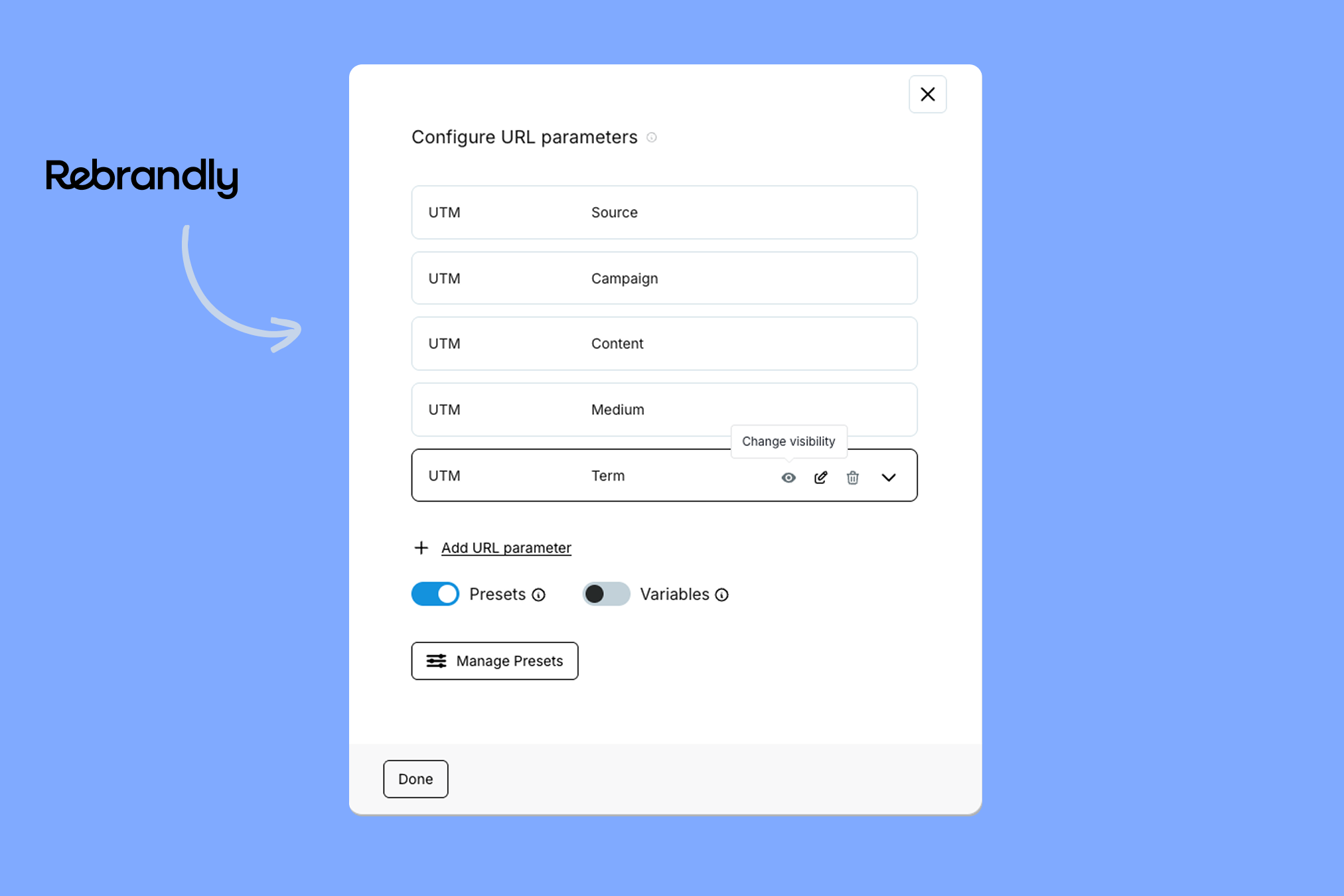
Rebrandly, on the other hand, handles UTMs at the workspace level. You can save UTM Presets that fill in your parameters from a dropdown, and you can lock a parameter to a list of approved values, set defaults, or hide parameters you don't want people changing.
It's not built for teams
UTM rules really matter when more than one person is creating links, which brings me to TinyURL's biggest limitation for businesses. The Pro and Bulk plans don't include multiple users or permissions.
Each account has one login. So if your team uses TinyURL, everyone shares the same email and password, and that causes a few problems pretty quickly:
- There's no way to tell who created, edited or deleted a link.
- You can't give someone view-only access to analytics, so anyone who can see the dashboard can also change or delete links.
- When someone leaves the team, you have to change the password and share the new one with everyone else.
I did spot a "Use in organizations" toggle in my domain settings, but TinyURL doesn't say anywhere what it actually does.
Rebrandly takes a different approach. Each person can have their own login, and workspace permissions control what each user can see and do.
That's how Generation, which has a global hub and in-country teams across 17 countries, manages 18 separate Rebrandly workspaces and more than 10,000 links. Each country can run its own campaigns while following the same organization-wide practices.
The free plan comes with strings attached
Most of what I've covered so far is about Pro, but the free plan deserves a mention too. It gives you 30 links a month, with no analytics and no way to edit or delete a link once it's created. Limitations like that are pretty common for free URL shorteners though.
The bigger catch is affiliate tagging. TinyURL has partnered with Sovrn Commerce to automatically turn free and guest links to shopping sites into affiliate links, which can earn TinyURL a commission.
TinyURL says those links still reach the right page. But if the person clicking has an ad blocker, they can end up on the store's homepage, an ad or a 404 page instead.
You can turn affiliate tagging off in your account, but you'd have to know the setting exists. So if you share product or partner links on the free plan, it’s something to keep in mind.
Smaller things that bugged me
Each of these is minor on its own, but I ran into all of them within a month.
The first was organization. Every link lives in one long list with no folders or campaigns, and you can only search by alias or tag, so finding a link is hard unless you remember what you named it.
You can't sort by clicks either, and there's no "top links" view for a date range. To see your most-clicked links from last month, you'd have to export the raw click log and work it out in a spreadsheet.
That's fine for a few dozen links. But once you're past 100 or so, it'll get messy fast.
QR codes were another letdown. Every link gets a QR code you can download as an SVG or PNG, and Pro removes the TinyURL logo from the middle. But you can't change colors, add your own logo or style it at all.
Then there's the branded domain setup. Out of the box, my branded domain's homepage showed a TinyURL sign-up page, and broken links went to a 404 page with the same branding.
I pointed both at my own website in the domain's settings, but it’s not something TinyURL directs you to. And even once your domain is set up, the link creator always defaults to tinyurl.com, and I couldn't find a setting to change that.
That means you have to switch to your domain on every single link. If you forget, the link goes out with TinyURL's branding instead of yours.
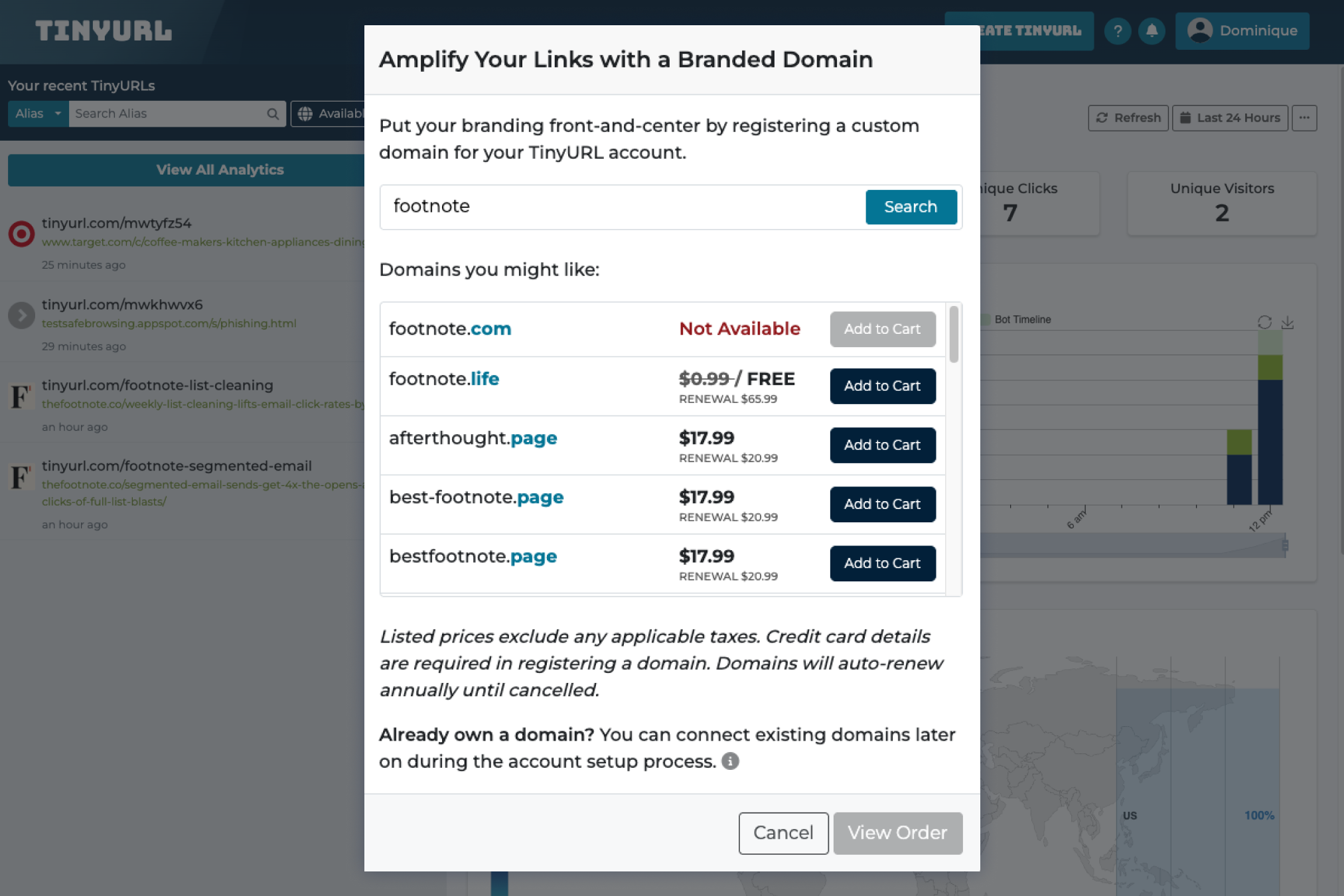
Last, watch out for "free" domains. Several domains in TinyURL's search show as "$0.99 / FREE," but those renew at $60.99 to $65.99 a year, and auto-renewal is turned on by default.
How much does TinyURL cost?
TinyURL has a free plan, and paid plans start at $9 a month billed annually. That low price is a big part of its appeal, so here's what each plan gets you, based on TinyURL's pricing page as of October 2026.
Keep in mind that Pro and Bulk are priced by how many links you need each month. The prices below are for 125 links a month on Pro and 50,000 on Bulk (the minimum for each plan), so you'll pay more if you need a higher limit.
Before you pick a plan, there are a couple of costs that are easy to miss:
- Monthly billing costs more. The pricing page shows annual rates by default, so the first price you see isn't what you'll pay month to month.
- Overages add up. Pro charges $1.50 for every 10 links over your 125, and Bulk charges $2 per 1,000 extra links plus $0.60 per 1,000 extra tracked clicks.
Should you buy TinyURL?
After a month of testing for this TinyURL review, I'd recommend it for shortening and branding links on a budget, but I'd expect most businesses to outgrow it. To me, it's a link shortener with a basic dashboard added on, which is a long way from a full link management tool (and even further from link intelligence).
Whether that's enough really depends on what you need your links to do.
TinyURL is a good fit if:
- You're a solo marketer or small business that shortens links every now and then
- You want a branded domain without touching DNS settings
- Keeping costs low matters more to you than routing, team access or deeper analytics
Look elsewhere if:
- More than one person needs to create or manage your links
- You run campaigns across different countries, devices or apps
- You need to connect clicks to signups or revenue
- You work in a regulated industry like healthcare or finance (our guide to HIPAA compliant link shorteners is a good place to start)
If you're in that second group, Rebrandly covers the gaps I ran into throughout this review. Whichever way you go, think about what you'll need to know after someone clicks before you pay for any link tool.
When you're ready, you can get started with Rebrandly for free, or see how other TinyURL alternatives compare.
Frequently asked questions about TinyURL
Is TinyURL safe?
TinyURL links themselves are safe to create and use, but scammers use them too, because a short link hides where it goes. In my testing, TinyURL didn't block a known phishing test page.
Deliverability is another concern if you send links by text. Some SMS providers list public shorteners like TinyURL as commonly blocked by carriers, so a branded domain is the safer bet there.
What's the TinyURL preview page?
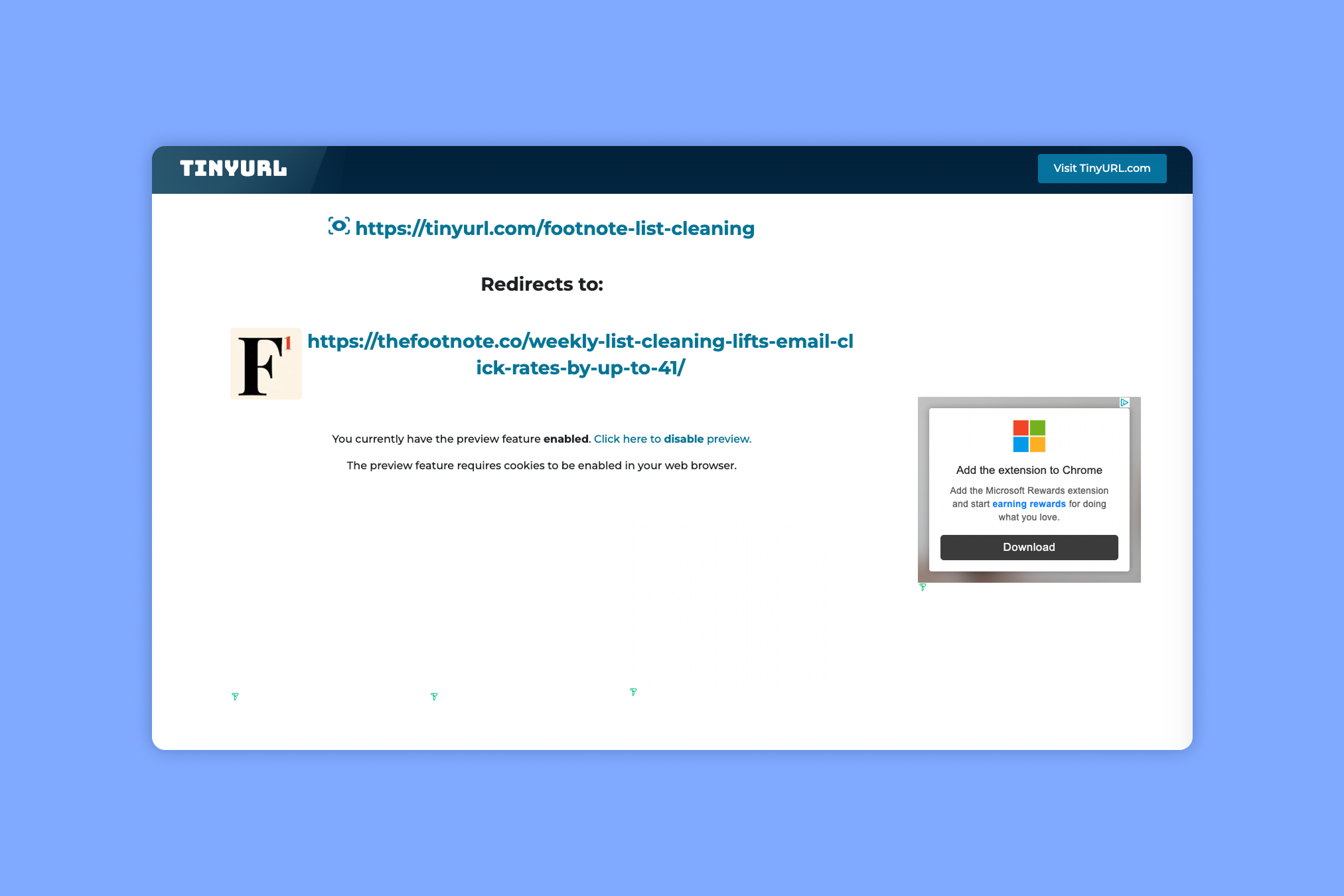
The TinyURL preview page shows where a link goes before you visit it. You get to it by adding "preview." to the front of a TinyURL link (for example, preview.tinyurl.com/your-alias).
That's handy if you're wary of a link someone sent you. For brands, though, the downside is that the page shows third-party ads next to your link that you can't control, even on Pro (my link showed up next to a Microsoft Rewards "Download" ad).
Its reach is limited, too. Most people don't know the preview page exists, and it only works on tinyurl.com links, not branded domains.
Do TinyURL links expire?
TinyURL's help center says its links never expire. The exception is the Bulk plan, where links expire after 90 days by default unless you change that setting.
Does TinyURL have an API?
Yes, TinyURL has an API for creating short links from your own apps and scripts. I didn't test it for this review, but we covered it in our TinyURL API review.
Does TinyURL have a Chrome extension or mobile app?
I couldn't find an official TinyURL browser extension or mobile app. The "TinyURL" extensions in the Chrome and Firefox add-on stores are made by an independent developer, not the company itself.