
For this Short.io review, I started on the free plan, upgraded to Pro and tested just about everything I could click on. To be honest, the tool kept surprising me in both directions.
It's inexpensive and does at least one thing I haven't seen any other link shortener do, but it never stopped feeling like something built by technical founders, for technical founders.
The closest comparison I can come up with is a kit car. It gives you the parts, and it's a lot of fun if you like working with a wrench, but most people would rather drive something off the lot.
So if you want an indie-hacker tool, Short.io might be exactly what you're looking for. But if you’re a marketing team or larger company that wants a link tool that’s more fully built out, you'll probably notice the rough edges pretty quickly.
Key takeaways from my Short.io review
My verdict: Short.io is an inexpensive link shortener with some bugs to work out, and it's built for technical founders more than marketing teams or enterprise companies (look at Rebrandly for those use cases).
What I liked
- Bulk link creation works like a spreadsheet inside the app, and my CSV import came in accurate.
- Referrer tracking was the most accurate of any tool I've reviewed so far, and bot clicks get filtered out.
- Phone verification and automatic account blocking make it hard for scammers to abuse.
What I didn't like
- I ran into a lot of quirks and bugs, including losing unsaved work.
- Design options are minimal, and some customization requires CSS.
- Analytics cover the basics, and most stats filters need a Team or Enterprise plan.
- The free .s.gy domain is unbranded and shared, so you'll need to buy your own.
How I tested Short.io
I started on the free plan and then upgraded to a paid subscription (Pro) for a month. Most of my time went to the things a marketer touches every week, like creating and editing links, bulk uploads, routing rules and analytics.
That meant making links one at a time, importing a CSV of 20+ links and building more in Short.io's in-app spreadsheet. I also clicked test links over a VPN from a handful of countries, shared them across different channels to check referrer tracking, and tried the extras, like Post, link bundles, QR codes and password-protected links.
One thing I should mention is that my first account got suspended partway through. I was testing how Short.io handles a known phishing test page, and it worked a little too well (more on that below), so I finished testing on a second account.
Post is the feature I haven't seen anywhere else
Post lets you publish a hosted content page at a short link, with a title, description, cover image and body, instead of sending people to another website. It's the one feature I haven’t seen from any other link shortener, and it's included on every plan, including free.
To try it, I built a sample page called "5 email marketing stats worth knowing." It had a heading, a highlighted tip, a table of links, a checklist and a small flowchart.
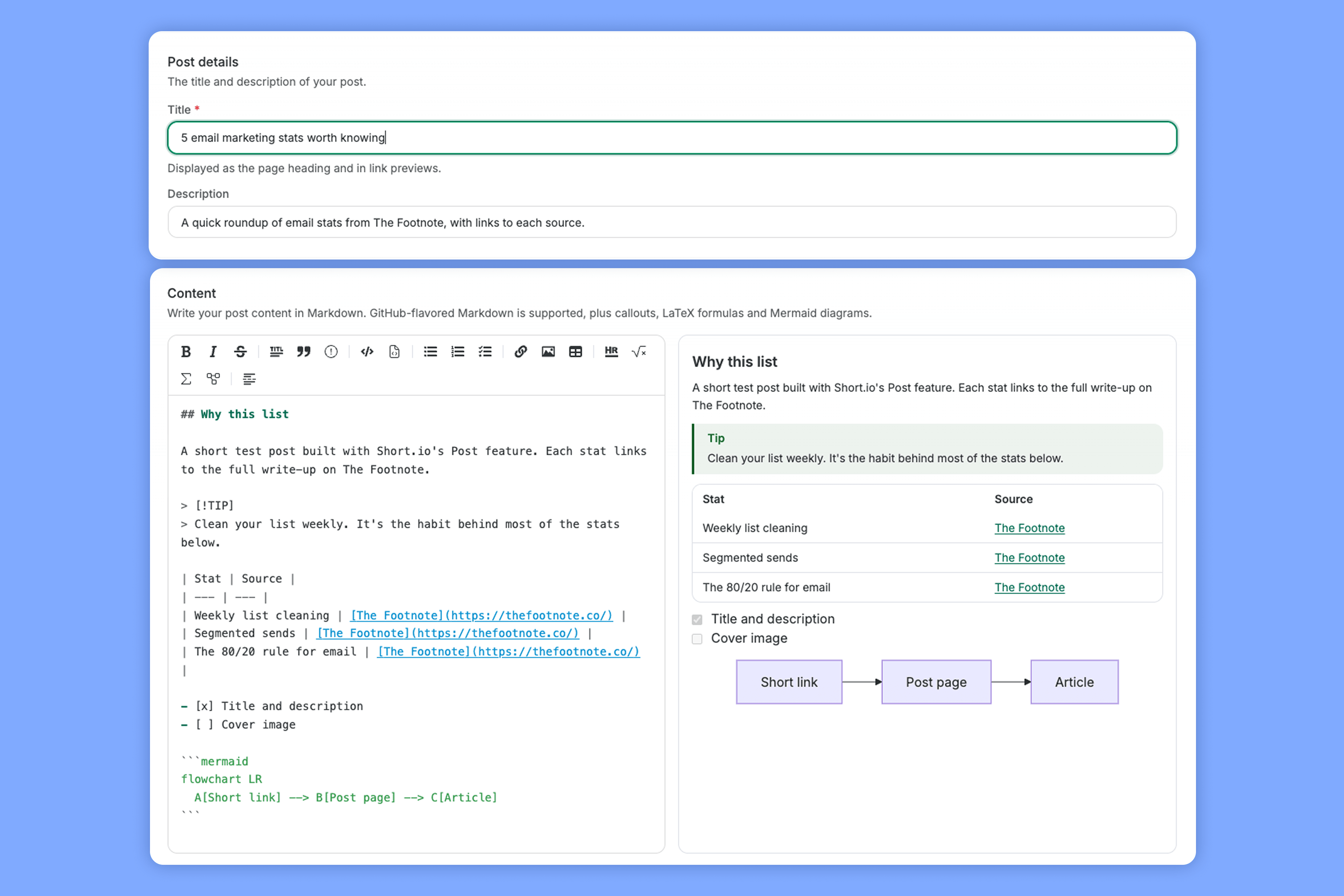
You write the body in Markdown (a simple formatting syntax), but there's a toolbar for headings, tables, images and the rest, so you don't need to know it. You get a live preview so you can see what your markdown will actually look like on the page.
The page itself is very minimal. It works on mobile, doesn't show any Short.io branding and fills in the title and description that appear when you share the link on social media.
Because of the bare-bones design, these pages feel less like like landing pages marketers would use, and more for text documentation. For instance, some of the use-cases Short.io notes are developers sending API notes, architecture notes or postmortems that don’t need a repo (another sign of the tool’s target audience.)
Every view of the post counts as a click in the link's stats, too. But there are two catches. Clicks on links inside the post aren't tracked unless you use short links there, and there aren't any design options, so every post looks the same.
Bulk tools are where Short.io feels most at home
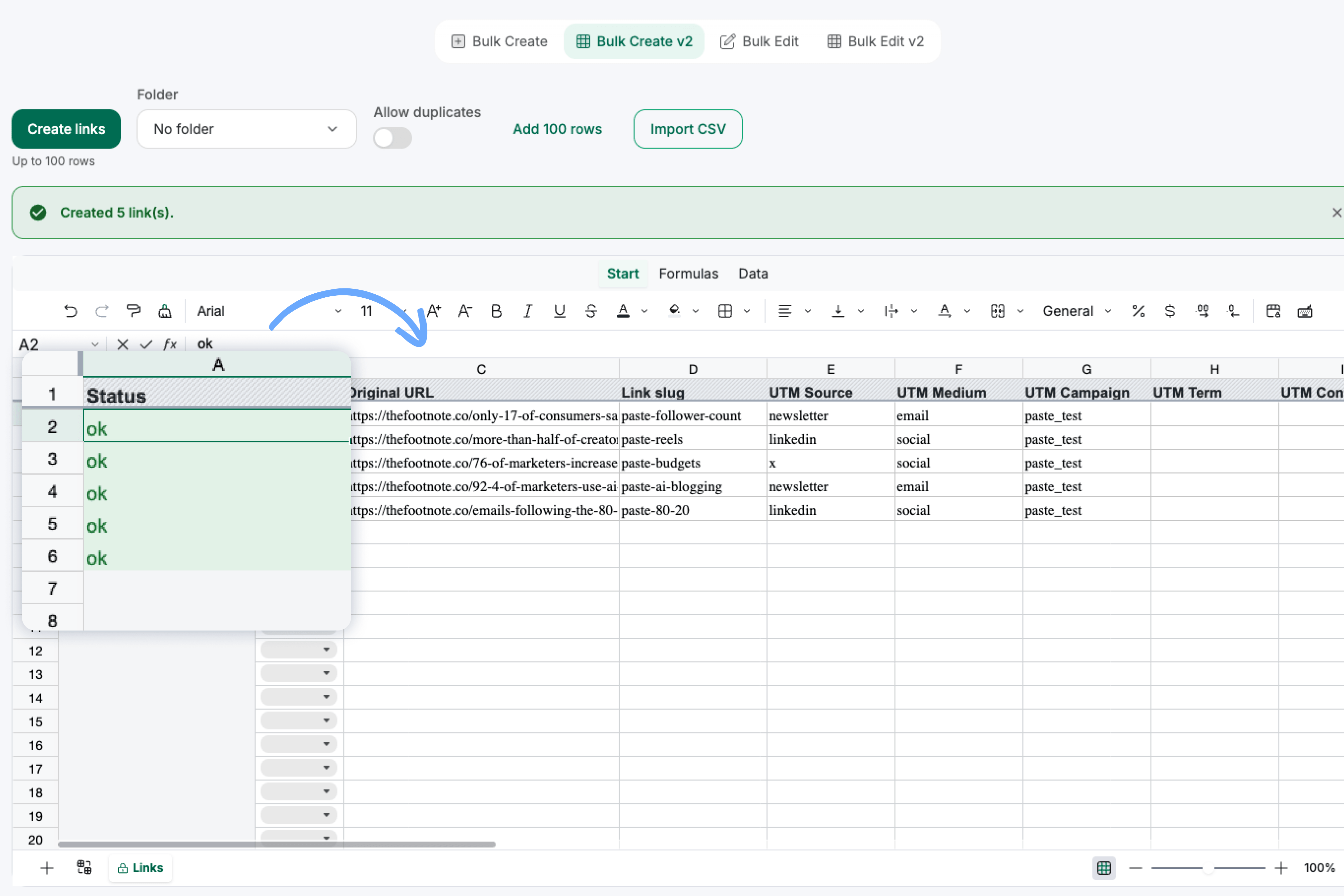
If you create links by the dozen, Short.io's bulk tools have a unique twist, even if they show their technical roots. The highlight is Bulk Create, which is basically a spreadsheet built into the dashboard.
It has 17 columns covering the destination URL, back half (the part of the link after the slash), each UTM parameter, expiration, click limits, tags, iPhone and Android links and more. You can also copy rows straight from Excel or Google Sheets and paste them in, which worked perfectly when I tried it.
There’s a status for each row once you hit create, so it's clear which links worked.
There's a matching Bulk Edit view that loads your existing links into the same spreadsheet. It splits each link's UTMs into their own columns, which makes it easy to spot a campaign tagged three different ways.
The CSV import was accurate as well. Twenty-one of my 22 links came in with the right back halves, titles, tags and UTMs, and Short.io skipped the 22nd (a back half I'd already used) while leaving the original link alone.
But the import also asks the most of you. Even though most of my column headers matched Short.io's field names, I still had to map every column by hand from a dropdown.
Once I confirmed, the page just reset, with no message saying the upload had started. However, Short.io emails you when it's done, with a results file that flags any rows that failed. It would’ve been nice to have an in-app notification of some kind though.
Routing and safety features go further than the price suggests
Once your links are live, Short.io gives you plenty of control over where they go, plus some serious abuse protection. Geo-targeting, a type of dynamic routing that sends people to different pages based on their country, starts on the Hobby plan.
I set up one link that sent US and Canadian visitors to one page and UK visitors to another, then clicked it from each country (using a VPN for Canada and the UK). Every click landed on the right page, and a click from Argentina, which didn’t have a rule, went to the default page, just like it should.

Device targeting is even more generous, since it's available on the free plan. I set separate destinations for iPhone and Android, and each phone went where it should.
Pro adds a few more controls that worked exactly as described:
- Click limits: I capped a link at 2 clicks, and the third click went to a backup page.
- Password protection: visitors had to enter a password before they were redirected.
- Link cloaking: the short link stays in the address bar while the destination page loads.
That brings me back to my suspended account. To see how Short.io handles abuse, I shortened a harmless page Google built for testing phishing filters.
Short.io created the link without a warning, but when I clicked it I saw a "This site has been suspended" page, and seconds later, I was locked out of my account. It automatically blocked my whole account.
That wasn't a big deal for me, since I was only testing it out. But if I relied on Short.io to manage all my links, getting suspended with no immediate way to reach anyone would be extremely frustrating (it's been days, and I still haven't heard back).
On top of that, you have to verify a phone number before you can use the free domain. Both are good signs that Short.io takes scams seriously, since free short domains attract a lot of them.
Just keep in mind that one flagged link could lock everyone out of the account.
Making it look like your brand takes some tinkering
Safety is clearly a priority for Short.io, but design gets a lot less attention, and the options you do get are pretty basic. The password-protected page I mentioned earlier is a good example.
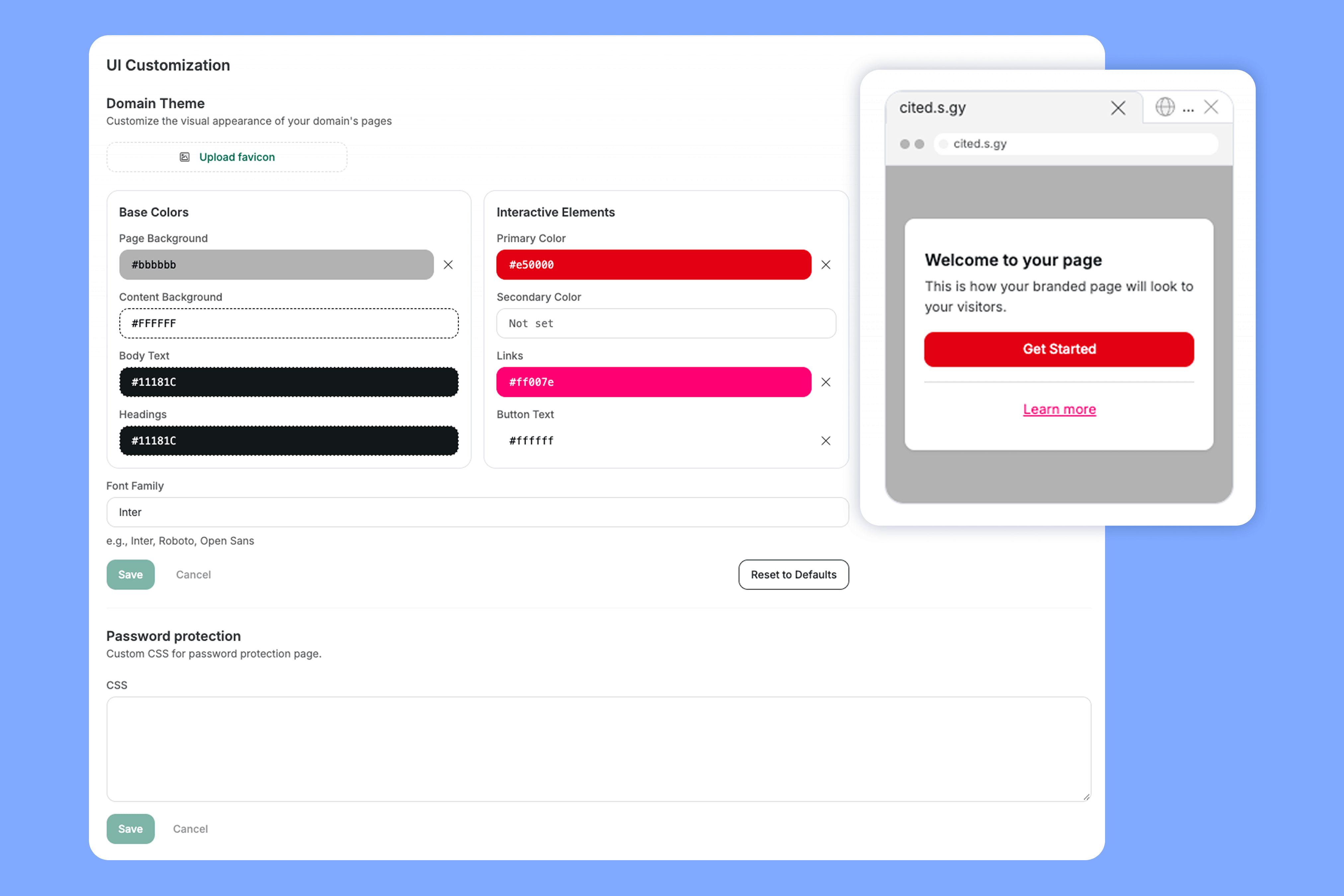
By default, it's a plain page that says "Please enter a password for this link." To change its look, you set up a Domain Theme, which lets you pick colors for the background, text, links and buttons, plus a font and a favicon.
Link bundles, Short.io's version of a link in bio (a single page that lists several of your links), have a similar problem.
You can't customize the design of each bundle. It’s all pulled from what you set in the Domain Theme setting. So two campaigns on the same domain end up looking identical.
If a link in bio matters to your team, Rebrandly's Link Gallery lets you add your own background images, brand colors, logo and button styles without touching any code. It also shows real-time click data for each link on the page.
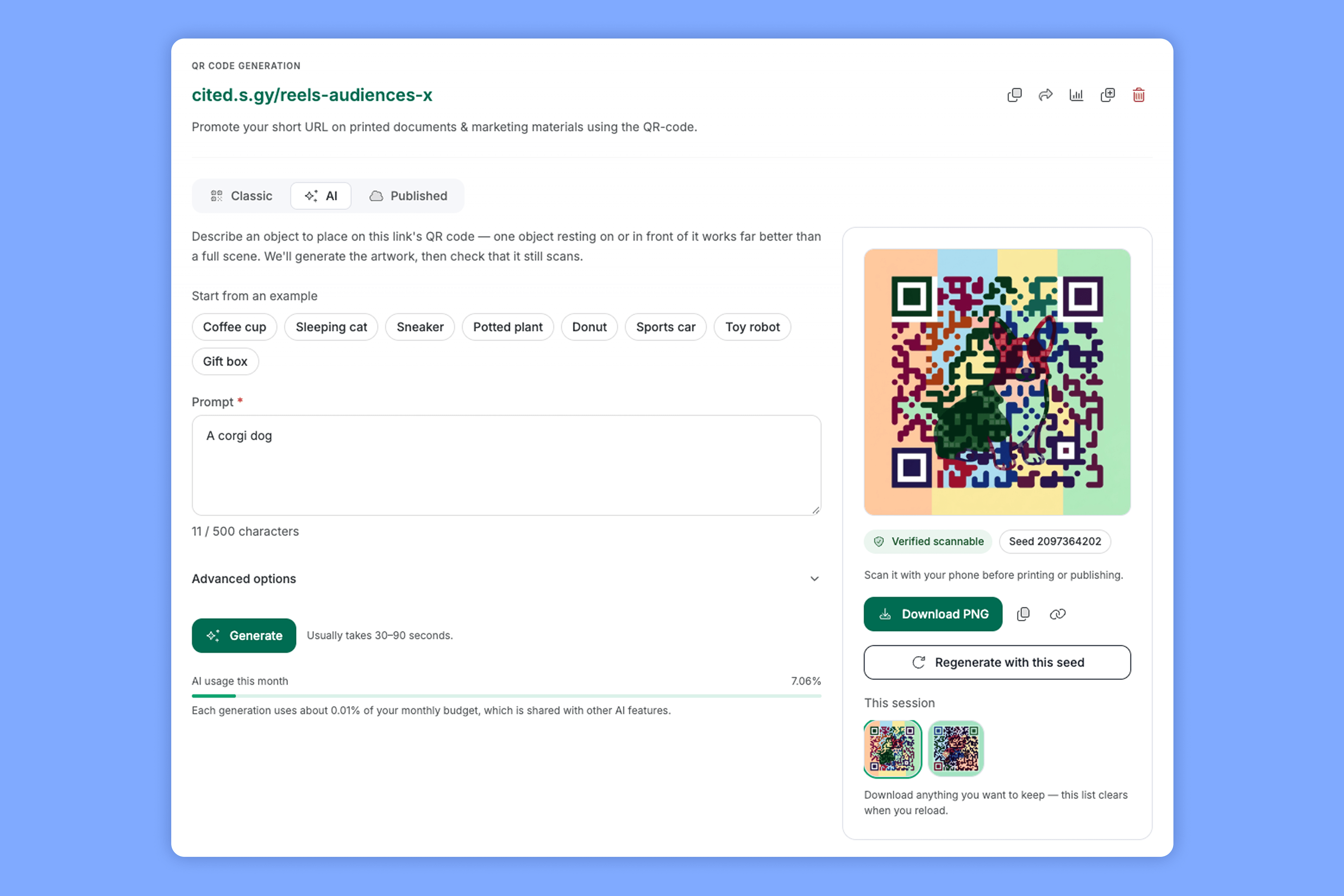
QR codes are a slight exception, since that's where design gets more attention. Classic QR codes come with all the settings you’d expect like themes, colors, logos and labels. But there's also an AI option that draws an image of your choice into the code and then checks that it still scans.
I tested a few things out—everything from Super Mario to a plant, and a corgi (random, I know). It took about 30 seconds or less each. It's clever, but I'm not sure how practical artwork QR codes will be for most teams.
There are a few other technical touches, too. You can jump around the app with single-key keyboard shortcuts, search your links with search syntax and choose which type of redirect each link uses, which some people will love and others will find intimidating.
The analytics are accurate, but not advanced enough
Short.io gets the core numbers right and is open about which clicks it filters out as bots, but there isn't much you can do with the data once you have it. I'll start with the good part.
To test referrer tracking, I shared one link on LinkedIn, Threads and X and clicked it once from each. Short.io labeled all three correctly, making it the first tool I've tested to get that Threads click right.
Dub only labeled LinkedIn cleanly, and in my TinyURL review and Bitly review, both tools credited the Threads click to Facebook as well.
Short.io also recorded 36 total clicks on that link but only counted 6 as human. The other 30 were link preview bots that visit a link as soon as you post it, and the click stream labels each one by name (Twitterbot, FacebookBot and so on), so it's easy to check what got filtered out.
Country data was spot on, too. City data was a different story, though, since my phone clicks showed up in three different cities (a common issue with mobile networks).
The limits show up once you try to dig deeper. On the free and Pro plans, you can only filter your stats by date range, time zone and human vs. bot clicks.
Every other filter, including country, referrer and UTM source, is limited to the Team and Enterprise plans. So you can see that LinkedIn sent you clicks and that the US sent you clicks, but not how many US clicks came from LinkedIn.
That's fine if you only need top-line numbers, but most marketing teams want to slice their data further than that.
Short.io says it offers conversion tracking on every plan, but I didn't test it. If that's what you're after, Rebrandly's Conversion Tracking connects your branded links to the signups and purchases they drive, so you can see which campaigns bring in revenue without exporting data into a spreadsheet.
The rough edges add up
Analytics gaps are easy enough to plan around, but the quirks were harder to ignore, and they're what make Short.io feel most like an indie hacker project. Each one is small on its own, but they get annoying:
- My unsaved work disappeared three times: UTMs I typed disappeared when I switched tabs without saving, a custom back half disappeared when I clicked just outside a pop-up, and a keyboard shortcut fired while I was typing and threw out a half-finished rule.
- Links get created instantly, with no ability to cancel: When you paste a URL or click "Link bundle" or "Post," Short.io creates a new link immediately, so you don’t have a chance to test or change your mind. You n so every misclick left me something to delete by hand.
- Settings are spread across 15 tabs: Anything beyond the back half and tags means leaving the pop-up for a full editor, and each tab has its own save button (Dub fits everything on one screen).
- The links list stopped showing click counts: The main links list stopped showing click counts, even for links with clicks, until I filtered the list.
- The stats page for an expired link wouldn't load: It's the link whose click limit I'd tested, so you could lose a campaign's stats right when it ends.
- Sign-up turned away real business emails: Two domains I own were rejected as "disposable," while a made-up address got through.
To be fair, some of these may already be fixed by the time you read this. But together, they made me double-check my work more often than I'd like.
Use your own domain, not the free one
Short.io gives you two free options for a domain but they’re both subdomains on its own .s.gy domain.
That's a problem for a few reasons. A link like yourname.s.gy is unbranded, hard to remember and anyone can use the same domain, so it doesn't build much trust when someone sees it in a text or email.
A branded domain is what makes a short link look like it came from you, so I recommend getting one before you launch anything. With Short.io, you can buy a domain inside the app or connect one you already own.
Short.io pricing: how much does each plan cost?
Domains aside, Short.io is fairly cheap at every tier, with a free plan and paid plans starting at $5 a month. Here's what each plan gets you, based on the pricing page as of October 2026.
Before you pick a plan, a few things are easy to miss:
- SSO is Enterprise-only. That's the only plan with single sign-on through tools like Okta or Google Workspace.
- Pro's 10,000-link limit applies to bulk, import and API links. Links you create by hand don't count toward it, which isn't obvious from the plan card.
- The free plan's 1,000 links are a lifetime total. Deleting a link does free up a spot.
- Domains cost extra. Custom domain connection is included, but registration fees aren't.
Who I'd recommend Short.io to
With plans starting at $5, price probably won't decide this one for you. It comes down to how much you enjoy tinkering, so it's the best fit for technical founders and small startup teams.
Short.io is a good fit if:
- You're a technical founder who likes keyboard shortcuts, spreadsheets and tweaking things yourself
- You create links in bulk and want strong tools for it on a budget
- You'd use Post for quick content pages
Look elsewhere if:
- You need deeper analytics with better filtering options
- You need a polished, predictable experience for a team of non-technical marketers
- You work in a regulated industry and need SSO, HIPAA and governance across many users
- You want more advanced link routing rules
- You’re an enterprise company that wants dedicated support and more native API integrations
After testing it for this review, I think Short.io is worth it if you enjoy tuning your tools as much as using them. But most teams would rather spend their time on managing campaigns and analyzing what’s working than setting things up.
So before you pick a link tool, think about which kind of team you are. If you'd rather have links that just work and data that goes past the click, Rebrandly is a link intelligence platform built for that, and you can get started for free.
And if you’re curious how the two stack up against each other, check out this article next. Rebrandly vs. Short: Link management platform comparison.
Frequently asked questions about Short.io
Can you move your links from Bitly to Short.io?
Yes, but it takes a couple of steps. You'll need to export your links from Bitly and bring them in with Short.io's CSV import, since there's no direct connection to Bitly.
Does Short.io have an API and integrations?
Yes, Short.io has an API for creating and managing links from your own apps. Its integrations page lists 13 integrations, including Zapier, Make, Segment, Google Analytics, Slack and browser extensions, though I didn't test them.
Is Short.io GDPR and SOC 2 compliant?
Short.io's Enterprise page lists SOC 2 Type II, ISO 27001, GDPR and CCPA, and says it signs HIPAA agreements on request. Its FAQ refers to ISO 27001:2013, which has since been replaced by a 2022 version, so ask which certification applies if compliance matters to your team.
Can you edit or delete Short.io links?
Yes, you can change a link's destination, back half and settings at any time, and you can delete links too. On the free plan, deleting a link also gives that spot back to your 1,000-link limit.
What are the best Short.io alternatives?
Rebrandly is the alternative I'd look at first, especially if your team cares about what happens after someone clicks. It's a link intelligence platform that covers the gaps I ran into with Short.io:
- Conversion Tracking, which connects your links to signups and purchases
- Workspace permissions, so each person only sees and edits what they should
- Routing by location, device, language and time from a single link
- SOC 2 Type 2 and HIPAA compliance for regulated industries