
After writing this Dub.co review, if a marketer friend asked me whether they should sign up, my answer would be pretty short. Unless you're running an affiliate or partner program, probably not.
That might sound strange, because I ended up liking a lot of it. Out of every link shortening tool I've tested, Dub's analytics dashboard impressed me the most. And next to TinyURL and Bitly, the whole app feels like it was built this decade.
Dub is a link attribution platform that pairs short links and analytics with tools for running affiliate and partner programs. Going in, that’s what I mostly knew Dub for, so I didn't have many expectations for its link features.
Now that I’ve used it myself, I think that reputation holds true, and the rest of this review explains why.
Dub.co review: the short version
- Best for: Companies running affiliate or partner programs, especially SaaS and tech startups.
- Not ideal for: Large or regulated companies and people who want more advanced routing and deep linking options.
- What impressed me: An analytics dashboard where clicking any link, country or referrer filters everything else, plus flexible tags, folders and workspaces.
- What held it back: Several features felt buggy or unfinished, and the link shortening features are fairly basic.
- Pricing: Free plan available, Pro at $30/month, Business at $90/month.
Dub is a partner platform first
Dub sells two connected products, Dub Partners for running affiliate and referral programs and Dub Links for creating and tracking short links.
The links are the foundation the partner side is built on. Even the pricing reflects it. Plans are measured in partners and payouts as well as links and clicks.
For this review, I tested Dub Links. I started on the free plan, upgraded to Pro and used it the way most marketing teams would: creating short links for articles, sharing them across different channels, setting up routing, importing links in bulk, and a few other tests.
Getting set up takes almost no time
Getting started with Dub Links is quick, and you notice the modern design right away. It feels aimed at SaaS and tech companies more than the average marketing team, which fits its developer roots.
It feels aimed at SaaS and tech companies more than the average marketing team, which fits its roots. Dub is open source, so developers can even host it themselves. Two other details stood out while I was getting set up:
- A free branded domain: Pro includes a free .link domain for the first year. Mine went from "Provisioning" to "Active" in about 10 minutes without me touching DNS.
- A useful free plan: You can edit links after they're live, connect up to 3 of your own domains, save UTM templates and style QR codes (with a Dub logo) without paying.
After the first year, that .link domain renews at $12 a year unless you turn off auto-renewal. It's a lot easier on the budget than the $60.99 renewals I saw when I tested TinyURL, but it's still worth setting a reminder on your calendar.
Creating links is everything you’d expect
Once your domain is set up, everything you need to create a link lives on one screen. You can set your destination URL, add tags, comments, choose a folder, and see a preview of the accompanying QR code and social media preview.
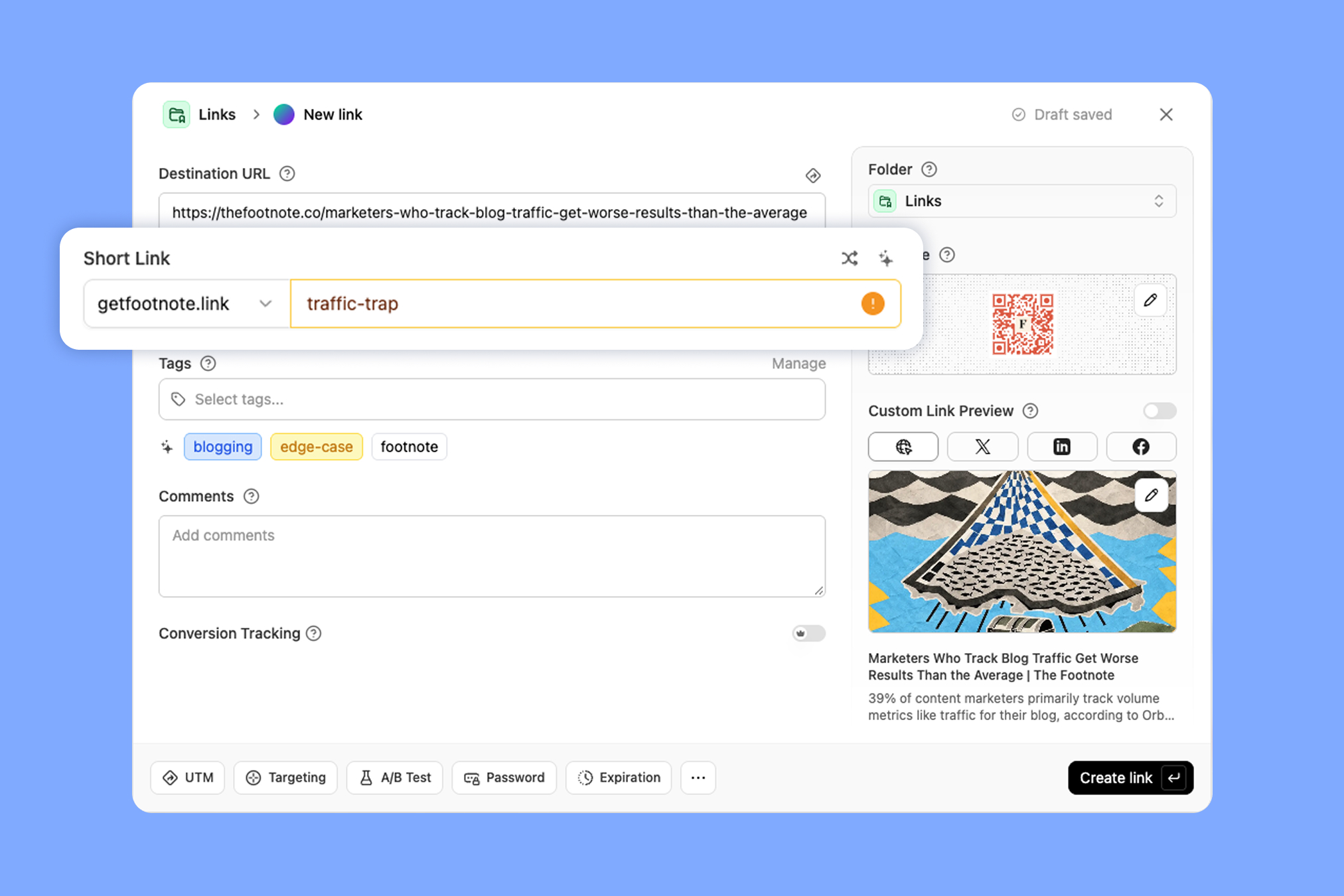
One feature I appreciated was was the back-half generator. After you add your destination URL, you can click a button and Dub will create a an optimized back-half for your short link. For instance, I used it for an article about segmented email sends and it gave me "segmented-email-wins" instead of a random 7-character string.
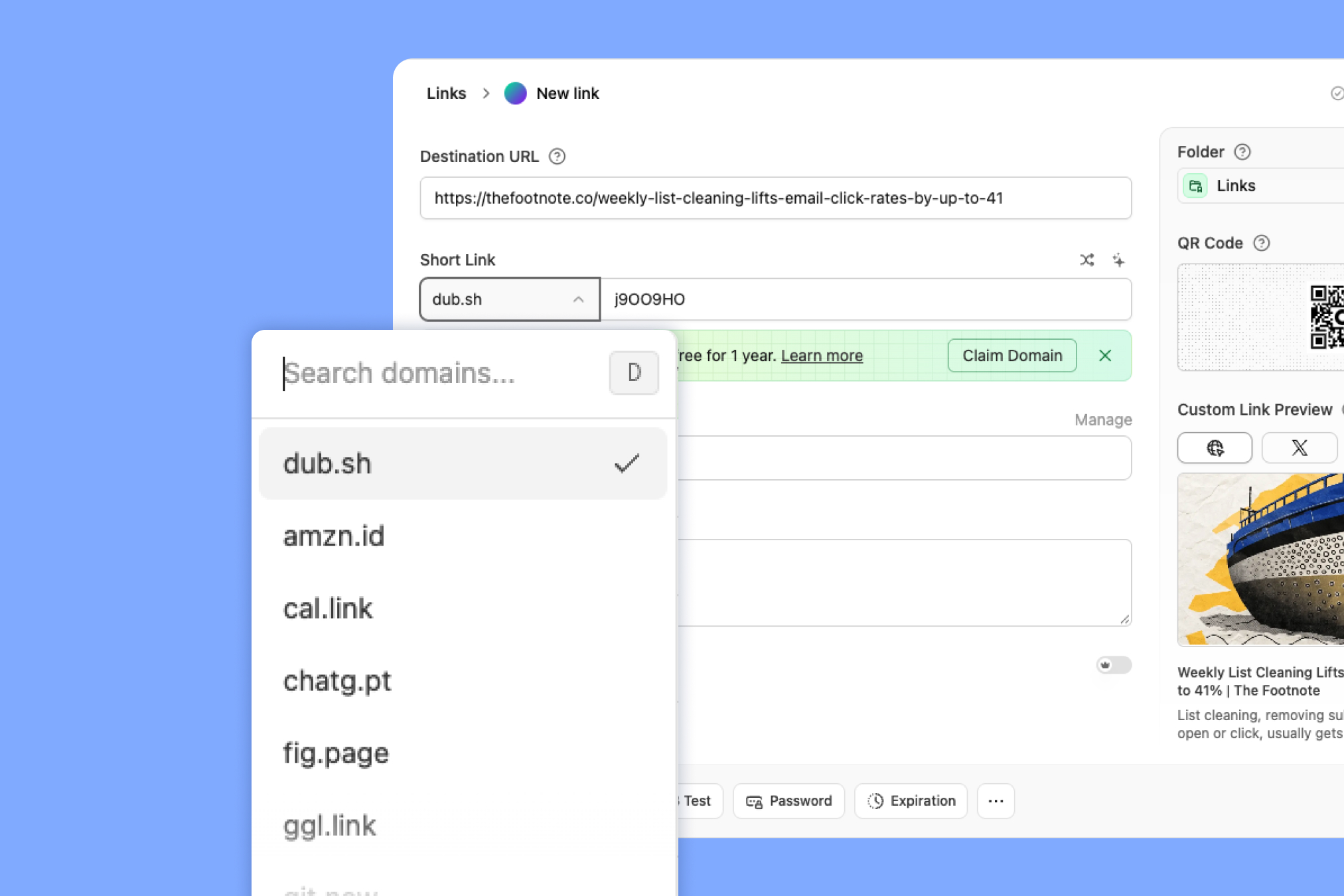
Something unique is Dub’s free plan gives you access to a pretty long list of domains, with some that are specific to different websites (e.g., git.new for Github links).
Upgrading to Pro gives you a handful of extra settings in the link editor. None of them are unusual for a paid link tool, and each one has its own strengths and catches.
Dynamic routing is the first one, and it sends people who click the same link to different destinations based on rules you set. Dub supports rules by country and device.
Both types worked in my tests. Clicking over a VPN from Canada and Australia sent me to a different article for each country (with the US getting the default), and an Android browser landed on the page I'd set for Android users.
Device rules take any URL, including regular web pages, which is handy. The catch is that country and device are the only rule types Dub offers. For comparison, Rebrandly offers dynamic routing based on:
- Country
- Region
- City
- Date
- Day of week
- Hour of day
- Device
- Language
- Platform
The rest of Dub.co’s paid controls are smaller:
- Password protection: Visitors get a clean password page, and a wrong password shows a clear error. I didn't run into any problems with it.
- Link expiration: You can type the time in plain English ("in 10 minutes" worked) and choose where the link goes afterward. There's no disable option if you just want to switch a link off, though, so you're stuck choosing between archiving it (it keeps working, just hidden from your list) or deleting it (and losing its history).
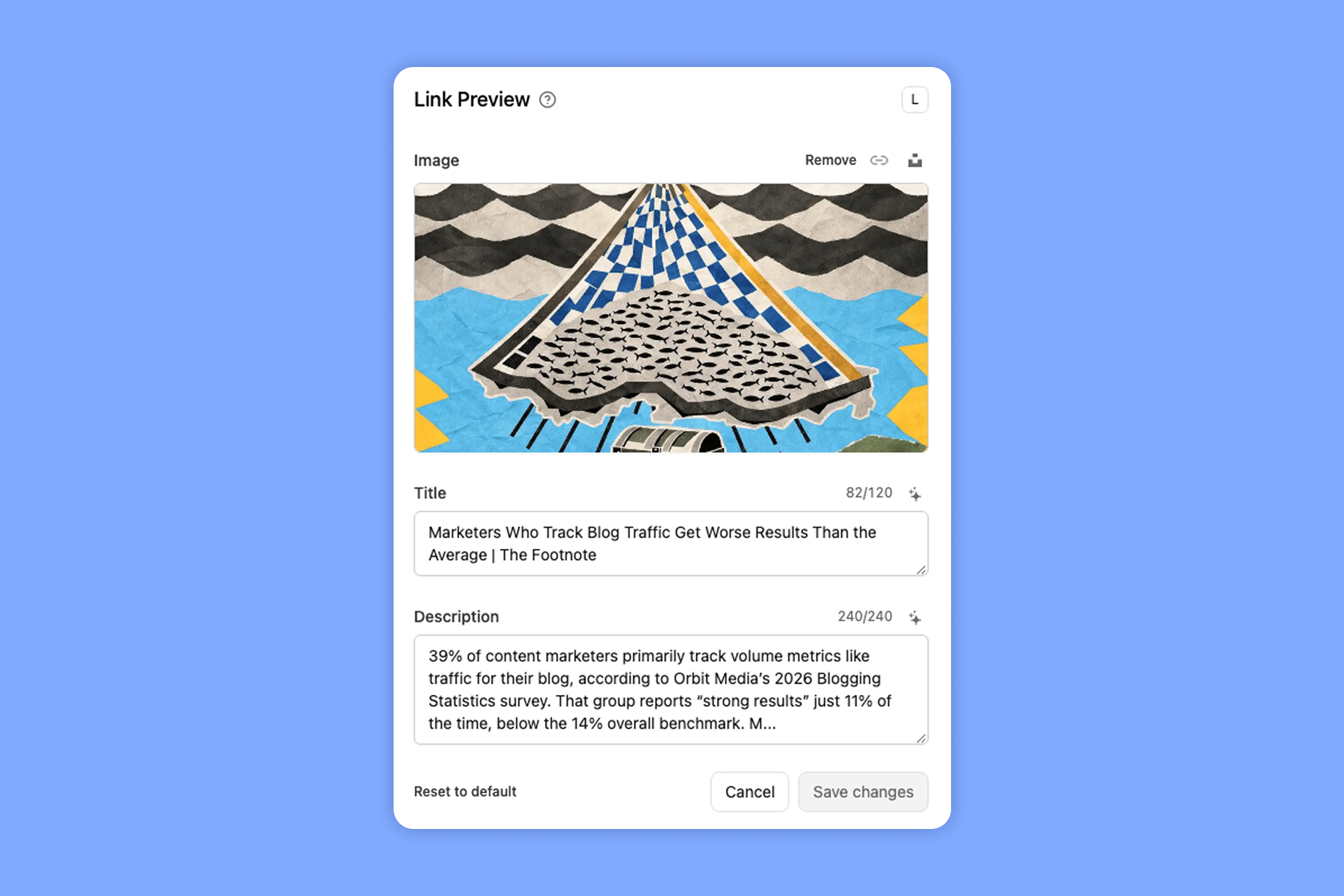
- Custom link previews: You can change the image, title and description people see when you share a link on social media, and there's a built-in Unsplash search for stock photos. The AI button for preview text is less reliable. In my test, it changed "6+ blog strategies" to "6 blog strategies" and turned "zero or one" into "none." Clicking "Reset to default" also blanked the whole preview until I reloaded the page, instead of bringing back the page's original image and text.
Pro also includes link cloaking, which keeps your short link in the browser's address bar after someone clicks instead of showing the destination URL. I tested it, and it works as advertised.
There are a few legitimate reasons to use it:
- Hiding a long string of UTM parameters or other tracking from the address bar
- Keeping your brand in the URL when you send people to a third-party site
- Hiding affiliate IDs, which is how a lot of affiliate marketers use it
The downside is that scammers use the same trick to make a link look legit while it points somewhere else entirely, like a page built to steal someone's information.
Hiding where a link goes also overlaps with what Google's spam policies call sneaky redirects, and some major affiliate programs ban it outright (Amazon's Associates policies prohibit cloaking or obscuring affiliate links).
So I don't recommend cloaking your links in most cases. If you're sending people to a legitimate site, you shouldn't have an issue with the destination URL showing up in their browser.
A couple of features you might expect here aren't on Pro, though. Conversion tracking and A/B testing both show up in the link editor, but they're only on the Business plan ($90/month).
The analytics are smooth, with a few blind spots
Once my links were out in the wild, I spent most of my time in analytics, and this is where Dub won me over. To be clear, it doesn't track anything other link shorteners don't, but the dashboard is organized in a way that makes it easier to see and find what you want.
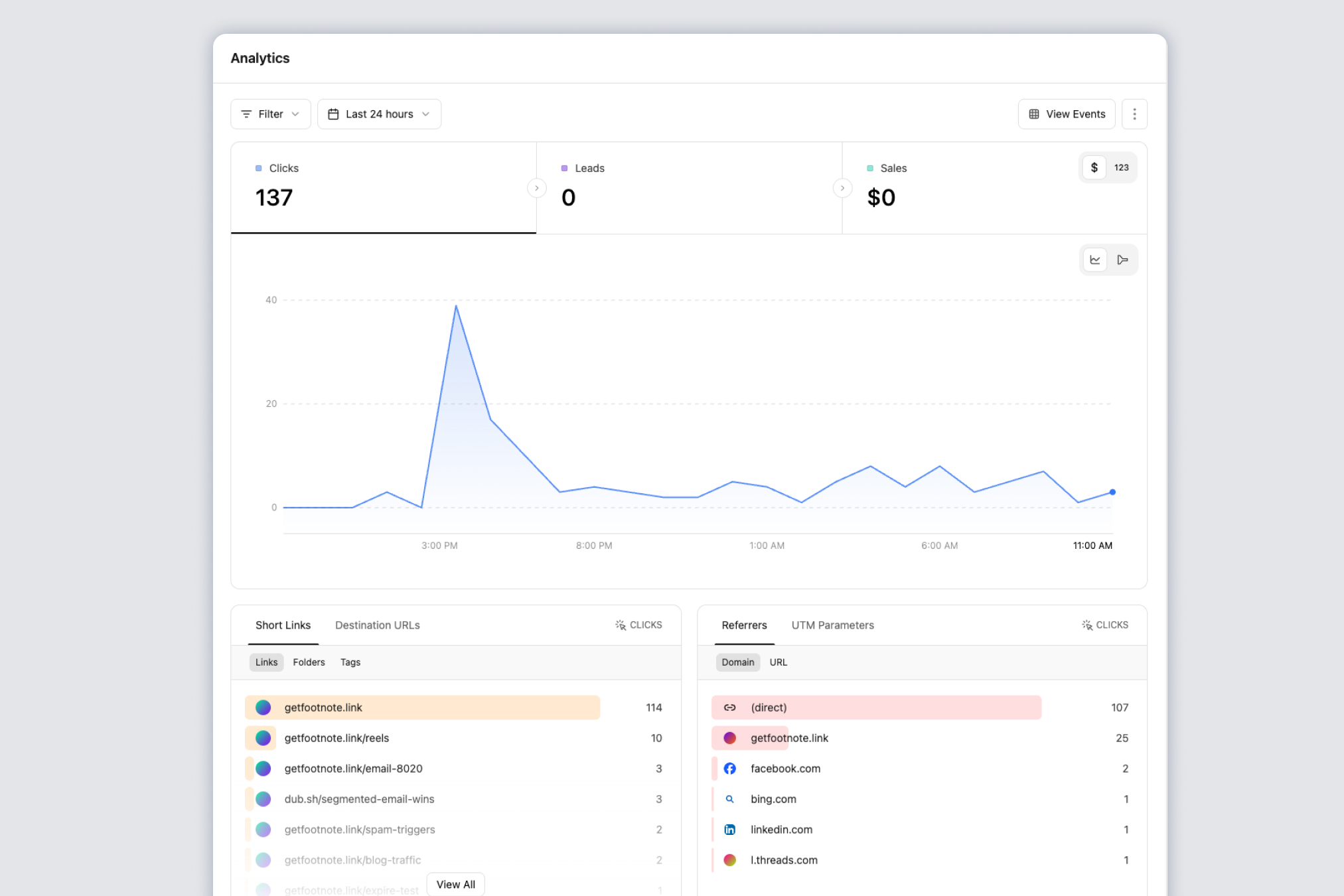
Every table on the dashboard doubles as a filter. For instance, when I clicked a link in the short links tile, and the whole dashboard narrows to just that link, and the same goes for a country, referrer, device or browser.
That makes it easy to go from "which link did best?" to "where did those clicks come from?" in a couple clicks.
I love a nice-looking dashboard, but if the data quality is questionable it doesn’t matter. So I dug into it with a few tests:
- Location: I clicked a link over a VPN from Canada and Australia, and each click showed up under the right country and city.
- Duplicate clicks: Dub only counts the first click from the same visitor within an hour, so one person refreshing a link doesn't pad your numbers.
- History: The free plan keeps 30 days, and Pro goes back 12 months.
I also wanted to check how accurately Dub matched a click to a referral source. It was a weak spot.
To test, I clicked one link each from LinkedIn, X and Threads, and only one of the three was categorized correctly:
- LinkedIn: counted correctly
- X: counted as "direct" traffic
- Threads: one click counted as 3 (2 from Facebook and 1 from Threads)
To be fair, nearly every link shortening tool I've tested has miscounted Threads clicks, so I'd chalk that one up to how Meta passes referrer data. The X result is more of a problem, though, since all the other tools labeled those clicks correctly.
Their dashboard also has an Ask AI option that’s supposed to make it easier to filter your data using natural language instead of clicking dropdowns (they have that option too).
I tested it by typing "clicks from Canada this week." and it returned “No matching options.” even though the data existed. Then I tried Dub’s suggested searches and nothing happened. So while I liked the concept, it flat out didn’t work for me.
Tags, folders and workspaces give you real control
Being able to slice data is only useful if your links are organized in the first place. Dub gives you three ways to do that (tags, folders and separate workspaces), so you can set things up by campaign, client, team or however your company thinks about its links.
You can also sort your link list by total clicks or by when each link was last clicked. That sounds minor until you've used a tool that won't let you, which was my experience with TinyURL.
Compared with Bitly, where grouping links into campaigns is only on its pricier plans, Dub is generous here. The one limit to watch is that Pro caps you at 3 folders and 25 tags.
UTMs are the one area where that control runs out. Dub lets you save UTM templates and apply them in one click, but you can't add your own parameters, hide the ones your team doesn't use or require anyone to use a template at all.
If you've ever tried to keep a team tagging campaigns the same way ("LinkedIn" vs. "linkedin" vs. "li"), you know why UTM governance control is crucial. For comparison, Rebrandly handles UTM parameters at the workspace level, so you can lock a parameter to a list of approved values, set defaults and hide the ones you don't want people touching.
Some parts still feel like a work in progress
On top of the issues I've already mentioned, the app felt a little buggy overall. None of it would stop a business from using it, but a few more things caught me off guard:
- Renamed links break: Dub warns you that changing a back-half "could potentially break existing links," and it does, since the old link doesn't redirect to the new one.
- A hidden import menu: Import and export live behind an unlabeled "⋮" button next to the search bar.
The one that annoyed me most was my own branded domain promoting Dub. Out of the box, the domain's homepage showed a full Dub landing page with "Try Dub today" buttons, and broken links went to a Dub-branded "Link not found" page.

You can redirect both to your own site on Pro, but the settings are in two different places ("Not found URL" in the domain settings, and "Edit Link" in the domain's menu for the homepage).
How much does Dub.co cost?
Dub's pricing looks friendly at first, with a free plan and Pro at $30 a month. But the features Dub markets hardest (conversion tracking, A/B testing and the real-time event log) all start at Business, which costs three times as much.
Here's how the plans compare, based on Dub's pricing page as of October 2026. "Tracked events" are clicks, plus leads and sales if you use conversion tracking.
As a pure link manager, Pro is roughly comparable to what you'd get from Bitly. So I'd think less about the price itself and more about what you plan to use Dub for, since partner programs are where it pulls ahead, and plain link management is where it has the most competition.
If attribution is the main reason you're looking, Rebrandly's Conversion Tracking connects branded links to the signups and purchases they drive, with workspace-level controls, configurable attribution windows and permissions. Plus you get more advanced link controls like deeper routing and deep linking features, as well as our link-in-bio tool.
Switching to Dub (or away from it) isn't as easy as it looks
Price is one cost, but the one I'd think about harder is what it takes to move your links. Dub has one-click importers for Bitly, Rebrandly and Short.io, so I tried bringing over my links from Bitly.
Every link came over, but each one was crossed out and wouldn't redirect. That's because the links only work once your branded domain points to Dub, which Dub's Bitly migration guide has you do by updating your DNS records after the import.
That works if you own the domain. Mine came free with my Bitly plan, though, and Bitly's complimentary domains can't be transferred to you or anyone else.
So for anyone in that situation, switching means a new domain and new links.
The CSV import wasn't perfect either:
- It ignored the creation dates in my file and marked every link as created that day.
- It skipped a row that reused an existing back-half without telling me.
- It added a domain I don't own to my workspace as "Invalid," using one of my 10 domain slots.
That experience is why I'd pause before moving your links to a newer tool. Link tools come and go, and Dub is still early, so it could keep evolving in ways you can't predict (it might stay focused on partner programs, or it might not).
So, should you use Dub?
After all of this, I'd say Dub has carved out a real niche for itself, but that's also what makes it hard to recommend as a link management tool. It has the standard features you'd expect, a nicer dashboard than most and nothing that blew me away.
Dub makes sense if:
- You run an affiliate or partner program
- You're a SaaS or tech startup that wants a modern, developer-friendly tool
- You want an easy-to-use analytics dashboard and flexible organization without a big upfront cost
I wouldn't recommend Dub.co if:
- You're a large or regulated organization, like a medical group or financial institution sending bulk links by text. Dub is SOC 2 Type II compliant, but I couldn't find any mention of HIPAA (our guide to HIPAA compliant link shorteners covers what to look for).
- Your primary use-case is link shortening and link management and you don’t plan on using the partner plan.
- You want an established tool you won't have to potentially move away from if the company pivots.
If you're in that second group, Rebrandly has been around for years and covers what I found missing in Dub, including more routing options, more metrics, high-volume link creation and support for regulated industries. Our Rebrandly vs. Dub comparison goes through the differences side by side.
Whichever way you go, the question I'd ask is where your links should live a few years from now, because that's a lot easier to answer before you've shared thousands of them. You can try Rebrandly for free and see how it compares.
Frequently asked questions about Dub
Is Dub.co open source?
Mostly. About 99% of Dub's code is open source under the AGPLv3 license, and its enterprise features use a commercial license.
Who makes Dub?
Dub was created by Steven Tey, the company's founder and CEO. The company behind it is Dub Technologies, Inc.
What's the difference between Dub Links and Dub Partners?
Dub Links is the link management product, covering short links, branded domains, QR codes and analytics. Dub Partners is a separate product for running affiliate and referral programs, including partner payouts and commissions.
Does Dub have a link-in-bio page?
No, Dub doesn't have a link-in-bio page, so you'd need a separate tool for that.
Is Dub a good Bitly alternative?
As a link manager, Dub's Pro plan is fairly comparable to Bitly, with a more modern interface and an analytics dashboard that's easier to dig into. Its real advantage is running partner and affiliate programs, which is what most of the product is built around.
What are the best Dub.co alternatives?
It depends on what you need Dub for. If you mainly need link management, Rebrandly, Bitly and Short.io are common alternatives, and Rebrandly adds routing by language and time, Conversion Tracking and support for regulated industries.