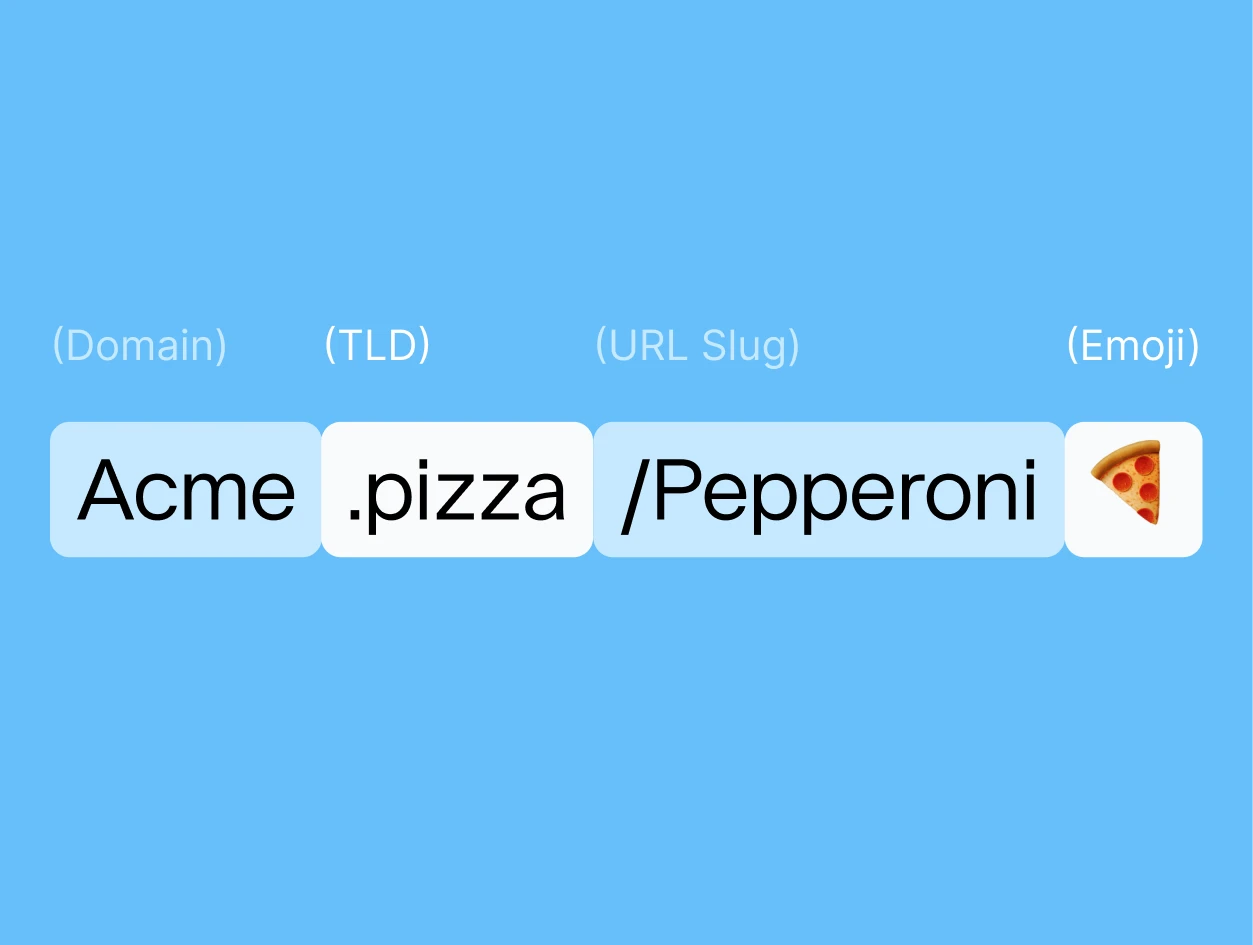

A vanity URL is a custom web address you build around your brand name, a keyword, or both, to replace something long and forgettable. If you manage more than a handful of links, it's one of the simplest changes you can make so people actually recognize (and trust) what they're clicking.
Below, we cover what separates a vanity URL from a branded domain and a plain short link, how to set one up, and the mistakes that make one forgettable instead of memorable.
Key takeaways
- A vanity URL is a custom address built around your brand name or a keyword. It's different from a branded domain (the underlying custom domain itself) and a short link (any shortened URL, branded or not).
- Vanity URLs don't hurt your SEO. Search engines don't index them directly, and a permanent 301 redirect keeps them pointed at your real, ranking page.
- The vanity URL itself is made of three parts: your short domain, the TLD, and the slug. Getting the slug right matters as much as the domain.
- Use vanity URLs for the links you're actively promoting, not every link on your site. If a link is already short and recognizable, changing it again adds nothing.
- You can use Rebrandly to create vanity URLs using your own custom domain
What is a vanity URL?
A vanity URL, a custom URL, or a branded URL is a unique web address customized to feature your brand name or keywords related to your business. It's an easy-to-remember and aesthetically pleasing alternative to the generic URLs generated by default.
A generic short link looks the same as everyone else's. A vanity URL is the first thing people see before they even click, so it's already doing work for your brand.
Setting one up takes minutes, whether you're building a personal brand or running a company's marketing.
Vanity URL vs. branded URL vs. short link
These three terms get used interchangeably, but they describe different layers of the same thing.
A short link is just any shortened URL, whether or not it's branded, like the auto-generated t.co link X creates for every post.
Branding is a separate question. A branded URL runs on your own custom domain, like rebrand.ly or yourbrand.link, instead of a shared generic one.
A vanity URL goes a step further. It's typically built on that branded domain, but the full path, domain plus slug together, is deliberately chosen to be memorable and specific to a brand, campaign, or page.
rebrand.ly/summer-sale is a vanity URL. rebrand.ly/x7Gk2p is a branded link, but not a vanity one, since nothing about that slug was chosen on purpose.
Think of a branded domain as something you set up once. A vanity URL is what you build on top of it every time one specific link needs to earn attention.
5 Benefits of using a vanity URL
A vanity URL does more than shorten a link. Done right, it's a small design choice with an outsized effect on how people perceive and trust your brand.
1. Increase brand awareness
Build your brand name or a relevant keyword right into the link, and every share reinforces the same identity. That's what makes a link recognizable at a glance.
When someone sees your vanity URL, they connect it to you before they even click, which builds trust and recognition over time.
2. Increase trust
Attaching your brand name to a link is itself a signal. It tells people the link won't redirect them to spam or phishing sites, and that what's on the other side matches your brand.
Rebrandly's own data shows a meaningful CTR lift for branded links over generic short URLs. Independent security research points the same direction from a different angle. One breakdown of link-shortening services from Cofense Intelligence data, via CaptainDNS, found meaningfully different phishing and malware abuse rates across providers, with rebrand.ly on the low end compared to several other shorteners in the same data set.
3. Doesn't hurt your SEO
Vanity URLs don't directly boost your search rankings. Search engines index the destination page, not the redirect in front of it.
What they do is keep that indexing clean. As long as you use a permanent 301 redirect, the destination page keeps ranking normally, with no SEO cost from the redirect itself.
The risk shows up when a vanity URL is set up wrong, like a temporary 302 redirect or a chain that hops through several links before landing. Get the redirect type right, and it's safe to use anywhere you'd use the full URL.
4. Increase link management and insights
A vanity URL also puts you in control after it's live. You can update where it points, redirect it, or retire it, all without changing the link itself, and Rebrandly's link tracking shows you the details behind the clicks, including:
- Geographic data down to the city level
- Device types
- Browser
- Operating systems
- Languages
- Referral sources
- Timing patterns
That control goes further than link performance alone. With Rebrandly's Conversion Tracking, you can see which vanity URLs drive signups or sales.
5. Integrated link retargeting and UTM tools
You can add people who click on your links to your retargeting lists, even if that link leads to a third-party website.
This can meaningfully grow your top-of-funnel retargeting audience without any extra ad spend. You can also attach UTM parameters to your URL before shortening it, making tracking traffic and conversions generated from your custom URLs easier.
For a more in-depth look at the benefits of vanity URLs, read our blog post on branded links vs. short links.
How do I create a vanity URL?
A vanity URL is composed of three sections. Your branded short domain, TLD, and URL slug.
For example:rebrand.ly/vanityurl
Short domain: rebrand
TLD: .ly
URL slug: vanityurl
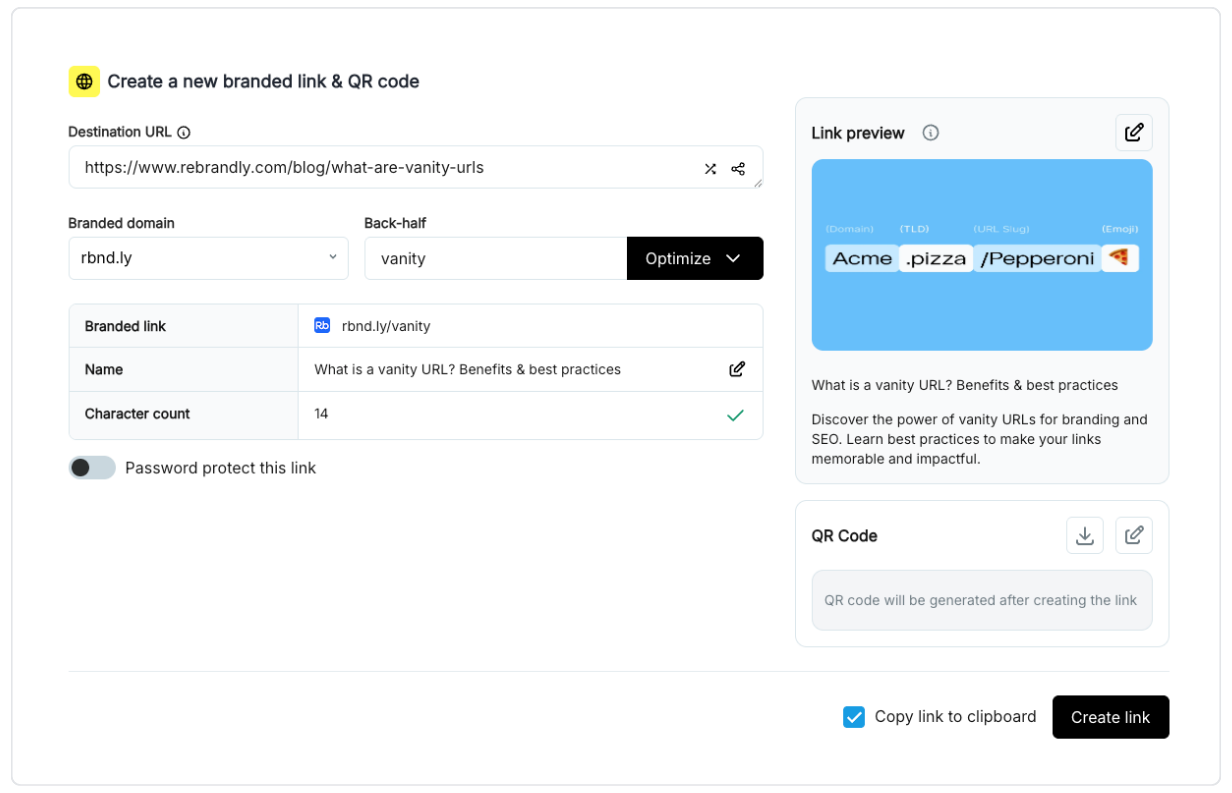
Here’s how you can create your vanity URL:
Step 1: Choose a domain name
Your domain name should reflect your business to keep your branding consistent and allow people to identify the link as yours.
This is often the hardest part of the process. If it's proving difficult, check out our guide on finding the best branded short domain for your vanity URLs.
Step 2: Choose a TLD
Choose a relevant TLD (top level domain). While .com is the most popular and widely recognized TLD, numerous alternatives are available. You might opt for a more specific TLD, depending on your content or brand.
Some examples include:
- .link
- .click
- .lol
- .news
- .bio
Rebrandly offers over 500 TLDs to choose from, starting at just $2.
The right TLD also shapes how visitors read your brand at a glance, so pick one that fits your website's purpose and audience.
Here’s an advanced pro-tip. You can assign different TLDs based on the type of content you’re sharing. For example we might have:
- Rebrandly.news for Rebrandly news and media mentions
- Rebrandly.rocks for Rebrandly sharing links to users' reviews
- Rebrandly.live, to share links to live webinars
- Rebrandly.blog to share our blog posts
- Rebrandly.link to share curated content
- Rebrandly.xyz for general and funny sharing
If you don’t have a domain name yet, check if the one you want is still available and how much it costs using our domain search tool.
Step 3: Incorporate a URL Slug with a Keyword
Once you choose your custom domain name and TLD, you can create vanity URLs. The slug is one of the most important parts of a URL as it tells people what the link will be about.
This is often not possible in generic short URLs as the URL generator will attach random letters that come across as cryptic. With a vanity URL, you get to decide what the slug will say.
A custom slug helps users understand the link before they click, since the words in the URL preview what's on the other side. For best practices, make the URL slug concise, descriptive, and free of special characters or spaces.
Once you add a domain to Rebrandly, it will be saved to your account so you can use it to create custom URLs. Our Chrome Extension, iOS app, and Android App can make this process even faster.
Best practices for using vanity URLs
Branded links only build trust when a few basics are in place.
Use vanity URLs for aesthetics, branding, and tracking
You don't have to use a vanity URL for every link you share. The purpose of a vanity URL is to make a link shorter, associated with your brand, and easier to track.
If a link already achieves this purpose, it's unnecessary to change it again. However, if you're using a URL shortener for analytics or link management, spending a few extra seconds editing your link will be worth it to keep all link data in one place.
Use clear wording
Always clearly display your brand and use full words to describe your content. For people to trust your link, they need to know where the link will bring them.
Make sure all parts of your link are optimized for clarity and that you're using a descriptive URL slug. Use the publication's name if you're linking to a third-party website. Be honest, straightforward, and as concise as possible.
Keep your link short and memorable
One of the primary purposes of vanity URLs is to make links easy to remember and type. Opt for simplicity: a short, plain-word slug is easier to read off a slide, type from memory, or say out loud than a string of random characters.
Reflect your brand
A vanity URL should look like it belongs to you. Include your company name, product, or a relevant keyword, and keep that pattern consistent across every channel you share links on.
Track and analyze performance
Check your click and conversion data while a campaign is still running, so you can catch what's working while there's still time to act on it. The next section covers exactly what to track and where to find it.
Where to use your vanity URL
Vanity URLs can be used anywhere you'd use a regular URL, including:
- Social Media: Some social media platforms automatically shorten your link using their own domain. Twitter, for example, shortens links to http://t.co. By using your vanity URL on these social media platforms you can keep your brand name prominent which helps provide clarity as to where this link is leading and increase trust. We’ve found that these factors help to increase click-through-rate by up to 39%.
- Promotional Materials: It can be difficult to report the return of offline marketing materials like flyers, posters or even product packaging. By using a vanity URL on these marketing materials you can easily track how many visits on your site were a direct result of these materials.
- SMS Messages: Text message marketing campaigns have increased in popularity recently.
You can also add UTM parameters to your vanity links so you can track this performance in Google Analytics to consolidate all of your reporting.
How to analyze your vanity URLs with Rebrandly
Creating a vanity URL is the easy part. Knowing whether it's working is where analytics come in.
Every click on a vanity URL gets tracked wtih Rebrandly. It filters out bot traffic and shows results in near real time, usually within about five minutes.
From there, Rebrandly's dashboard breaks each link down by country, device, referrer, and time of day, plus UTM parameters if you've attached them. You can also see whether a click is unique or a repeat visit, and export the full data set to CSV or Excel when you need it elsewhere.
Clicks only tell you who showed up. Conversion Tracking tells you what they did next, connecting a specific vanity URL to the signup, purchase, or form fill it produced.
Frequently asked questions about vanity URLs
What's the difference between a vanity URL and a branded URL?
A branded URL uses your own custom domain instead of a shared one. A vanity URL goes a step further: the full link, domain and slug together, is deliberately built to be memorable and tied to a specific brand, campaign, or page.
Does a vanity URL hurt SEO because it's a redirect?
No. Vanity URLs aren't indexed or ranked by search engines in the first place, so redirecting one doesn't cost you anything, as long as it's a permanent 301 redirect to the real destination page.
What are some examples of vanity URLs?
A few real patterns: rebrand.ly/summer-sale for a seasonal campaign, yourbrand.link/webinar for an event signup, or a company using its own name as the domain, like bit.ly or pep.si, for general link sharing.
Is a vanity URL the same as a short link?
Not necessarily. Any shortened URL is a short link, whether or not it's branded, like the auto-shortened links some social platforms generate. A vanity URL is always branded and intentionally worded, while a short link doesn't have to be either.
Boost performance with vanity URLs
With the ability to enhance trust, vanity URLs are a great way to encourage more people to click on your links. They can boost your performance across your marketing campaigns effectively. Rebrandly lets you create short URLs with your brand domain and custom slugs to support your branding efforts.