Mobile deep links that open the right screen
One branded link that opens your app at the screen you choose, on iOS and Android.
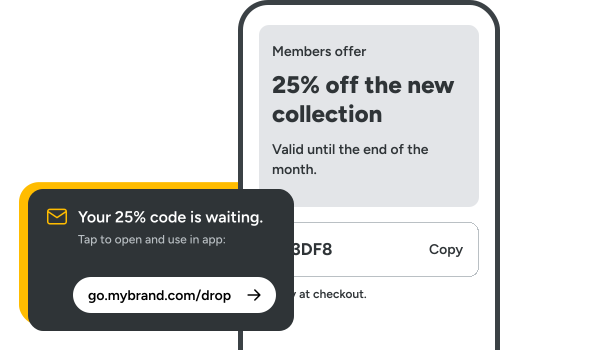


















Open the right screen from one link
A few of the ways teams put it to work.
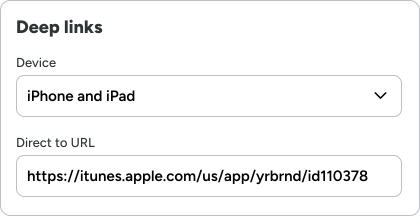
Dashboard setup
Configure your app once, then add a deep link rule to any link you create.
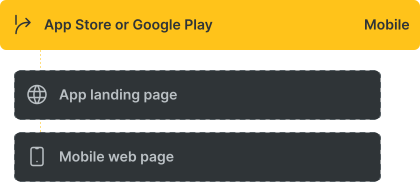
Fallback options
No app installed? Send people to the app store, an app landing page, or a mobile web page.
Combined routing
Combine deep links with dynamic routing rules like device, operating system, and location.
Route every tap, app or no app


Installed app
The link opens your app to the screen you set.

Missing app
People go to the App Store or Google Play, a landing page about your app, or a mobile web page. You choose which.

Other devices
Everyone else goes to your link’s default destination URL.
Brand and measure every deep link

Branded links
Branded short links lift click-through rates by up to 39% against generic ones.

Click analytics
Geography, device, operating system, and referrer on every tap, in one place.

Conversion tracking
Link-level conversion tracking ties a tap to the signup or purchase that followed.
When to use deep links
A few of the ways teams put it to work.
Email campaigns
Send email readers straight to the right screen in your app.
SMS marketing
Text people a link that opens your app, or your mobile site if they don’t have it.
Retargeting ads
Bring app users back to unfinished purchases, like the items left in their cart.
Printed QR codes
Send scans from packaging, posters, and flyers to the right page in your app.
Pass your security review with every deep link
We run on AWS with 99.99% uptime, and we’re SOC 2 Type II and HIPAA compliant, along with GDPR and CCPA, so a deep link inside a patient reminder or a bank alert clears the same review as the rest of your stack.


Why teams choose Rebrandly

Rebrandly is the best we've seen, they can create a crazy amount of volume with the highest deliverability and performance, more than a million links in a minute.


Rebrandly empowers us to keep tabs on our campaign performance worldwide.

Deep link questions, answered
A deep link is a URL that opens a native mobile app at a specific screen rather than at its home page. Tapping one in an email can open a product page inside a shopping app directly. Rebrandly creates deep links on your own branded domain, so the link carries your brand before anyone taps.
A deep link carries routing instructions that decide where a visitor lands based on their device and whether your app is installed. Rebrandly checks both at the moment of the tap, opens the configured in-app location when the app is present, and uses the fallback URL you selected when it isn't.
Deep link is the broad term for any URL that opens a specific location inside a mobile app. Universal Links are Apple's iOS implementation, using standard HTTPS web addresses verified against your domain. App Links are Google's Android equivalent. A URI scheme, a custom prefix such as myapp://, is the older approach with no web fallback.
Both platforms check whether your app is installed before deciding where to send a visitor. A Rebrandly deep link covers iOS and Android from one rule set: it opens the in-app location when the app is present, and routes to your chosen fallback URL when it isn't. Visitors on other devices get the link's default web destination.
Deferred deep linking takes the concept of standard deep linking a step further by allowing users to access specific content or features even if they haven’t installed the app yet. It is achieved by redirecting users to the appropriate app store to download the app and then seamlessly taking them to the linked content upon installation.
No software development kit goes inside your app. We handle deep linking at the link layer: you configure your app once, then add deep link rules to individual links in the dashboard or through the API. Your app needs a public listing on the App Store or Google Play.
Yes, a Rebrandly deep link works in any channel where you control the link.
Yes. The REST API creates deep links programmatically for onboarding flows and referral programs, with Python and Node.js SDKs, webhooks, and an MCP server.
Mobile deep linking is available on the Growth plan and above.

Follow us


Download the app