
Most visitors leave your content without converting. Someone clicks your Instagram link, browses three products, then closes the app at their train stop. Another person reads your email, clicks through to your landing page, gets distracted by a Slack notification, and never returns. According to LeadPages, bounce rates hit 20-45% for eCommerce sites and 60-90% for blogs.
Traditional remarketing only works when people reach a site you own. That means you lose audience data from app store links, YouTube videos, partner articles, event pages, and press coverage. If the destination isn't your domain, your pixel doesn't fire.
Link retargeting fixes this. Attach a retargeting pixel to any branded link you share. When someone clicks, the pixel triggers during the redirect and adds them to your remarketing audience. You can build audiences from every click, not just website visits. Retargeting typically boosts conversion rates by up to 70% and reduces CPC by 30-60%.
This guide covers what link retargeting is, how it works, and how to set it up in Rebrandly. One tactic can expand your high-intent audiences and make your ad spend more efficient.
What is link retargeting?
Link retargeting tracks people who click specific URLs, then shows them targeted ads based on those clicks. When someone clicks the link, your pixel loads, and they're added to a remarketing audience.
From the user's perspective, nothing changes. They click a link and land where they expect. Behind the scenes, the redirect triggers your pixel and sends anonymous interaction data to your analytics platform.
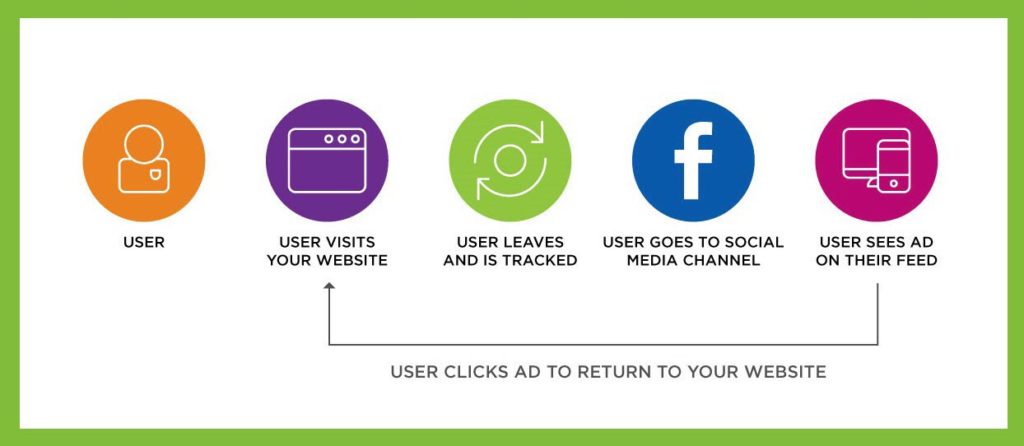
Here's the process:
- You generate a branded link in Rebrandly
- You attach a retargeting script from Meta, Google, LinkedIn, TikTok, or another ad platform
- A user clicks the link
- The pixel fires
- Your tracking platform adds that person to your retargeting audience
The technical process is invisible, automated, and nearly instant. You can build audiences from any channel where clicks happen.
For example: The "I meant to check out later" customer
A shopper browses Instagram during their commute. Your brand posts a spring collection teaser with a Rebrandly-branded link in the caption. The shopper clicks out of curiosity, scrolls through a few products, then gets off the train and closes the app without buying.
If your retargeting relies only on website pixels and cookies, you lose this user. You also lose the insight that they engaged at all.
With link retargeting, your Meta Pixel fires the moment they click. They're now part of your remarketing audience. Later you can serve them a tailored ad featuring the collection they browsed. A casual click becomes an opportunity to reconnect instead of a lost signal.
Why marketers use link retargeting
Link retargeting increases audience size, improves ad relevance, and makes campaigns more cost-effective. The real value is filling the gaps left by traditional remarketing.
Reach audiences beyond your website
Standard remarketing has a hard limitation: it only works for users who land on your site. But modern marketing doesn't live exclusively on your site. You're sending people to app stores, YouTube videos, partner articles, third-party event pages, survey forms, PR coverage, and product demos hosted elsewhere.
Every time you share a link to something you don't own, you lose the chance to build audiences. Link retargeting eliminates that dependency. The pixel fires on the click, not the page load.
This works across every channel: organic social posts, SMS campaigns, influencer promotions, emails, paid ads, affiliate programs, and even QR codes. Anywhere a link is clicked, a retargeting audience can grow.
Someone may watch a product review on YouTube, read a guest article about your industry, or register for a conference hosted by a partner. These behaviors signal intent, but they're largely untrackable by traditional pixels. Link retargeting captures those signals and gives you a way to grow qualified audiences from every action.
Understand the entire customer journey
When you layer link retargeting with UTM tracking and Rebrandly Analytics, you capture a richer version of the customer journey:
- Where their first click happened
- Which channel or creator influenced them
- What content sparked early interest
- Which sequences created conversions
It becomes easier to understand how top-of-funnel touchpoints affect bottom-of-funnel results.
Improve ROAS by expanding high-intent audiences
Retargeting audiences consistently produce better results than cold audiences, often at a fraction of the cost. But many marketers struggle with small or stagnant retargeting pools.
Link retargeting expands those pools dramatically by capturing interactions from every click you generate, not just those that reach your site.
A broader remarketing pool directly improves ad efficiency, increases conversions, and lowers acquisition costs.
How marketers apply link retargeting in real campaigns
The technology is simple, but the strategic applications are diverse. Here are the most common uses.
Recovering product interest
A shopper clicks a promotional link from a creator's TikTok video. They browse a few items but don't buy. Link retargeting ensures they don't disappear. You can serve them follow-up ads featuring the products they viewed or a limited-time offer to bring them back.
Strengthening content marketing
Links to blog articles, videos, case studies, or whitepapers often send people to non-revenue-generating pages, which means less opportunity to retarget. With link retargeting, content becomes a gateway into more targeted nurture flows. A user who clicks a blog post may later see ads for a related webinar, ebook, or product bundle.
Increasing event attendance
Event promotion often involves linking to registration platforms that aren't hosted on your domain. With link retargeting, anyone who clicks your event link can later be shown registration reminders, speaker announcements, or "last chance to join" ads—even if they never reached the registration form.
Adding structure to influencer and affiliate programs
Influencer audiences are valuable but often hard to track. When their links include a retargeting script, every click becomes part of your remarketing ecosystem. This gives brands more control over nurturing influencer-driven traffic.
B2B sales acceleration
Someone clicking a pricing link is significantly more valuable than someone reading a top-of-funnel blog post. With link-level pixel control, you can treat these audiences differently—showing more relevant content like case studies, ROI calculators, or product demo invitations to higher-intent audiences.
In each scenario, link retargeting gives you a second chance to reach people who already showed interest.
How to set up link retargeting inside Rebrandly
Rebrandly makes link retargeting accessible for any team—no coding or technical implementation required. The process takes a few minutes, and once configured, it runs automatically. For detailed setup instructions, see our help center guide.
1. Get your retargeting pixel
Each advertising platform provides a pixel snippet or ID you can copy into Rebrandly. This includes Meta, Google Ads, LinkedIn, TikTok, and X. Nothing needs to be installed on your website. The pixel is tied to your link instead.
2. Add your pixel to Rebrandly
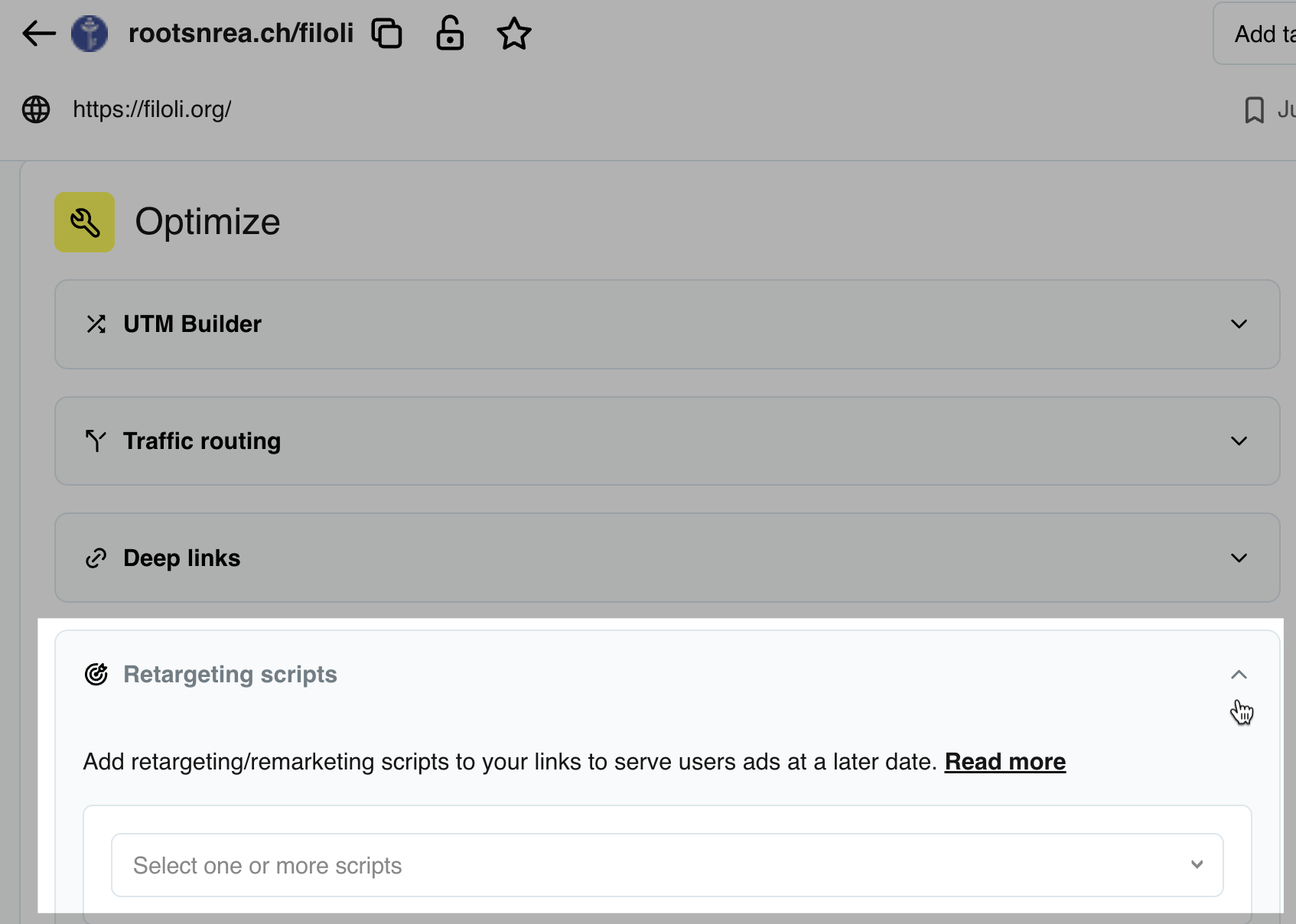
You can add a pixel at two levels:
- Workspace-level, which applies the pixel to every link created in that workspace
- Link-level, which applies the pixel only to a single link
Workspace-level pixels are ideal for broad, evergreen remarketing audiences. Link-level pixels are better for campaign-specific audiences, like collecting users interested in an event or tracking influencer clicks.
3. Create or edit your branded link
Branded links are critical here. Because they look cleaner and more trustworthy, they drive significantly more clicks—up to 39% higher CTR and up to 25% more trust compared to generic short URLs.
More clicks mean more pixel fires, which build stronger remarketing audiences.
4. Share your link across channels
Once your link is created and your pixel is attached, share it wherever your audiences engage: SMS campaigns, Instagram stories, QR codes, newsletters, video descriptions, influencer posts, or landing pages. Every click becomes part of a measurable, targetable audience.
5. Verify your pixel
Tools like Meta Pixel Helper or Google Tag Assistant confirm that the pixel is firing. A quick test prevents issues that could compromise audience data.
Pro techniques for maximizing link retargeting performance
Marketers get the highest return from link retargeting when they approach it with segmentation in mind rather than treating all clicks as a blanket audience.
Segment by intent
A person who clicks a pricing link should not receive the same ads as someone who clicks a blog post. Rebrandly's link-level pixeling makes it easy to build highly nuanced audience segments that align with the customer journey.
Use workspaces to separate campaigns or teams
Workspaces let you apply different retargeting scripts to different groups of links. An ecommerce team and a B2B enterprise team, for example, may want completely different retargeting strategies.
Combine retargeting with UTMs
UTMs help marketers understand where traffic originated. Pixel fires show who should be retargeted. Combined, they create a full-funnel view that makes optimization easier.
Test pixel behavior regularly
Platforms update scripts, redirect flows can change, and integrations sometimes shift. A simple routine test ensures your audiences remain accurate.
Layer in dynamic routing
Dynamic link routing lets you send users to different destinations based on their device, location, or language. When combined with retargeting, you can build highly specific audience segments—mobile users who clicked from California, for example, or Spanish speakers who engaged with a particular campaign.
Supported platforms and the role each plays
Rebrandly integrates with the major advertising ecosystems that marketers rely on. While the core mechanism is the same, each platform captures slightly different types of data and serves different purposes in your marketing strategy.
- Meta's pixel is typically preferred for ecommerce and B2C campaigns because its algorithm excels at predicting purchase behavior
- Google's remarketing tag is useful for search-based remarketing lists and display placements
- LinkedIn's Insight Tag provides aggregated professional demographics that help B2B brands nurture prospects by industry or role
- X's pixel is commonly used for awareness campaigns or to retarget users in niche communities
Best practices to ensure clean, compliant, and effective link retargeting
Link retargeting opens up opportunities, but a thoughtful approach ensures you capture the full value without friction.
Maintain audience hygiene
Retargeting only works when your audience is accurate. Make it a habit to exclude converters, clean out stale segments, and test your pixel behavior periodically. Accurate audiences reduce wasted budget and improve campaign relevance.
Understand privacy expectations
Rebrandly is a SOC2-compliant link management platform, which means pixeling links is done in a secure environment. Still, marketers should maintain transparency in how they use remarketing and should respect regional regulations such as GDPR. Clear consent practices build trust, and trust increases engagement.
Evaluate performance holistically
Link retargeting should be evaluated alongside channel metrics, UTM data, and eventual conversion outcomes. The goal isn't just a larger audience—it's a more intent-rich one. Watching how different link categories influence revenue helps you shape your long-term content strategy.
Common link retargeting mistakes to avoid
Link retargeting is easy to set up, but some recurring pitfalls can undermine its effectiveness.
One of the most common is forgetting to test pixels before launching campaigns. A broken or misconfigured pixel can produce incomplete audiences or inaccuracies that skew performance data.
Another pitfall is treating all clickers the same. Users who engage with different types of content are at different stages of the buying journey. Without segmentation, ads become less relevant, reducing CTR and increasing costs.
Marketers also often forget to exclude converters. When someone buys, registers, or completes a form, continuing to show them the same ads wastes budget and can harm the customer experience.
Finally, unbranded short links can undermine results. If users hesitate to click, your audience never grows. Branded links not only overcome this trust barrier but also improve click-through rates, directly increasing the number of people entering your remarketing ecosystem.
Turn every click into a growth opportunity
Link retargeting takes every click and turns it into a measurable, actionable remarketing advantage. By firing a pixel during the redirect, link retargeting captures intent across channels and platforms that traditional pixels can't reach. It expands audience size, increases ad relevance, and strengthens the entire marketing funnel.
With Rebrandly, link retargeting becomes part of a larger link management system—branded domains, routing rules, analytics, and retargeting all work together to support more personalized and more profitable marketing journeys.
If you're looking for a simple, high-impact way to improve campaign performance, link retargeting is one of the highest-leverage tools available. Start with one campaign—attach a pixel to a branded link, share it across your channels, and watch how your remarketing audience grows.
Sign up for a free trial to test our retargeting for yourself.
.jpg)
.jpg)
.jpg)