Marketing teams, developers, and enterprise security leaders share sensitive materials constantly—pre-launch product pages, confidential client proposals, early creative assets, internal announcements. These materials move through links long before they're ready for public release. But traditional access-control methods often don't fit how quickly campaigns move or how widely content needs to be shared.
Password-protected links add a layer of control right at the point of click. Instead of sending open-access URLs or relying only on login-gated systems, you can gate individual links behind a password. Only people who have both the link and the password can view the content.
The concept is straightforward, but the impact matters. Password-protected links help teams safeguard sensitive materials without slowing workflows. They give marketers, agencies, and enterprises a fast way to protect content without changing how audiences experience the brand. And because not all link shorteners offer this feature at scale, password protection has become a key differentiator for organizations that need both branded trust and security.
This guide explains what password-protected links are, when to use them, how they work in Rebrandly, and why Rebrandly is the most scalable platform for generating secure branded links across teams and enterprise environments.
What are password-protected links?
Password-protected links are branded short URLs that require a password before someone can access the destination page. They work like a lightweight content gate: anyone with the link sees a password prompt, and only people with the correct password can access the content.
From the user's perspective, the experience is clean. Click a branded link like yourbrand.co/preview, enter the password, and you're routed to the protected content—a private landing page, PDF, video, portal, or shared resource.
Rebrandly enforces password verification at the link level using secure hashing methods. The password itself is never stored in plain text, and the content stays shielded from unauthorized access. Because password protection works alongside domain-level trust, the result is a secure experience that still feels on-brand—something generic URL shorteners can't deliver.
Password-protected links are also trackable. Even with access gated, Rebrandly Analytics records click data: timing, device type, location, and engagement patterns. You get visibility into how restricted content performs without sacrificing security.
Why password-protected links matter
Password protection lets you control access to sensitive content that circulates constantly in marketing and enterprise workflows, often long before a public launch or announcement. Password-protected links let you share work-in-progress content without opening it to unintended audiences.
They're helpful for:
- Pre-launch campaign assets: Early landing pages, product teasers, or unlisted videos often need review by partners or internal stakeholders before the full rollout. Password-protected links ensure only authorized reviewers can see them.
- Confidential client presentations: Agencies and consultants share pitch decks, proposals, and pricing models regularly. A protected link keeps these materials private without requiring the client to log into a portal.
- Internal team resources: Policy updates, internal training videos, and draft documentation can be shared securely across departments without forcing every team into a new system.
- Exclusive partner offers: Early-access pages or special pricing links can be gated to maintain exclusivity and prevent public distribution.
In each case, password-protected links add a layer of security at the moment of access without adding friction.
Maintain brand consistency while adding protection
Security solutions often introduce an aesthetic tradeoff. A long, unbranded URL with a generic password prompt looks unfamiliar or suspicious—and research shows that branded links increase trust and click-through rates by up to 39%. That trust matters more when you're sharing confidential content.
Password-protected links created with Rebrandly maintain a professional, on-brand appearance. The custom-branded domain reinforces trust and ensures the link feels like an official communication from your organization, not a random or risky redirect.
This solves a common problem: without branded links, teams send a generic URL and share the password separately. The experience is disjointed and hard for recipients to trust. A password-protected branded link keeps everything clean, cohesive, and recognizable.
Track engagement on restricted content
Most security methods hide analytics. Password-protected links help you protect access without sacrificing insights.
Rebrandly Analytics records:
- total clicks and attempted access
- device and browser information
- time-of-day engagement
- geographic patterns
Even if a link requires a password, clicks register in the dashboard, letting you monitor who is engaging with restricted materials and when. For marketers, this validates early interest. For sales teams, it signals client intent. For internal communications, it confirms whether teams have accessed required materials.
Gated materials shouldn't be invisible. Password-protected links give you security and reporting.
Common use cases for password-protected links
Password-protected links fit into a wide range of marketing, sales, partner, and internal workflows. Below are some of the most common ways teams use them.
Marketing campaigns and pre-launch workflows
Campaigns move fast, and many materials aren't ready for public release until launch. Password-protected links help teams collaborate and review content securely.
Use cases include:
- Product launch previews: Share early landing pages, draft ads, or preview videos with partners or executives.
- Press kits: Embargoed assets—images, logos, or announcement copy—can be shared with journalists or influencers while keeping the materials off the public web.
- Influencer collaboration materials: Influencers often need early access to promotional materials, brand guidelines, or copy. A password-protected link prevents leaks.
- Beta testing programs: Give testers access to product updates or documentation while preventing the general public from discovering early versions.
Sales and client communications
Sales teams share sensitive information that shouldn't be broadly available. Password-protected links provide an easy alternative to complex portals.
Common examples include:
- Proposal presentations and pitch decks: Instead of attaching large files or granting temporary file access, share a single branded link with a password. It looks professional and reduces friction for prospects.
- Confidential pricing documents: Custom pricing shouldn't circulate publicly. A password-protected link ensures only the intended client sees the details.
- Contract materials and service terms: Legal and procurement workflows often involve documents that require confidentiality without requiring an entire portal login.
- Client-specific resource hubs: Sales teams can create personalized resource pages and gate them with unique passwords, providing a bespoke experience with minimal overhead.
Internal communications and operations
Not all internal materials require enterprise-grade login systems—many just need a light access barrier.
Password-protected links support:
- Pre-public announcements: Teams can coordinate communications securely before sharing updates company-wide or externally.
- Training materials: Videos, onboarding documents, or handbooks can be gated with a simple password.
- Policy documents: Draft versions can circulate among reviewers without being exposed to the entire organization.
- Team resources: Documents, dashboards, or reference links can be shared as needed, especially when cross-functional groups are involved.
Password-protected links provide a flexible option that supports real-world collaboration without adding bureaucracy.
How to create password-protected links with Rebrandly
Rebrandly makes it simple to enable password protection on any branded link. The workflow takes only a few steps and requires no developer involvement.
To create password-protected links with Rebrandly:
- Create or edit your branded link: Start by generating a new branded link or selecting an existing one in your Rebrandly dashboard.
- Enable password protection: In the link settings, toggle on the password protection option. This activates Rebrandly's secure password prompt for that link.
- Set your password: Choose a strong password that's easy for your intended audience to remember but difficult for unauthorized users to guess. Rebrandly securely hashes passwords so they aren't stored in plain text.
- Share the link and password: For security, never send the link and password in the same channel. Send the password via SMS, Slack, or another secure communication method.
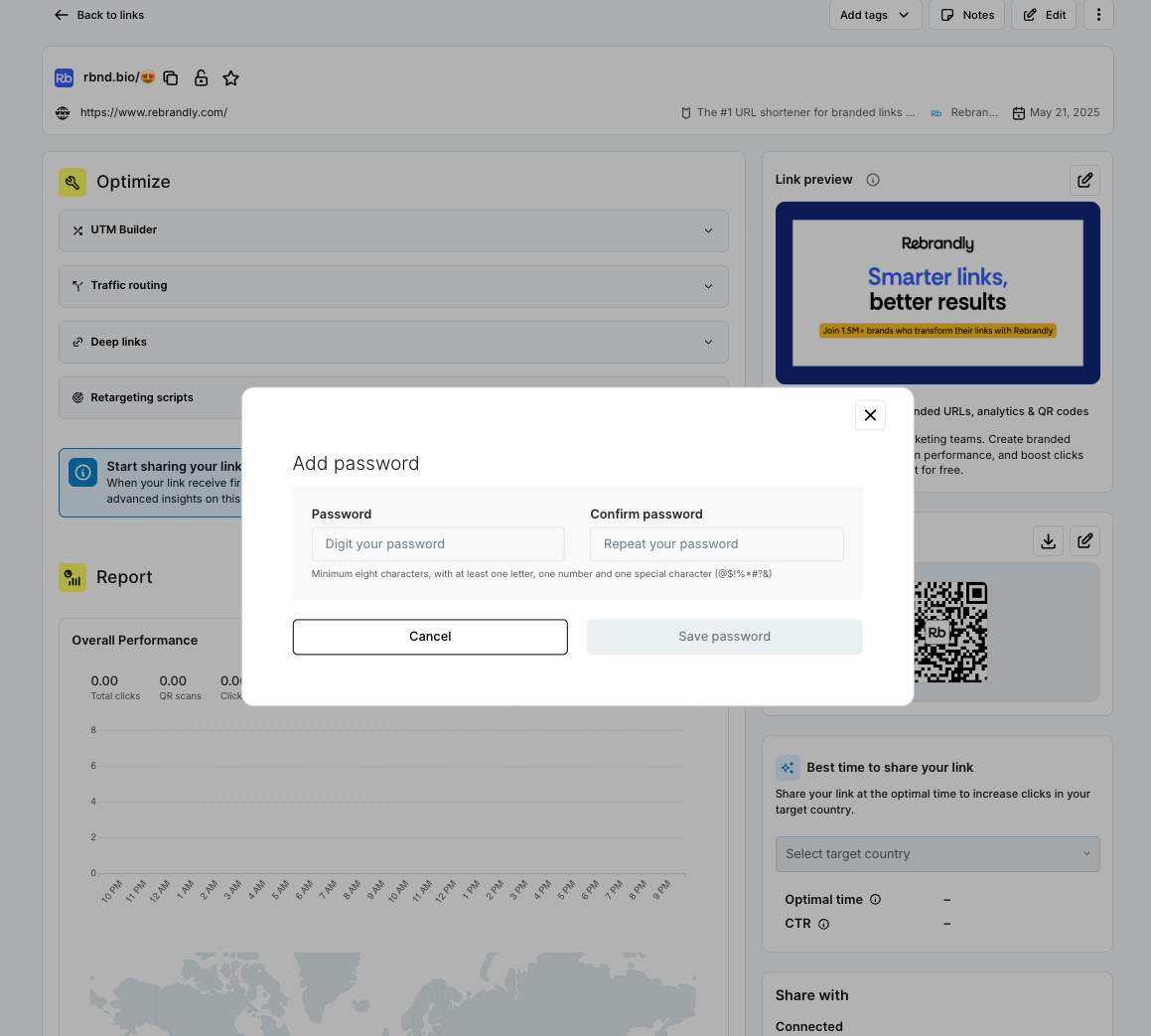
Once enabled, anyone who clicks the link will see a branded password screen and must enter the correct password to proceed.
Best practices for secure link sharing
A password-protected link is only as secure as the processes around it. A few best practices help maximize security:
- Use strong, unique passwords rather than simple phrases.
- Share the password through a different channel than the link itself.
- Update passwords periodically, especially for ongoing campaigns.
- Monitor link analytics to ensure access is happening as expected.
These practices help balance usability and security while maintaining smooth workflows.
Creating password-protected links at scale
Password-protected links become more powerful when organizations need to create them at volume. That's where the Rebrandly API becomes essential.
Automate password protection with the Rebrandly API
With the Rebrandly API, teams can:
- Programmatically generate thousands—or millions—of password-protected links
- Apply consistent password rules across campaigns or client accounts
- Integrate link security directly into existing software, portals, or automated workflows
- Bulk update passwords across entire link groups
This is useful for SMS teams, where short-lived, secure links are sent out by the thousands and must maintain trust and deliverability. The Rebrandly API powers all of this with consistency, reliability, and performance. For organizations managing security at scale, this level of automation is essential.
Rebrandly's security infrastructure
Password protection is only as strong as the platform behind it. Rebrandly is the only SaaS link management platform that offers both SOC 2 Type 2 and HIPAA compliance, giving security teams confidence that their link infrastructure meets stringent enterprise requirements.
Enterprise-grade compliance
Rebrandly provides:
- SOC 2 Type 2 certification
- GDPR compliance
- HIPAA compliance
- 99.99% uptime to support critical business systems
With links acting as core infrastructure for many organizations, these standards matter. They ensure that password-protected links—and the underlying data—are handled with the highest level of security.
Layered link security features
Password protection is one tool in a broader security ecosystem.
Rebrandly also supports:
- Link expiration dates to automatically disable links after a specified time.
- SSL/TLS encryption applied to every click.
- Custom domain control to reduce phishing risks and increase trust.
- Workspaces and permissions for secure team collaboration.
Security is most effective when layered. Rebrandly gives teams the flexibility to combine features to fit their risk level, sensitivity, and internal controls.
Password protection limitations and considerations
Password-protected links are best suited for content with moderate sensitivity. They're not a replacement for enterprise identity systems, especially when regulatory controls or high-security classifications are involved.
Teams should be aware of:
- Password sharing: Users may share the password beyond the intended group. Combine password protection with expiration dates or unique links for greater control.
- Regulatory requirements: For highly sensitive or compliance-heavy data, use stricter access controls alongside secure links.
- Workflow fit: Password-protected links are ideal for short-term, collaborative, or pre-launch workflows—not as a substitute for full user authentication systems.
Think of them as a flexible part of your security toolkit, not the entirety of it.
Control link access with password protection
Password-protected links give marketers, developers, and enterprise teams a secure, scalable way to control access to sensitive materials—all while preserving the advantages of branded trust and detailed analytics.
Whether you're launching a campaign, sharing confidential documents, collaborating with partners, or distributing limited-access resources, password-protected links ensure your content stays protected without disrupting workflows.
Rebrandly pairs password protection with enterprise-grade security, SOC 2 and HIPAA compliance, advanced analytics, automation through the Rebrandly API, and the strength of branded domains. This combination makes Rebrandly the most powerful platform for organizations that need to generate high volumes of password-protected links while maintaining both trust and security.
Ready to get started? Sign up for a free trial