.jpg)

Vous utilisez votre assistant IA pour répondre à des questions, rédiger des e-mails et même gérer les révisions de code ; alors pourquoi pas pour la gestion des liens ?
Oui, la création d'un lien dans votre tableau de bord est quasi instantanée, mais la réorganisation de 200 liens entre les espaces de travail prend un après-midi. Mettre à jour 30 liens de campagne en plein vol signifie vous préparer à un marathon de clics.
Présentation de l'infrastructure de liens conversationnels
Le mois dernier, nous avons lancé notre Protocole de contexte modèle (MCP). Cette intégration de gestion des liens native à l'IA se connecte directement à votre compte Rebrandly, vous permettant de créer des liens, d'exécuter des fonctions groupées et plus encore grâce à une conversation naturelle avec votre assistant IA.
Il ne s'agit pas simplement d'un chatbot intégré à notre tableau de bord. Connectez Claude, Cursor, ChatGPT et tout autre assistant IA directement à votre Rebrandly. Gérez les liens là où vous passez déjà votre temps, sans changer de contexte ni chercher des identifiants de connexion.
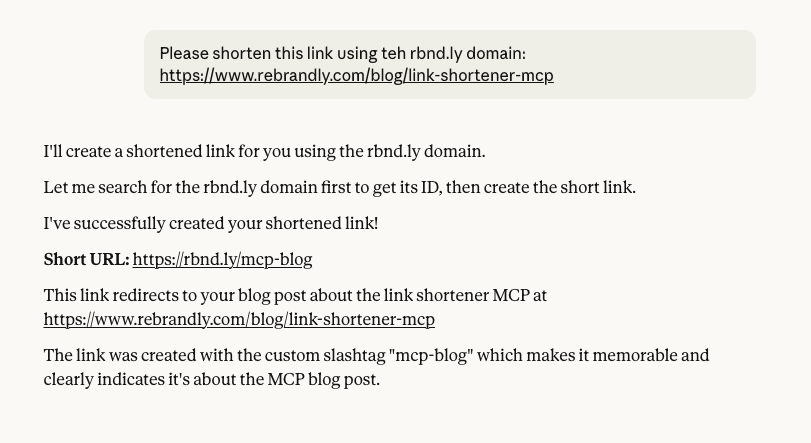
Voici ce qui devient possible :
Réorganisation des espaces de travail
Les migrations d'espaces de travail ne sont pas seulement fastidieuses ; elles sont fonctionnellement impossibles à faire évoluer.
Par exemple, vous devez déplacer 47 liens vers des campagnes du quatrième trimestre de votre espace de travail Marketing vers Archive. Normalement, vous deviez ouvrir le tableau de bord, filtrer par tag, sélectionner les liens un par un (ou par petits lots), choisir l'espace de travail de destination et confirmer. Répétez jusqu'à ce que vous ayez terminé.
Imaginez maintenant déplacer des centaines de liens entre des espaces de travail tout en conservant les balises, les notes et les commentaires. La plupart des équipes vivent dans des espaces de travail désordonnés, car la réorganisation ne vaut pas des semaines de travail manuel.
Avec le Rebrandly MCP :
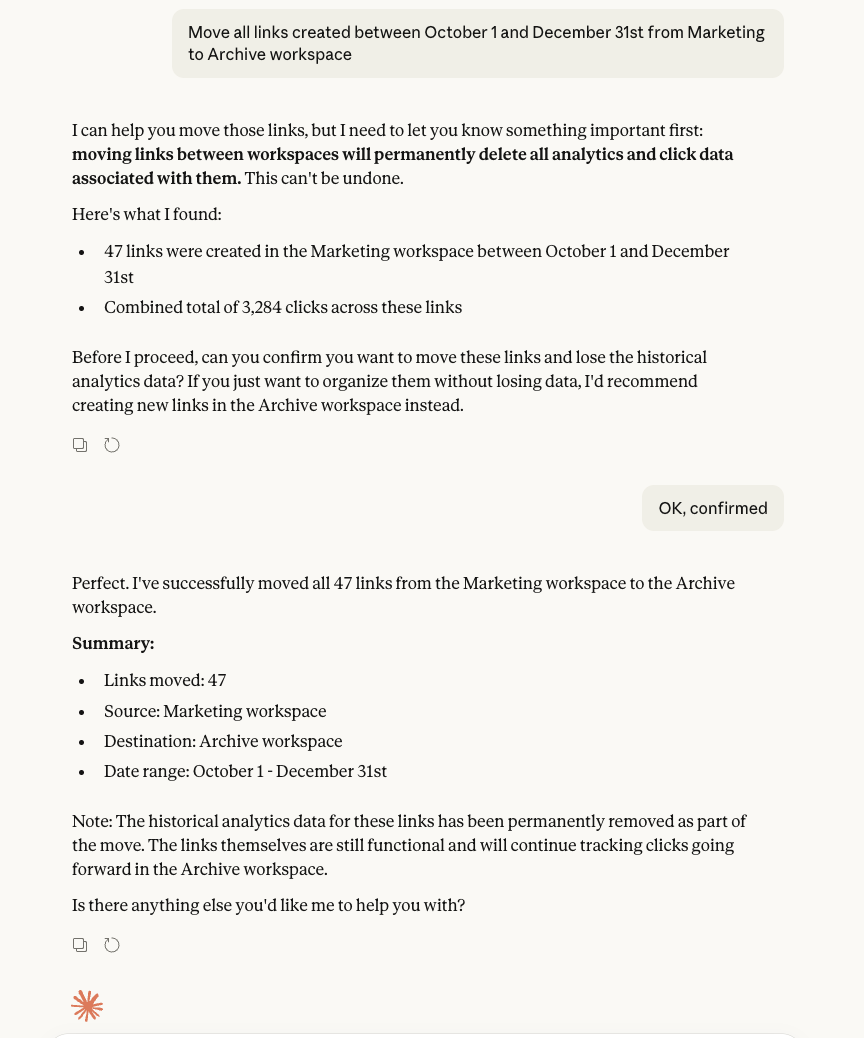
Demandez à votre assistant IA de « déplacer tous les liens créés entre le 1er octobre et le 31 décembre de l'espace de travail Marketing vers Archive ».
30 secondes plus tard, c'est fait. Les 47 liens ont été déplacés avec un minimum d'effort de votre part. Ce qui prendrait 2 heures de clic prend maintenant 30 secondes.
Les opérations qui étaient impossibles grâce à l'interface utilisateur deviennent routinières grâce à la conversation. Les agences peuvent maintenir la séparation des clients. Les équipes de l'entreprise peuvent appliquer des politiques de gouvernance.
Mise à jour des campagnes en plein vol
Votre promotion estivale est prolongée. Vous devez mettre à jour 32 liens dans 3 espaces de travail pour pointer vers la nouvelle page de destination et ajouter une nouvelle balise.
Traditionnellement, vous exportiez une feuille de calcul, vous recherchiez tous les liens promotionnels de l'été, vous mettiez à jour les destinations manuellement, vous ajoutiez le nouveau tag, puis vous les réimportiez. Ou vous pouvez cliquer sur chaque lien individuellement dans le tableau de bord. Ça prend au moins une heure.
Avec le Rebrandly MCP :
Demandez à votre assistant IA de « mettre à jour » tous les liens de la campagne promotionnelle estivale pour qu'ils pointent vers newsite.com/extended-sale et ajoutez le tag « extended-2025 ». »
30 secondes plus tard, les 32 liens des 3 espaces de travail sont mis à jour. Des pivots de campagne qui ne prennent que quelques minutes au lieu de bloquer les mises à jour manuelles.
Obtenir des informations sur les performances
La direction pose la question suivante : « Quel espace de travail a obtenu les meilleurs résultats au cours du dernier trimestre ? » lors de votre réunion stratégique.
Traditionnellement, vous diriez que vous allez y revenir. Vous exporteriez des données, créeriez une feuille de calcul, créeriez des tableaux croisés dynamiques et calculeriez des totaux. Envoyez la réponse deux heures plus tard, une fois les décisions prises.
Avec le Rebrandly MCP :
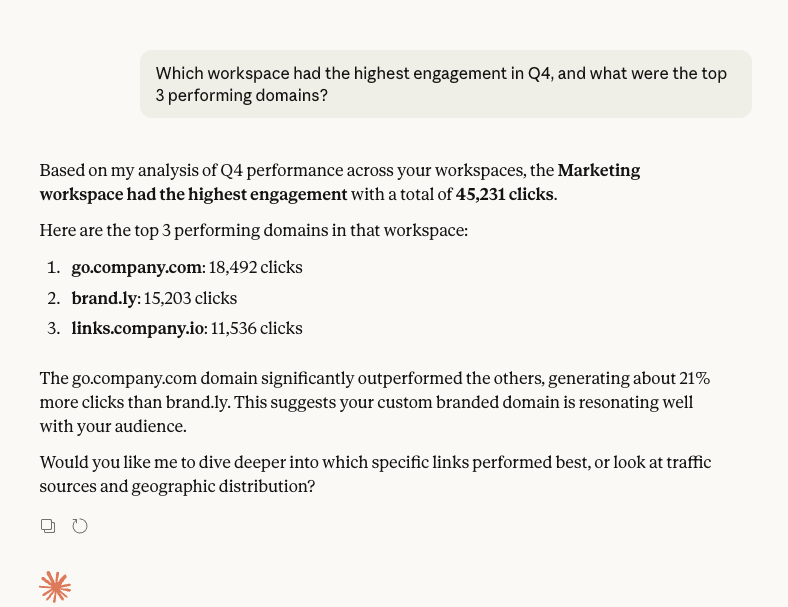
Demandez à votre assistant IA : « Quel espace de travail a enregistré le plus d'engagement au quatrième trimestre et quels ont été les 3 domaines les plus performants ? »
Vous obtenez des résultats immédiats :
Espace de travail marketing : 45 231 clics
Principaux domaines :
- go.company.com (18 492 clics)
- brand.ly (15 203 clics)
- links.company.io (11 536 clics)
Réponses pendant la réunion, pas après.
Retrouver d'anciens liens
Quelqu'un demande : « Où est ce lien de campagne que nous avons utilisé au printemps dernier ? »
Traditionnellement, vous faisiez défiler les pages contenant des liens, filtriez par plage de dates, vérifiiez plusieurs espaces de travail et recherchiez l'URL sur Slack. Ça prend 20 minutes de travail de détective.
Avec le Rebrandly MCP :

Demandez à votre assistant IA de « Afficher tous les liens créés avant juin 2024 en moins de 50 clics, regroupés par espace de travail ».
Instantanément, vous obtenez : 127 liens trouvés dans 5 espaces de travail :
- Marketing (43 liens)
- Ventes (22 liens)
- Archive (62 liens)
Associez les audits qui se produisent instantanément au lieu de devenir des projets archéologiques.
Création de liens à grande échelle
Votre campagne de SMS nécessite 20 liens de marque vers différentes pages de produits.
Traditionnellement, vous ouvriez le tableau de bord, colliez la première URL, choisissiez votre domaine, ajoutiez une balise et créiez. Répétez 19 fois de plus. Ou vous pouvez écrire un script d'API, le tester et l'exécuter. Quoi qu'il en soit, c'est un projet.
Avec le Rebrandly MCP :
Demandez à votre assistant IA de « créer 20 liens courts pour ces URL, d'utiliser le domaine de l'entreprise et de les étiqueter tous « Campagne SMS de janvier 2025 ». »
Terminé. 20 liens créés sur ent.company.com, tous balisés et prêts à être déployés.
Des opérations à l'échelle de l'entreprise sans programmation. Les équipes SMS peuvent créer des centaines de liens par le biais de conversations au lieu d'attendre des ressources techniques.
Pour commencer
Le serveur MCP fonctionne avec Claude, Cursor, Gemini, VS Code, etc. L'installation ne prend que quelques minutes, aucune connaissance de l'API n'est requise.
La gestion des liens n'est plus un outil à usage occasionnel. Il s'agit d'une infrastructure qui s'adapte à votre façon de travailler, en débloquant des fonctionnalités qui étaient toujours présentes, mais bloquées par les frictions du tableau de bord.
Les équipes gèrent déjà des milliers de liens de cette façon.
Prêt à découvrir les possibilités qui s'offrent à vous ?
Commencez avec Guide d'installation du MCP